More on Alternate Linksys Firmware
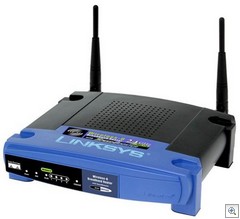 Just about two years ago Greg turned me on to alternate firmware for the ubiquitous Linksys WRT54G. This is the little router than could. You can pick these little guys up for a song but it's the thriving alternate firmware community that's so interesting.
LinksysInfo.org has the best listing of the different firmware projects available. If you concerned about compatibility, flip your router over, get the version numbers and check the matrix.
Linksys released versions 1.0 through 4.0 (I have an unused 1.1 and a 2.0 I'm using) powered by Linux. This little guy is a Linux box! Then, sadly, Linksys released version 5.0 powered by VxWorks and the hacking community was bummed. However, in an unusual turn of actually listening to the customer Linksys released the new WRT54GL with the "L" for Linux.
From LinuxElectrons.com: Linksys WRT54GL Features
- Linux Kernel 2.4
- Based on the Broadcom BCM95352E SoC
- Hardware design is the WRT54G Version 4.0
- After market firmware upgrades
- All-in-one Internet-sharing Router, 4-port Switch, and 54Mbps Wireless-G (802.11g) Access Point
- Shares a single Internet connection and other resources with Ethernet wired and Wireless-G and -B devices
- Push button setup feature makes wireless configuration secure and simple
- High security: TKIP and AES encryption, wireless MAC address filtering, powerful SPI firewall
I've noticed some interesting stuff going on with Sveasoft, my previous firmware, so I started looking for an alternative. Sveasoft hasn't released a new version in a while and I've consistently had trouble VPN'ing back into my house from outsite. Additionally, the wife insists on 100% uptime with Vonage (as she should) so I really need the QoS (Quality of Service) to be solid. If I'm downloading 5 Gigs from MSDN at 800k/s over Comcast, I need her phone calls to NOT be dropped.
My options:
- HyperWRT is very well thought of, based on the Linksys 3.03.6 firmware, it adds adjustable transmit power, better QoS and port forwarding as well as command shells, etc. If you want something that is 50% better than the standard firmware you have now and you don't want to compromise stability, this is your firmware.
- Talisman 1.1 is SVEASoft's firmware. There's some GPL drama going on over the last few years though.
- DD-WRT is a fork of an early SVEASoft build that has now integrated lots of stuff from OpenWRT. I downloaded version v23. It is very actively developed. I heard good things about DD-WRT and eventually settled on it.
Good stuff about DD-WRT:
- Includes XBox Live, BitTorrent and Skype in its QoS services priority list.
- UPnP Forwarding admin screen lets you see what UPnP devices have punched holes through your firewall.
- WRT radius authentication (that I haven't figured out how to work yet)
- Support for updating my DynDNS.org account.
- Support for Chilispot if I ever choose to charge my neighbors for using my wireless HotSpot.
- DHCPd support for assigning IP addresses based on MAC addresses (centrally administered static IPs, very important, and very useful)
- PPTP VPN Server using MS-CHAP means no-install VPN from Hotel Rooms
It was easy to setup and I was back in business and Mo was back on the phone in < 20 min. If you do use one of these firmwares, do use Kiwi's SYSLOG and turn on syslogd in the new Firmware, giving the IP address of the machine running Kiwi. This lets you see the router's boot up process and won't leave you staring at the lights (as I used to) wondering if it's coming back up.
Aside: There's even WRT54G firmware dedicated to sharing your bandwidth with other anarchists like-minded people. No one in my town though.
About Scott
Scott Hanselman is a former professor, former Chief Architect in finance, now speaker, consultant, father, diabetic, and Microsoft employee. He is a failed stand-up comic, a cornrower, and a book author.


About Newsletter

 Jon Galloway
http://en.fon.com/shop/linksys-wrt54gl-router.php

http://stavos.homeip.net/detroitarchive/uploadcenter/images/meLeonard.jpg


Comments are closed.