The Weekly Source Code 46 - Jeff Key rocks Taskbar Meters that Monitor your Windows 7 CPU and Memory and Disk in the Taskbar
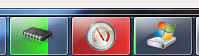
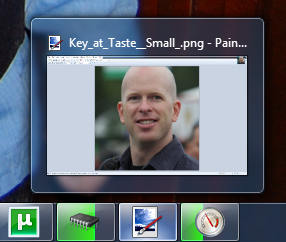 It's funny to watch things go viral, even just a little viral on the Internet. Here's what happened, but more importantly, we'll talk about the code. Let's also make it complete clear that Jeff Key rocks. See picture at left, in between his two "lame" creations."
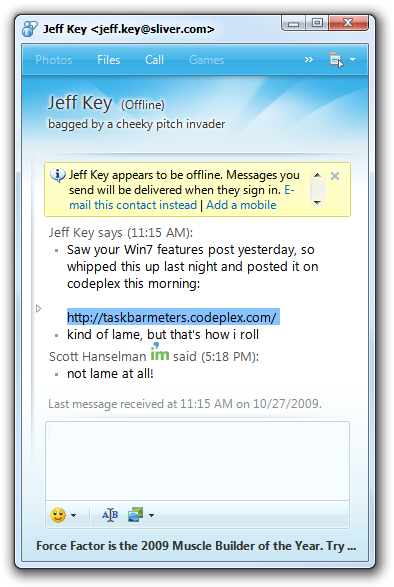
First, I did a post earlier this week called "Light it Up: List of Applications that use new Windows 7 Features." A day or two later I got an instant message from my former-roommate and part-time belay Jeff Key (@JeffreyKey on Twitter) (actually, that's all a complete lie, but, Jeff and I are friendly acquaintances for many years and have each other on IM) that said:
Saw your Win7 features post yesterday, so whipped this up last night and posted it on codeplex this morning:
http://taskbarmeters.codeplex.com/ kind of lame, but that's how i roll
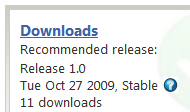
For years Jeff has lived the mantra "Talk is Cheap, Show Me the Code." And he does, with some of the most inspired little .NET-based utilities out there asking for little else but our undying admiration and gratitude. That is how Jeff rolls. I visited his CodePlex site and saw it had 11 downloads.
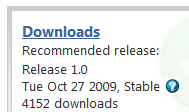
I tweeted it and forgot about it. Then that tweet got picked up by Download.com (which I've heard of and whole gave credit to Jeff) Life Rocks 2.0 (which I've never heard of and who gave credit to no one) and then Lifehacker (which I have heard of and who "via'ed" Life Rocks). Next, I returned to CodePlex and saw that it had 4152 downloads! Congrats to Jeff for being so "lame!" ;)
The Code
Why would Jeff be so down on himself and say the code is "lame" when clearly people were (are) going bananas and downloading these little utils? Well, because it's so darn easy to do, this was likely the source of Jeff's intense guilt. ;) The Windows API Code Pack makes it easy.
ASIDE: In fact, WPF on .NET 4 makes it even easier because it includes the new TaskbarItemInfo class that lets you do this from XAML. Pete Brown from my team has a great write-up on Showing Progress in the Windows 7 Taskbar with WPF 4 on his blog.
First, since his apps are specific to Windows 7, he checks first to make sure it's OK to continue. Note that it IS very possible to make apps that work great from XP to Windows 7, but these apps are little Windows 7 showcases, so you can see why he'd want to check for this:
if (!TaskbarManager.IsPlatformSupported)
{
    MessageBox.Show("Sorry, but this app only works on Window 7.", "Aw snap!", MessageBoxButton.OK, MessageBoxImage.Error);
    Application.Current.Shutdown();
}
To update the Taskbar (Superbar) Progress Bar he wrote a little helper because he wanted the colors to be green, yellow or red depending on the value of the CPU usage or Memory usage:
public void SetTaskBarStatus(int value)
{
    if (value < 0)
    {
        value = 0;
    }
    else if (value > 100)
    {
        value = 100;
    }

    var state = TaskbarProgressBarState.Normal;

    if (value > _settings.Yellow)
    {
        state = value < _settings.Red ? TaskbarProgressBarState.Paused : TaskbarProgressBarState.Error;
    }

    TaskbarManager.Instance.SetProgressState(state);
    TaskbarManager.Instance.SetProgressValue(value, 100);
}
Then he just sets up a little System.Timer love and sets the Progress Bar values appropriately for Memory...
public partial class App : Application
{
    private ComputerInfo    _computerInfo;
    private ulong            _totalPhysicalMemory;

    protected override void OnStartup(StartupEventArgs e)
    {
        base.OnStartup(e);

        _computerInfo = new ComputerInfo();
        _totalPhysicalMemory = _computerInfo.TotalPhysicalMemory;

        var mainWindow = new MainWindow();
        mainWindow.Tick += WhenTimerTick;
        mainWindow.Show();
    }

    private void WhenTimerTick(object sender, EventArgs e)
    {
        var available = (double)(_totalPhysicalMemory-_computerInfo.AvailablePhysicalMemory) / _totalPhysicalMemory;
        ((MainWindow)sender).SetTaskBarStatus((int)(available * 100));
    }
}
or CPU...
public partial class App : Application
{
    private readonly PerformanceCounter _counter = new PerformanceCounter();

    protected override void OnStartup(StartupEventArgs e)
    {
        base.OnStartup(e);

        _counter.CategoryName = "Processor";
        _counter.CounterName = "% Processor Time";
        _counter.InstanceName = "_Total";

        var mainWindow = new MainWindow();
        mainWindow.Tick += WhenTimerTick;
        mainWindow.Show();
    }

    private void WhenTimerTick(object sender, EventArgs e)
    {
        ((MainWindow)sender).SetTaskBarStatus((int)_counter.NextValue());
    }
}
Jeff also adds some JumpLists to launch Task Manager or Resource Monitor on right-click as well. Nice touch! A little polish there.
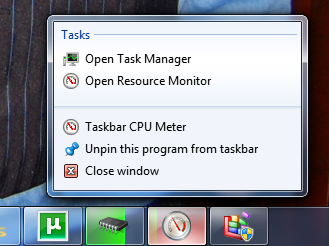
Also easy to do with the Windows 7 APIs in the Windows API Code Pack.
var jumpList = JumpList.CreateJumpList();
var systemFolder = Environment.GetFolderPath(Environment.SpecialFolder.System);

jumpList.AddUserTasks(new JumpListLink(Path.Combine(systemFolder, "taskmgr.exe"), "Open Task Manager")
{
      IconReference = new IconReference(Path.Combine(systemFolder, "taskmgr.exe"), 0)
});

jumpList.AddUserTasks(new JumpListLink(Path.Combine(systemFolder, "perfmon.exe"), "Open Resource Monitor")
{
      IconReference = new IconReference(Path.Combine(systemFolder, "perfmon.exe"), 0),
    Arguments = "/res"
});

jumpList.Refresh();
Nice job, Jeff Key. You rock. So, Dear Reader, go light up YOUR applications under Windows 7. Enjoy!
Patching this Open Source Project and adding a Disk IO Meter
A day later, @ScottMuc tweeted me about adding a Disk IO Meter and we went back and forth about it on Twitter. He eventually submitted a patch to CodePlex. While Jeff hasn't updated his code with that patch (maybe he'll make me an admin and I can do it), I'm able to patch my local copy, of course.
Useful Link: Example: How to contribute a patch to an Open Source Project
Downloading ScottMuc's patch and simply right clicking (using Tortoise SVN) and clicking Apply Patch gives me a new TaskbarDiskIOMeter project that I can then add to the larger solution. The only problem with the patch was that it refers to a binary file called Drive.ico that didn't get included in the .patch file. I found one and added it and now we've got a Disk IO monitor as well. :)
Enjoy!
1. Get Windows 7 and the SDK
2. Develop and Test Your Application
- Get the Windows API Code Pack
- Learn about Application Compatibility
- Read the Windows 7 Application Quality Cookbook
- Download the Windows 7 Training Kit for Developers
3. Get the Windows 7 Logo
- Learn about the Pledge Program
- Get the Windows 7 Logo
4. Light Up Your Application with Windows 7
- Read the Windows 7 Developer Guide
- Learn how to Develop for Windows 7
Related Links
- Pete Brown - Showing Progress in the Windows 7 Taskbar with WPF 4
- The Weekly Source Code 45 - Kicking Butt on Windows 7 *and* Windows XP
- Example: How to contribute a patch to an Open Source Project
- Windows 7 Developer Guide
- Windows API Code Pack
- Less Virtual, More Machine - Windows 7 and the magic of Boot to VHD
- Top 10 Tips Working Developers Should Know about Windows 7
- Windows 7 Easy Upgrade Path Truth Table/Chart
- Windows 7 - Seamless Apps in Windows Virtual PC (Virtual XP) and Application Compatibility
- Step-By-Step: Turning a Windows 7 DVD or ISO into a Bootable VHD Virtual Machine
About Scott
Scott Hanselman is a former professor, former Chief Architect in finance, now speaker, consultant, father, diabetic, and Microsoft employee. He is a failed stand-up comic, a cornrower, and a book author.


About Newsletter

Btw Scott, the link for Life Rocks is incorrect ;)

Scott (yet another developer named Scott)


http://msdn.microsoft.com/en-us/library/aa511446.aspx
MS shouldn't have hidden away the notification area in 7 - it was useful for this sort of thing, e.g. a minimized Task Manager instance.
Still, a good example of coding for Win7 in .NET.


Do these have to live in a certain folder?

Comments are closed.
(I didn't know that patch notifications where turned off by default(!) for administrators. Fixed that too.)