Scott Hanselman

ASP.NET 5 and .NET Core RC1 in context (Plus all the Connect 2015 News)

November 18, 2015 Comment on this post [32] Posted in ASP.NET | Open Source | VS2015
Sponsored By

Connect() 2015 - Scott Hanselman's KeynoteIt was a huge day in New York today as I got to join Scott Guthrie and the team at the Connect() 2015 event as they announced a bunch of stuff, including, but not limited to:

  • Visual Studio Code is now Open Source and a new Beta that supports extensions is out now!
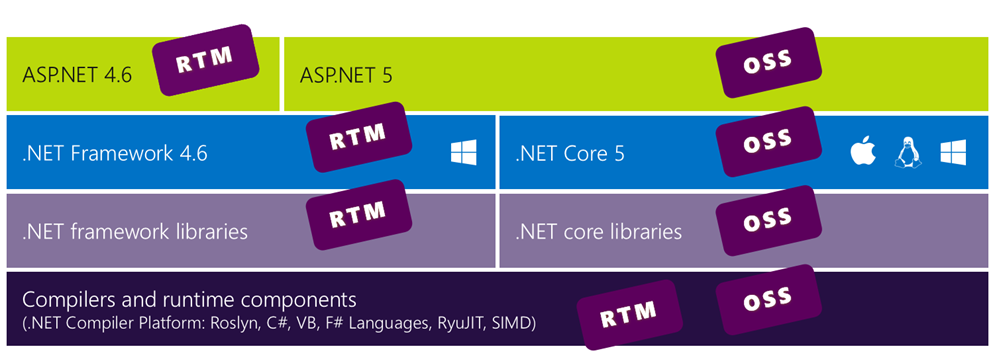
  • ASP.NET 5 RC1 is out with .NET Core and has a Go Live License. This means you can go into production with ASP.NET 5 on Windows or Linux and Microsoft will support you.
  • You can get ASP.NET at, wait for it, http://get.asp.net. Yes. This lively URL is a mini-site that will look at your OS and show you Linux, Mac, or Windows (try visiting it on a mobile phone for fun, too) and tell you how to get ASP.NET.
    • If you insist, you can visit https://get.asp.net/OtherDownloads for a list of all the packages and combinations available. There is a .pkg for Mac and a .tar.gz and some instructions for Linux. In the future I hope/expect we'll have .NET in some popular OS package managers.
  • Node.js Tools 1.1 for Visual Studio was also released. A lot of folks don't realize how cool Node.js development is in Visual Studio. Node.js Tools for VS is free and open source AND works with the Visual Studio Community, which, ahem, is also free.

If you don't have Visual Studio, I'd recommend you grab Visual Studio Code which is a non-threatening size and runs on any OS, then if you're a command line person you can do this on Windows:

@powershell -NoProfile -ExecutionPolicy unrestricted -Command "&{iex ((new-object net.webclient).DownloadString('https://dist.asp.net/dnvm/dnvminstall.ps1'))}"

or this on Linux/Mac.

curl -sSL https://dist.asp.net/dnvm/dnvminstall.sh | sh && source ~/.dnx/dnvm/dnvm.sh

And yes, we have have formal ways to get this and you can again, always go to https://get.asp.net and check our SSL cert. ;)

Connect 2015 Keynotes and Videos

You can watch everyone's talks here and my specific keynote here. My talk was complex and varied but also very personal as we built all the demos around my diabetes and blood sugar system. I also used the Nightscout Open Source CGM Project and gave them a shoutout as well. I use Nightscout to remote my continuous glucose meter's data to the cloud. That glucose data collector runs in an Azure Web Job that I've blogged about before.

We had so much fun making our "parade" of cool cloud demos. I get tired of doing demos around product catalogs and such, so we build a connected Health Clinic. We pulled data in from thousands of (simulated) Microsoft Bands, as well as my actual physical Band 2 that I wear every day. We combined my heart rate data with my actual live and historical glucose data and ran it through Azure Machine Learning to create a "Hanselman Stress Index" to get a sense of how stress and my schedule affects my heart rate and blood glucose. You should really watch the video to get the full effect.

We'll do some cleanup of the slides and code and try to get it all on GitHub soon(ish) so please be patient with us.

image

I also want to point out the documentation for ASP.NET 5 RC1 over at http://docs.asp.net. This documentation is hosted and built at ReadTheDocs using Python and Sphinx and managed as source in GitHub using reStructuredText.

Contributing to the docs is a great way for YOU to get involved in Open Source, especially if you are a FirstTimer! Check out this great video on how to contribute to the ASP.NET documentation.  The community can contribute by:

The Mega List of Connect() 2015 Information

You want it all? OK, here you go, the list of everything announced at Connect() 2015:

What does it all mean?

It means that you can build basically whatever you want, however you want. You can use the editor you like, the OS you like, and the languages you like. VSCode on a Mac doing Node and deploying to Azure? Check. ASP.NET 5 with C# to Docker Containers in a bunch of VMs created in Azure and managed with Microsoft Operations Manager? Check. And on and on. Node.js on VS, C to Raspberry Pi's in C in VS, whatever you dig. It's a whole new world.


Sponsor: Big thanks to Octopus Deploy for sponsoring the feed this week! Check out their amazing product. I'm a fan.

Build servers are great at compiling code and running tests, but not so great at deployment. When you find yourself knee-deep in custom scripts trying to make your build server do something it wasn't meant to, give Octopus Deploy a try.

About Scott

Scott Hanselman is a former professor, former Chief Architect in finance, now speaker, consultant, father, diabetic, and Microsoft employee. He is a failed stand-up comic, a cornrower, and a book author.

facebook bluesky subscribe
About   Newsletter
Hosting By
Hosted on Linux using .NET in an Azure App Service

The Crowdsourcing of Software Quality

November 11, 2015 Comment on this post [52] Posted in Musings
Sponsored By
Stock photo used under CC from WoCinTechChat's "stock photos of women of color in tech"

I posted a rant back in 2012 called "Everything's broken and nobody's upset." Here's another. Lots of people commented on that first post and a number agreed with the general premise. Some were angry and thought that I was picking on particular companies or groups. Sure, it's easy to throw stones, and criticism is a great example of stone throwing. So, in the years since I posted I made a concerted and focused effort on a personal level to report bugs. By this, I mean, I REPORT BUGS. I take screencasts or videos, I email reproductions (repros) and I fill bug issues anywhere and anytime I can because a Bug Report is a Gift.

Fast forward a few years, and I think that we as an industry are perhaps still headed in the wrong way.

Technology companies are outsourcing QA to the customer and we're doing it using frequent updates as an excuse.

This statement isn't specific to Apple, Google, Microsoft or any one organization. It's specific to ALL organizations. The App Store make it easy to update apps. Web Sites are even worse. How often have you been told "clear your cache" which is the 2015 equivalent to "did you turn it on and off again?"

It's too easy to ship crap and it's too easy to update that crap. When I started in software we were lucky to ship every 6 to 9 months. Some places ship every year or two, and others still ship once.

I see folks misusing Scrum and using it as an excuse to be sloppy. They'll add lots of telemetry and use it as an excuse to avoid testing. The excitement and momentum around Unit Testing in the early 2000s has largely taken a back seat to renewed enthusiasm around Continuous Deployment.

But it's not just the fault of technology organizations, is it? It's also our fault - the users. We want it now and we like it beta. We look at software like iOS6 and say "it feels dated." I even overheard someone recently say that iOS9 felt visually dated. It JUST came out. Do we really have to restyle our sites and reship our apps every few months to satisfy a finicky public?

As with many rants, there isn't a good conclusion. I think it's clear this is happening. The question for you, Dear Reader, is do you agree? Do you see it in in your own organization and in the software and hardware that you use every day? Is the advent of the evergreen browser and the always updated phone a good thing or a bad thing?

Sound off in the comments.


Sponsor: Thanks to Infragistics for sponsoring the feed this week. Responsive web design on any browser, any platform and any device with Infragistics jQuery/HTML5 Controls.  Get super-charged performance with the world’s fastest HTML5 Grid - Download for free now!

About Scott

Scott Hanselman is a former professor, former Chief Architect in finance, now speaker, consultant, father, diabetic, and Microsoft employee. He is a failed stand-up comic, a cornrower, and a book author.

facebook bluesky subscribe
About   Newsletter
Hosting By
Hosted on Linux using .NET in an Azure App Service

Using Redis as a Service in Azure to speed up ASP.NET applications

November 05, 2015 Comment on this post [18] Posted in ASP.NET MVC | Azure
Sponsored By

Microsoft Azure has a Redis Cache as a Service. There's two tiers. Basic is a single cache node, and Standard is as a complete replicated Cache (two nodes, with automatic failover). Microsoft manages automatic replication between the two nodes, and offers a high-availability SLA. The Premium tier can use up to a half-terabyte of RAM and tens of thousands of client connections and be clustered and scaled out to even bigger units. Sure, I could manage your own Redis in my own VM if I wanted to, but this is SAAS (Software as a Service) that I don't have to think about - I just use it and the rest is handled.

I blogged about Redis on Azure last year but wanted to try it in a new scenario now, using it as a cache for ASP.NET web apps. There's also an interesting open source Redis Desktop Manager I wanted to try out. Another great GUI for Redis is Redsmin.

For small apps and sites I can make a Basic Redis Cache and get 250 megs. I made a Redis instance in Azure. It takes a minute or two to create. It's SSL by default. I can talk to it programmatically with something like StackExchange.Redis or ServiceStack.Redis or any of a LOT of other great client libraries.

However, there's now great support for caching and Redis in ASP.NET. There's a library called Microsoft.Web.RedisSessionStateProvider that I can get from NuGet:

Install-Package Microsoft.Web.RedisSessionStateProvider 

It uses the StackExchange library under the covers, but it enables ASP.NET to use the Session object and store the results in Redis, rather than in memory on the web server. Add this to your web.config:

<sessionState mode="Custom" customProvider="FooFoo">
<providers>
<add name="MySessionStateStore"
type="Microsoft.Web.Redis.RedisSessionStateProvider"
host="hanselcache.redis.cache.windows.net"
accessKey="THEKEY"
ssl="true"
port="1234" />
</providers>
</sessionState>

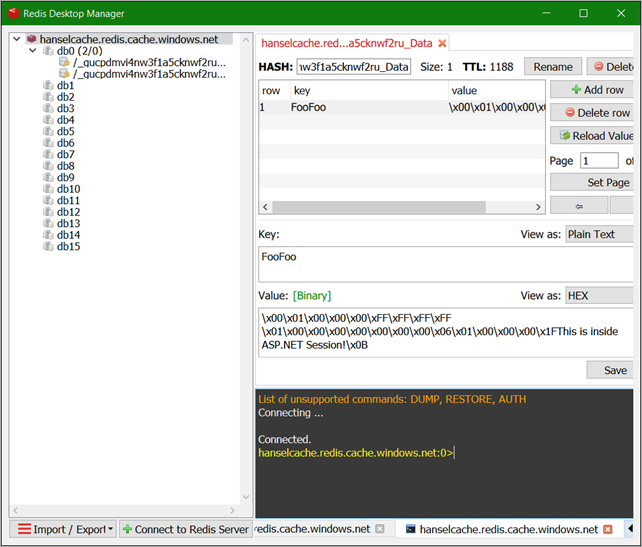
Here's a string from ASP.NET Session stored in Redis as viewed in the Redis Desktop Manager. It's nice to use the provider as you don't need to change ANY code.

ASP.NET Session stored in a Redis Cache

You can turn off SSL and connect to Azure Redis Cache over the open internet but you really should use SSL. There's instructions for using Redis Desktop Manager with SSL and Azure Redis. Note the part where you need a .pem file which is the Azure Redis Cache SSL public key. You can get that SSL key here as of this writing.

Not only can you use Redis for Session State, but you can also use it for a lightning fast Output Cache. That means caching full HTTP responses. Setting it up in ASP.NET 4.x is very similar to the Session State Provider:

Install-Package Microsoft.Web.RedisOutputCacheProvider 

Now when you use [OutputCache] attributes in MVC Controllers or OutputCache directives in Web Forms like <%@ OutputCache Duration="60" VaryByParam="*" %> the responses will be handled by Redis. With a little thought about how your query strings and URLs work, you can quickly take an app like a Product Catalog, for example, and make it 4x or 10x faster with caching. It's LOW effort and HIGH upside. I am consistently surprised even in 2015 how often I see folks going to the database on EVERY HTTP request when the app's data freshness needs just doesn't require the perf hit.

You can work with Redis directly in code, of course. There's docs for .NET, Node.js, Java and Python on Azure. It's a pretty amazing project and having it be fully managed as a service is nice. From the Azure Redis site:

Perhaps you're interested in Redis but you don't want to run it on Azure, or perhaps even on Linux. You can run Redis via MSOpenTech's Redis on Windows fork. You can install it from NuGet, Chocolatey or download it directly from the project github repository. If you do get Redis for Windows (super easy with Chocolatey), you can use the redis-cli.exe at the command line to talk to the Azure Redis Cache as well (of course!).

It's easy to run a local Redis server with redis-server.exe, test it out in development, then change your app's Redis connection string when you deploy to Azure. Check it out. Within 30 min you may be able to configure your app to use a cache (Redis or otherwise) and see some really significant speed-up.


Sponsor: Big thanks to my friends at Octopus Deploy for sponsoring the feed this week. Build servers are great at compiling code and running tests, but not so great at deployment. When you find yourself knee-deep in custom scripts trying to make your build server do something it wasn't meant to, give Octopus Deploy a try.

About Scott

Scott Hanselman is a former professor, former Chief Architect in finance, now speaker, consultant, father, diabetic, and Microsoft employee. He is a failed stand-up comic, a cornrower, and a book author.

facebook bluesky subscribe
About   Newsletter
Hosting By
Hosted on Linux using .NET in an Azure App Service

Using the Surface Pro 4 Type Cover with Fingerprint Reader on a Surface Pro 3

November 02, 2015 Comment on this post [21] Posted in Reviews
Sponsored By

Using the Surface Pro 4 Type Cover with Fingerprint Reader on a Surface Pro 3Last year in August I went and bought a Surface Pro 3 with my own money (it's not machine that work paid for) and I've been very happy with it. Now the Surface Pro 4 came out, and well, it's silly to upgrade for me when it's been just a year.

But. That Keyboard. The Surface Pro 4 has an all new Keyboard and Touch Pad.

The Surface Pro 3 keyboard is good, to be clear, but the touchpad sucks. After I used it for a few months I called it out as sucking. It's usable, but it's not fun to use.

Turns out that you can get a Surface Pro 4 Type Cover keyboard and it works and fits perfectly on a Surface Pro 3. You can upgrade your Surface Pro 3 (and pretend it's a 4, which is what I'm doing) by just adding the new Keyboard.

Fingerprint Reader

There's lots of new color Type Covers but the really interesting one is the Type Cover with Fingerprint Reader. Sadly, only available in Black, but it has an integrated Fingerprint Reader that lets you use the new "Windows Hello" login feature of Windows 10. Windows Hello means "using biometrics like fingerprints and faces and eye scanning to login to your computer."

It works and it works great. There was an Oct 26th "Firmware Update" in Windows Update that gives you the drivers you'll need. A Firmware Update for a Surface is essentially a "driver pack." Run Windows Update and attach the keyboard and you're set.

Windows Hello for Fingerprints

You enroll as many fingers as you want in Sign-In Options and that's it. Now you log in with your fingerprint. Lovely.

All new keyboard and touchpad

The picture before shows my original Surface Pro 3 Type Cover next to my new Surface Pro 4 Type Cover with Fingerprint Reader. First, the keyboard was already good on the Surface Pro 3, but it's just better on the 4. There are actual spaces between the keys, and you can see from the pic how the keys go even closer to the edge/bezel of the cover's surface. The keys are also slightly rearranged for the better. FN has been moved to the left, which makes sense, and a "context key" (which is effectively Shift-F10).

Another nice touch is that the FN key now has a light. On SP3 you had no way to see if it was locked, and you had to FN-CapsLock to force it on, and would have no visual indicator.

Finally, the silly Share and Settings secondary functions for Function F7 and F8 are gone and there's now an actual PrtScn button. It's the little things.

image

Now, to the touchpad. IT IS SO MUCH BETTER. It's actually usable. It's way larger (they say 40%) and it feels nicer. Before I always took another mouse with me because the SP3 touchpad was crippling. No longer. It's large enough for multi-finger gestures, including 3 and 4-finger taps. I'm still holding out for a "4 finger swipe" for Virtual Desktop switching, though.

One other subtlety that is worth pointing out...the fold. With the Surface Pro 3 Type Cover keyboard, when you fold it up to keep the Type Cover off the table, the fold makes it hard to press the "Start Button" on the screen because the keyboard butted right up against the screen. The Pro 4 Type Cover folds tighter and lower against the bottom bezel such that pressing icons in the taskbar and the Start button isn't a problem anymore. Subtle, but again, it's the little things.

I totally recommend this keyboard. It's given my Surface Pro 3 new life. It's the keyboard it should have always had.

* My links are Amazon Affiliate Links! Use them as they help support my blog and buy me tacos.


Sponsor: Big thanks to my friends at Octopus Deploy for sponsoring the feed this week. Build servers are great at compiling code and running tests, but not so great at deployment. When you find yourself knee-deep in custom scripts trying to make your build server do something it wasn't meant to, give Octopus Deploy a try.

About Scott

Scott Hanselman is a former professor, former Chief Architect in finance, now speaker, consultant, father, diabetic, and Microsoft employee. He is a failed stand-up comic, a cornrower, and a book author.

facebook bluesky subscribe
About   Newsletter
Hosting By
Hosted on Linux using .NET in an Azure App Service

How to simulate a low bandwidth connection for testing web sites and applications

October 28, 2015 Comment on this post [26] Posted in Open Source
Sponsored By

Facebook just announced an internal initiative called "2G Tuesdays" and I think it's brilliant. It's a clear and concrete way to remind folks with fast internet (who likely have always had fast internet) that not everyone has unlimited bandwidth or a fast and reliable pipe. Did you know Facebook even has a tiny app called "Facebook Lite" that is just 1Mb and has good support for slower developing networks?

You should always test your websites and applications on a low bandwidth connection, but few people take the time. Many people don't know how to simulate simulate low bandwidth or think it's hard to set up.

Simulating low bandwidth with Google Chrome

If you're using Google Chrome, you can go to the Network Tab in F12 Tools and select a bandwidth level to simulate:

Selecting lower bandwidth in Google Chrome F12 Tools

Even better, you can also add Custom Profile to specify not only throughput but custom latency:

Custom Profiles for Google Chrome that control throughput and latency

Once you've set this up, you can also click "disable cache" and simulate a complete cold start for your site on a slow connection. 20 seconds is a long time to wait.

Google Chrome timeline showing my site on a 2G connection

Simulating a slow connection with a Proxy Server like Fiddler

If you aren't using Chrome or you want to simulate a slow connection for your apps or other browsers, you can slow it down from a Proxy Server like Fiddler or Charles.

Fiddler has a "simulate modem" option under Rules | Performance, and you can change the values from Rules | Customize Rules:

image

You can put in delays in milliseconds per KB in the script under m_SimulateModem:

if (m_SimulateModem) {
// Delay sends by 300ms per KB uploaded.
oSession["request-trickle-delay"] = "300";
// Delay receives by 150ms per KB downloaded.
oSession["response-trickle-delay"] = "150";
}

There's a number of proxy servers you can get to slow down traffic across your system. If you have Java, you can also try out one called "Sloppy." What's your favorite tool for slowing traffic down?

Conclusion

There is SO MUCH you can do to make the experience of loading your site better, not just for low-bandwidth folks, but for everyone. Squish your images! Don't use PNGs when a JPEG would do. Minify! Use CDNs!

image

However, step 0 is actually using your website on a slow connection. Go do that now.

Related Links


Sponsor: Big thanks to Infragistics for sponsoring the feed this week. Quickly & effortlessly create advanced, stylish, & high performing UIs for ASP.NET MVC with Ignite UI. Leverage the full power of Infragistics’ JavaScript-based jQuery/HTML5 control suite today.

About Scott

Scott Hanselman is a former professor, former Chief Architect in finance, now speaker, consultant, father, diabetic, and Microsoft employee. He is a failed stand-up comic, a cornrower, and a book author.

facebook bluesky subscribe
About   Newsletter
Hosting By
Hosted on Linux using .NET in an Azure App Service

Disclaimer: The opinions expressed herein are my own personal opinions and do not represent my employer's view in any way.