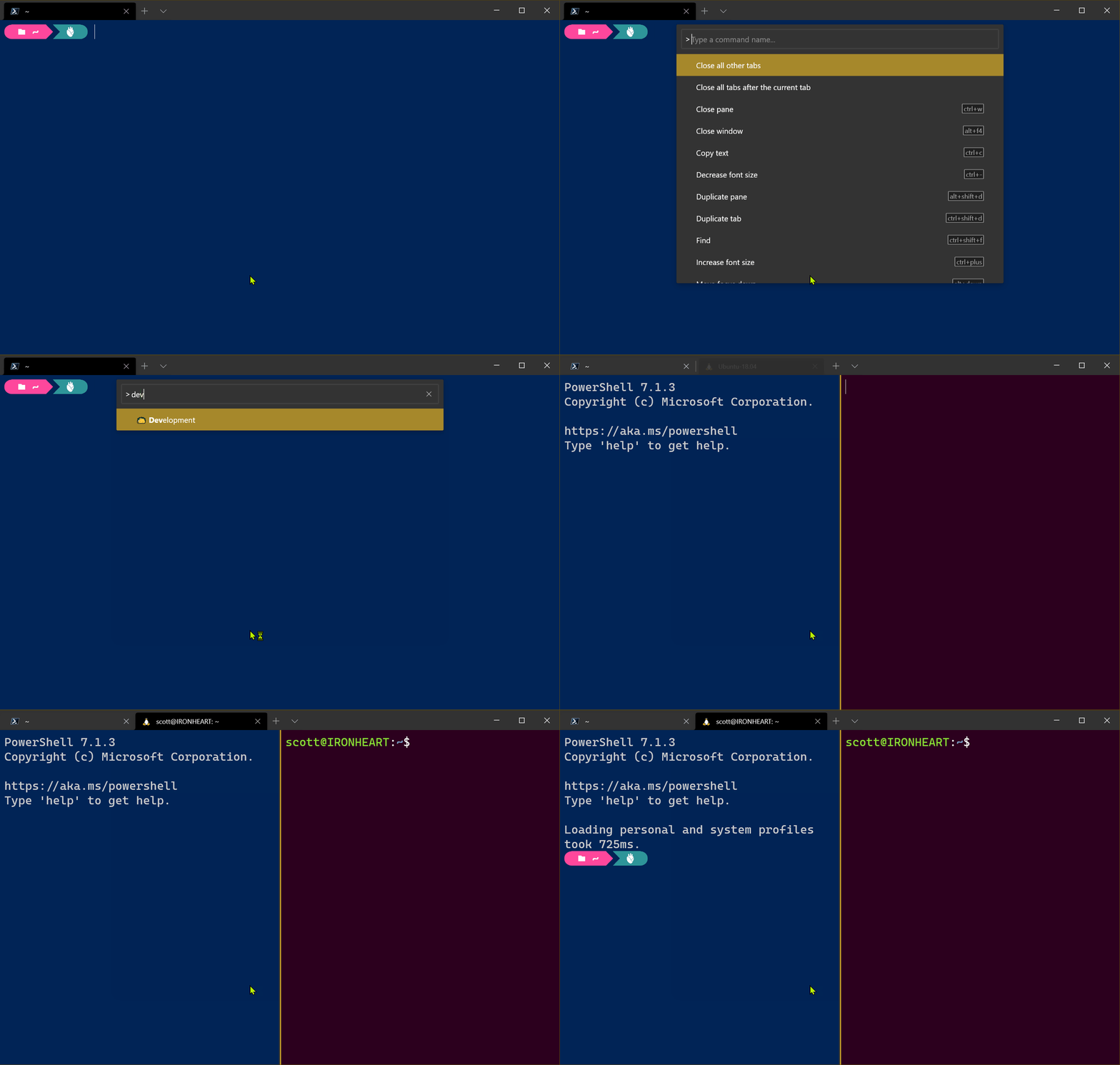
I thought I knew everything about the open source Windows Terminal and then I hit Ctrl+Shift+P like I do in VS Code (muscle memory) and it pops up a lovely Command Palette. You can search for any command and see the current keybinding. Super useful if you haven't yet discovered Window Panes. You can also type new wt.exe command lines and affect the current window.
NOTE: Don't forget, "wt" is an alias for the Windows Terminal, so you can Win+R and type wt and run it!
Since the wt.exe allows for chained commands, I can create a custom command in settings that calls wt.exe with chained commands/actions and bingo, I have a command called Development that opens multiple profiles, splits the screen and sets me up for Windows+Linux development in a single move!
Here I have a new command called Development that calls wt with a new-tab with a named profile, then a split-pane with another named profile.
Sponsor: The No. 1 reason developers choose Couchbase? You can use your existing SQL++ skills to easily query and access JSON. That’s more power and flexibility with less training. Learn more.
About Scott
Scott Hanselman is a former professor, former Chief Architect in finance, now speaker, consultant, father, diabetic, and Microsoft employee. He is a failed stand-up comic, a cornrower, and a book author.
Muscle memory is a heck of a thing. When I want to build code I type Ctrl-Shift-B. I can't not. It's built into my hands! Ctrl-Shift-T is test (even though it's non-standard, it's there, in my hands.
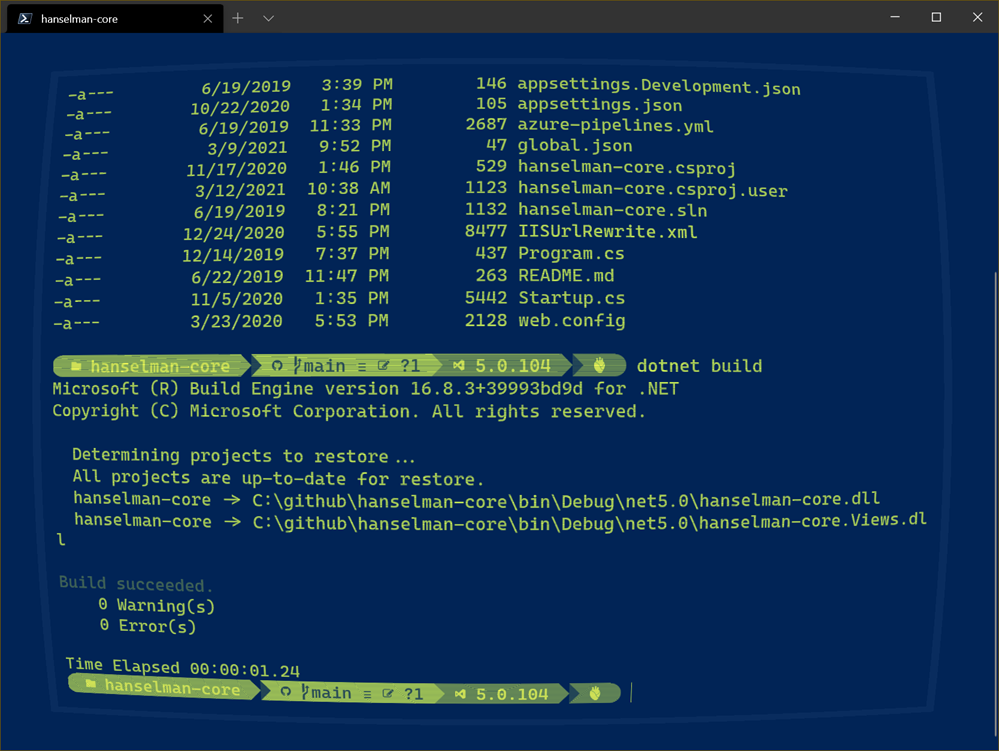
I spend a lot of time at the command line, in Windows Terminal, in PowerShell, using PSReadLine. So why not make a few of these intuitive hotkeys work for me there as well?
PSReadLine supports Set-PSReadLineKeyHandler which is basically hotkey bindings to any arbitrary script block.
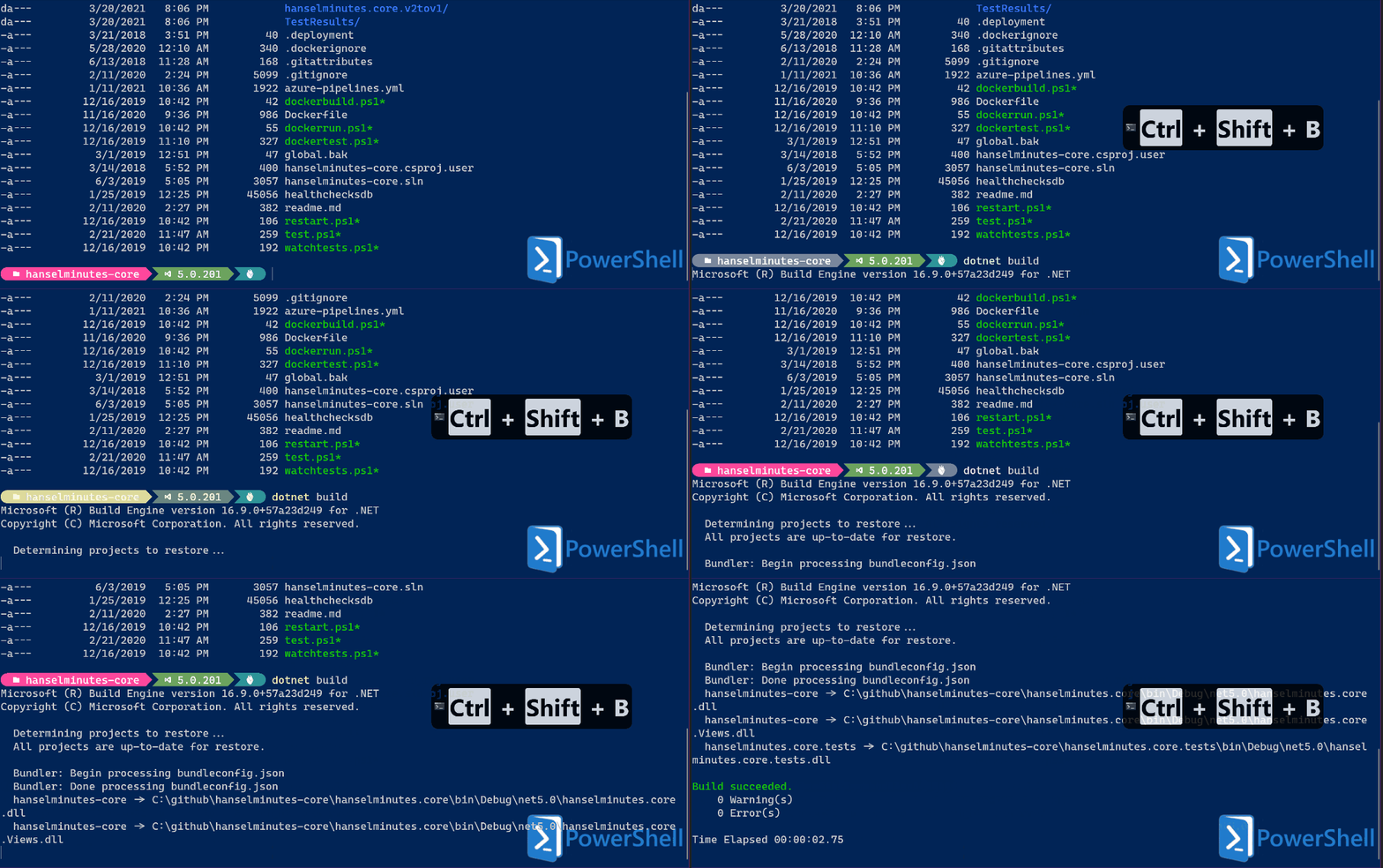
Here's Shift-Ctrl-B typing dotnet build and pressing enter. Just add these to your $profile, after you've imported PSReadLine via
if ($host.Name -eq 'ConsoleHost')
{
    Import-Module PSReadLine
}
Here's Shift-Ctrl-T typing dotnet test and pressing enter.
Set-PSReadLineKeyHandler -Key Ctrl+Shift+t `
                         -BriefDescription TestCurrentDirectory `
                         -LongDescription "dotnet Test the current directory" `
                         -ScriptBlock {
    [Microsoft.PowerShell.PSConsoleReadLine]::RevertLine()
    [Microsoft.PowerShell.PSConsoleReadLine]::Insert("dotnet test")
    [Microsoft.PowerShell.PSConsoleReadLine]::AcceptLine()
}
Here's it in Animated Gif Form! (Using Carnac to see the hotkeys being pressed)
Since I am using Ctrl+Shift+T for testing (that's just me) I did need to manually unbind it from New Tab in my Windows Terminal settings. Just be aware.
{
    "command": "unbound",
    "keys": "shift+ctrl+T"
},
Sweet. What hotkeys will YOU hook up?
Sponsor: Have what it takes to code securely? Select from dozens of complimentary interactive challenges in Veracode Security Labs, test your skills, and earn a badge. Learn more.
About Scott
Scott Hanselman is a former professor, former Chief Architect in finance, now speaker, consultant, father, diabetic, and Microsoft employee. He is a failed stand-up comic, a cornrower, and a book author.
Every 6 or 7 years I get a new PC. My most recent one was in 2018 and I'm happily still using it today. However, I have made a few modest and somewhat low-cost (and one high-cost) upgrades. Each of these upgrades means I'll get another 3 to 5 lovely years out of this desktop machine. I'll be using Amazon referral links below, and you are supporting my writing when you use them, thanks!
The #1 thing I'm thankful for is that the ASUS ROG Strix X299-E Gaming II ATX Gaming Motherboard (Intel X299) I purchased three years ago was such a solid choice. It has/had ample memory slots, two (the new one has 3!) m.2 hard drive slots, and it's a large size for future video cards. I'm putting upgrades into this motherboard that didn't exist when I purchased it and it's doing great. If you can, always stretch the budget for a roomy motherboard - you can save up for the upgrades over the coming years like I did.
These are the upgrades I've made over the last year.
New SSD - Low Cost and High Availability
Upgrading your hard drive is a huge benefit and relatively inexpensive upgrade. I originally had a Western Digital Black 512GB SSD using an m.2 interface. This was my first "hard drive that doesn't look like a hard drive," and I still find m.2 drives to be basically impossibly amazing.
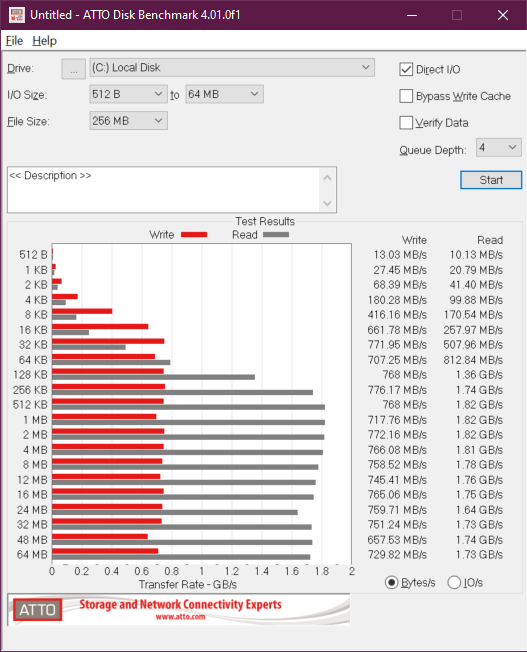
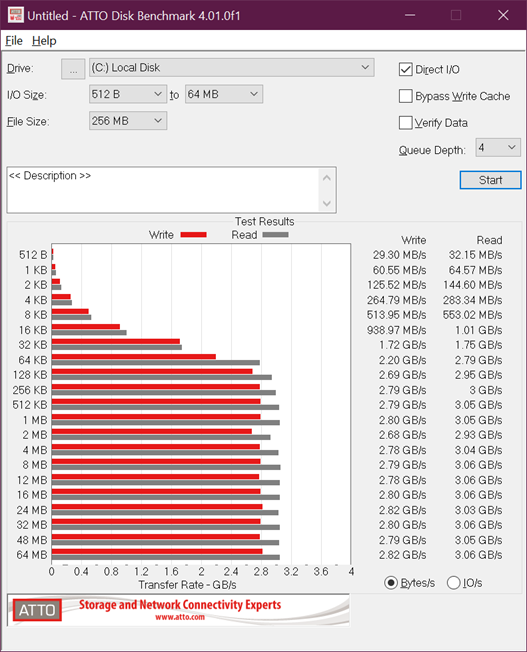
I noticed that my Drive Health, per CrystalDiskInfo was in the low 60%s and the ATTO Benchmark was getting weak on the writes.
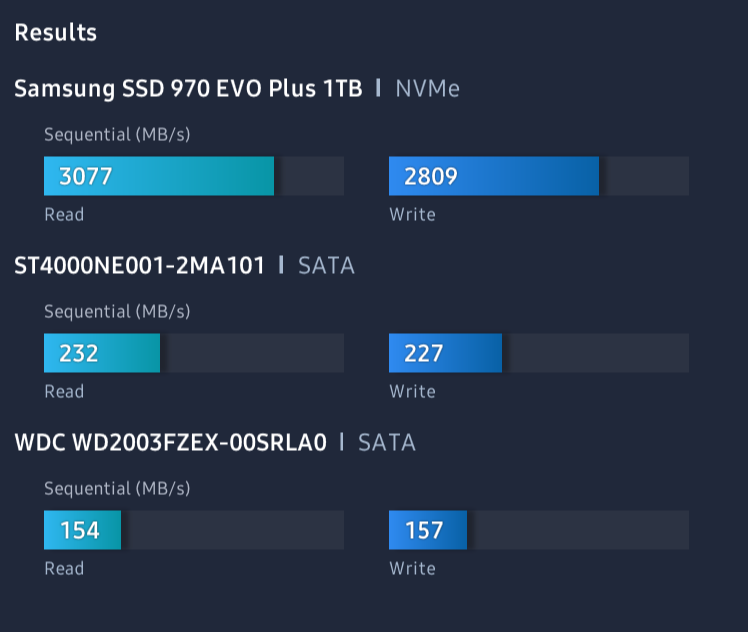
I upgraded to a Samsung 970 EVO Plus SSD m.2 NVMe for just $165. This drive is double my original's space and nearly 3-4x the perf in some places. Plus, the Samsung Drive Migration software just worked. I literally added this drive to my second m.2 slot, ran the migration, shut down, moved the drive to the first m.2 and removed the old drive, and rebooted. I didn't get a single complaint from Windows.
This is NOT a sponsored post. This product and technique just worked and I'm thrilled. You may also be able to get a similar result from Clonezilla and another drive, but I was very much impressed with Samsung and this upgrade.
Here's the before and after benchmark between the 2018 WDC m.2 SSD and the new Samsung EVO Plus SSD.
Before:
After:
Comparing this drive to my D: and E: spinning rust (regular) hard drives is the difference between shooting a bullet and throwing it. This SSD is 10x faster than a regular drive.
Memory - Medium Cost and High Availability
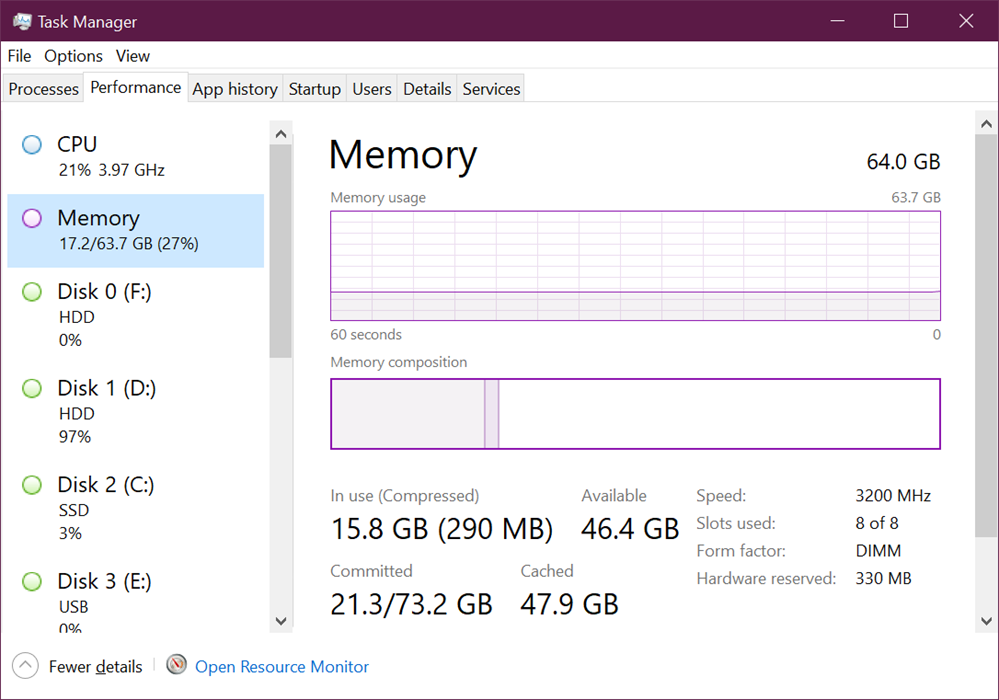
I had 32 gigs of RAM since 2018 but randomly (I know, this is silly) while cleaning my PC noticed I had four memory slots unused. I *did* know this when I bought it but I just flaked or forgot I had the extra space.
While upgrading, I also noticed (with help from Twitter) that I wasn't running the XMP memory profile and running these at 3200Mhz. I was running them at 2133Mhz all this time! Doh. So a nice upgrade and one small switch in the BIOS and I've got 64 gigs PLUS I'm clocking nearly 50% faster.
This has improve performance for me when running Docker and Kubernetes locally along site, Teams, VS, VS Code, Outlook, you know the drill. I usually sit around 35-50 gigs committed when really working with everything open. The extra headroom has been great.
High Cost and Low Availability
And finally, as of the time of this writing, this is one that requires more money and more luck. I used an online bot to look for stock drops of the new NVidia 3080 video cards and got one near Christmas. I've also heard good things about the waiting list at Evga.com.
This card was $699 which was a significant outlay and I went back and forth on it before I decided to go for it. It's proven to be a great upgrade, particularly as an upgrade for video rendering for my YouTube as Adobe Premiere uses it a lot.
I really hope that this card and the more affordable 3060 are more available soon because it's a lovely upgrade.
Take a look at your desktop motherboard and consider your possible upgrades based on cost, availability, and performance and see what you could put together at a reasonable budget! Hope this helps!
Sponsor: Have what it takes to code securely? Select from dozens of complimentary interactive challenges in Veracode Security Labs, test your skills, and earn a badge. Learn more.
About Scott
Scott Hanselman is a former professor, former Chief Architect in finance, now speaker, consultant, father, diabetic, and Microsoft employee. He is a failed stand-up comic, a cornrower, and a book author.
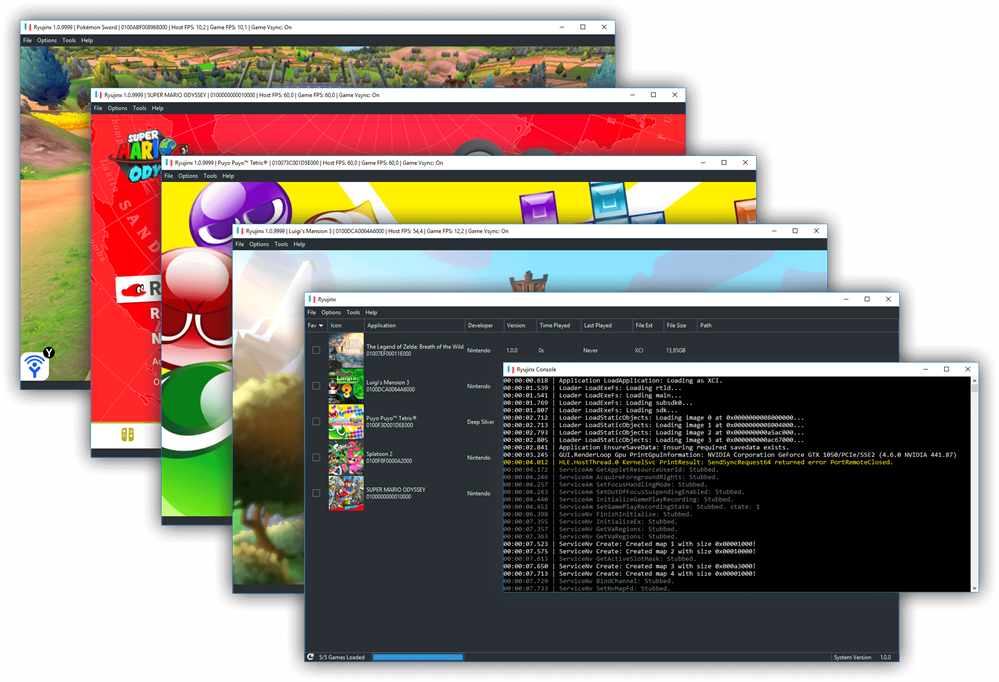
I love emulators. I love that they exist. I love that we have computers that are not only fast enough to translate and emulate instructions in real time for totally different computers that may not even exist any more but also for computers that are shipping today!
Ryujix is particularly cleanly factored with individual projects and modules that really follow the single responsibility principal.
It's written in .NET 5 and you can just git clone it, and go into the Ryujinx folder and "dotnet run," or build from Visual Studio. There are also daily builds on their site.
Some of the impressive features - and again, this is written in C# on cross-platform open source .NET 5:
The CPU emulator, ARMeilleure, emulates an ARMv8 CPU and currently has support for most 64-bit ARMv8 and some of the ARMv7 (and older) instructions, including partial 32-bit support. It translates the ARM code to a custom IR, performs a few optimizations, and turns that into x86 code.
The GPU emulator emulates the Switch's Maxwell GPU using the OpenGL API (version 4.4 minimum) through a custom build of OpenTK.
Xinput-compatible controllers are supported natively; other controllers can be supported with the help of Xinput wrappers such as x360ce.
Most emulators are created for educational and experimental purposes, so don't look to be using this for nefarious purposes. This is a fantastic codebase to explore and experiment with.
Using a computer is like riding in a Lyft. Writing an Emulator is like disassembling an internal combustion engine and putting it back together differently and it still works. It won't make you a better person but it will make you appreciate your Lyft.
Sponsor: Simplify code, reduce costs, and build faster without compromising the transactionality, scale and flexibility you need. Fauna - a global serverless database for all your applications. Learn more!
About Scott
Scott Hanselman is a former professor, former Chief Architect in finance, now speaker, consultant, father, diabetic, and Microsoft employee. He is a failed stand-up comic, a cornrower, and a book author.
My mom is very clever and thoughtful and when I was in my early teens and easily overwhelmed and generally freaking out or panicky she'd say, "feel it. Be here. What is your body telling you. Freak out fully but put a time limit on it."
This idea of "time-boxed freak outs" has always stuck with me. A few times a year I get overwhelmed. I think we all do to some extent. Often I'd try to fight it, don't cry, don't get overwhelmed.
But I remembered what my Mom said and I started being present in the freak out. I'd set a timer for 10 or 15 minutes and REALLY own it. Get upset, cry, and not feel bad about it.
I deserve the release and by time-boxing it, it allowed me to own it and accept it. I can ramp up, and then ramp down. I've found this to be far more healthy than trying to swallow feelings and hold it in. Sometimes it needs to be OK to go and cry in your car in the parking lot.
Disclaimer: I am not a doctor. I'm a random person and this is my random blog. This advice works for me and has worked for others, but know yourself and talk to a therapist if you are having uncontrollable panic attacks or feel unsafe. If this doesn't sound helpful, be present and be safe.
I tweeted about this idea and found a number of replies that also found this technique helpful. Here are some anonymized quotes:
“time boxed panic” I love it. Don’t skip the feelings. You can’t. You just defer them often to disastrous results. Sit with the discomfort a while. The way out is through.
and
Great advice. For some reason, we have been taught to suppress emotions, not to let things get to us and to not panic. And unfairly, men in particular have been encouraged not to show emotion. But it is a natural human response. Give yourself permission to feel & time box it.
and
This is a phenomenal idea. I would add, if you could add a few more minutes, take a walk away from whatever is stressing to clear your head. Sometimes being away from what is causing the stress can help as a reset.
and finally
You don't even have to cry or freak out. Just give yourself a time box to sit, stare, and clear your mind. No phones, no distractions. We have too much swirling in our heads.
Again, as with all random internet advice, you are under no obligation to do anything you don't feel is safe for you. However, some have found this helpful. I also recorded a TikTok about it that is just 1 minute long:
I hope it helps you. Be well!
Sponsor: Simplify code, reduce costs, and build faster without compromising the transactionality, scale and flexibility you need. Fauna - a global serverless database for all your applications. Learn more!
About Scott
Scott Hanselman is a former professor, former Chief Architect in finance, now speaker, consultant, father, diabetic, and Microsoft employee. He is a failed stand-up comic, a cornrower, and a book author.