Scott Hanselman

Hack a TV into a Teams and Zoom Computer with EpocCam and Miracast

January 26, 2021 Comment on this post [12] Posted in Remote Work
Sponsored By

If you have a TV, you can turn it into a fancy conference room monitor and pretend you have a Surface Hub 2S. Let's see the different ways we can make Teams/Zoom meetings more a "walking around and thinking" experience, and less a "hunched in front of the laptop" experience.

Cheapest/Good - Wire up to a big TV

You can just get a nice HDMI cable and plug it into your TV and duplicate or extend your laptop's screen. In this simple scenario you're using your Laptop's mic and webcam, and just using the screen of your TV. You can also check your audio output and use the TV speakers as output if you like.

Doing this is not just a nice change of pace, but it reminds you of the options you have to hold meetings! It's your space...how many ways can you change your boring meeting into a new perspective by using the same space in a new way?

Cheap/Better - Wireless to a big TV

If you want to be wireless, you can use Miracast (if your computer/laptop/Surface supports it) or AirPlay or AirServer to "throw" your screen wirelessly to your TV. Some Samsung Smart TV support wireless communications built-in!

  • You may be able to throw from Windows to a Smart TV with AirServer software. You may be able to throw with AirPlay on your Mac to an Apple TV.
  • You may be able to get a Miracast HDMI dongle (amzn link) and make a dumb TV smart. This is the solution I use. I throw my Surface screen over Miracast to the TV.

Less Cheap/Best (for me) - Wireless to a big TV with a wireless Webcam via my iPhone

I have a TV on my wall in my office, but it doesn't lend itself to wires and moving my laptop. I wanted to throw the screen over there AND also have a webcam on top of the TV. Ideally there'd be a webcam in the bezel of the TV, but there isn't.

What's an ideal and cheap webcam? My iPhone is already a great device with a long life battery, it's portable, and a webcam. You can get a number of apps that will enable you to use your iPhone (or Android) as a webcam.

I decided on Elgato EpocCom to turn my iPhone into a webcam.

Troubleshooting: The docs aren't amazing, so you'll want to not only install the software, but confirm that the EpocCamService is enabled in the Windows Firewall for both Private AND Public Networks (or ensure your network is the same type as the type that's enabled for this service.) I had to manually allow the EpocCam Service to work on Private Networks.

Then you'll get the iPhone side of the app and your iPhone will show up as a camera. With the Pro version ($7.99) you'll get higher quality and microphone support.

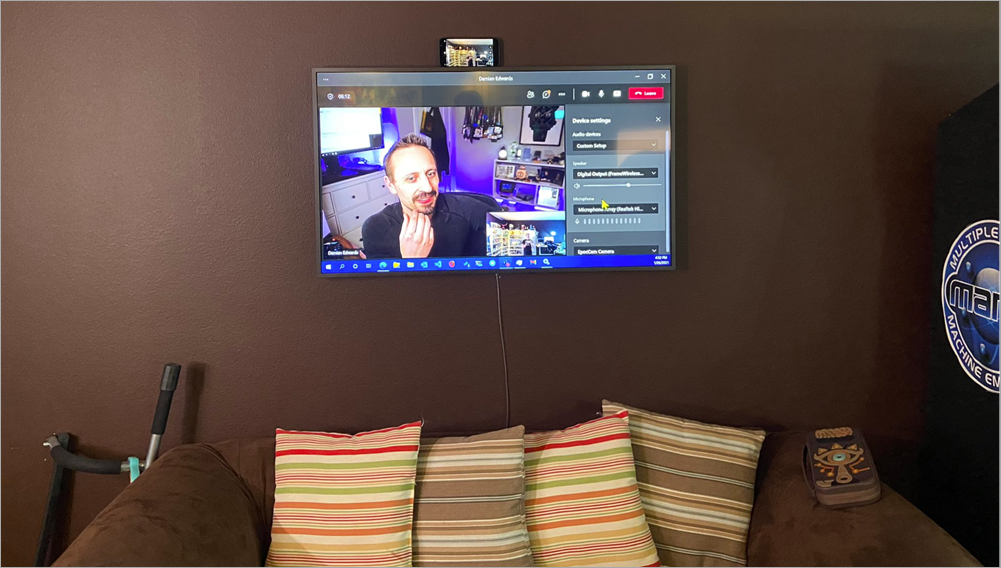
Now I just put my iPhone on the top of the TV, run the EpocCam software, and then on my PC I throw my video to the TV and select the EpocCam virtual Camera. Now I can wander around my office and pace and talk and think, which is great!

Here I've got my Samsung Frame TV (amzn link) (I got it for just $600 as it's the 2018 model, I love it) and I've hooked up the Microsoft Wireless Display Adapter v2 (amzn link).

Using an iPhone as a Teams Camera

Other Alternatives

Once you familiarize yourself with these wireless options for throwing video and audio around, you'll find there is no right answer. There's only the answer that works for you! The results will be similar, but some of the solutions will fit better into your system or setup.

Here's some other ideas.

  • Use NDI Tools to throw formally throw video around your office and catch it with OBS or XSplit
  • Use a really long USB extension code and mount a cheap webcam on the top of the TV
  • Just use your iPhone or iPad or Android device and join Teams or Zoom with the phone itself! Then either wired (via adapter and HDMI) or wirelessly connect the device to your TV!

Leave your solutions in the comments!

There also appear to be Teams devices that will take a TV or Display and Teamsify it! I'll go educate myself about those as well!


Sponsor: Protect your apps from reverse engineering and tampering with PreEmptive, the makers of Dotfuscator. Dotfuscator has been in-the-box with Microsoft Visual Studio since 2003. Visit preemptive.com/hanselminutes for a professional-grade trial.

About Scott

Scott Hanselman is a former professor, former Chief Architect in finance, now speaker, consultant, father, diabetic, and Microsoft employee. He is a failed stand-up comic, a cornrower, and a book author.

facebook bluesky subscribe
About   Newsletter
Hosting By
Hosted on Linux using .NET in an Azure App Service

Using Tailscale on Windows to network more easily with WSL2 and Visual Studio Code

January 21, 2021 Comment on this post [3] Posted in Linux | Open Source | Win10
Sponsored By

Tailscale is a zero config mesh "VPN" that runs atop other networks and effectively "flattens" networks and allows users/services to more easily (and securely) communicate with each other.

For example, I've written extensively on how to SSH into WSL2 on Windows 10 from another machine and you'll note that there is not only a ton of steps but there's more than one way to do it!

I have talked about this for SSH, but if you're an active developer and want to share the services and sites you're working on with your coworkers and collaborators, there's a non-trivial amount of setup, management, and maintenance to deal with.

Phrased differently, "wouldn't it be easier if we were all just on the same network and subnet?"

WSL1 shares its networking stack with Windows 10, so the "machine" is the same. Whatever YourMachineName is, running a service on 5000 is the same if it's a Windows service or an app running in Linux under WSL1. However, in WSL2, your Linux environment is "behind" your Windows host. While WSL2 makes it easy to hit http://localhost:5000 by transparent port-forwarding, your WSL2 Linux machine isn't really a peer on the same network as your other devices.

Using a zero-configuration networking system like Tailscale (and similar services) levels the playing field - and the network. Due to some characteristics of WSL2 there are a few gotchas. Here's how I got it working for me.

Tailscale on WSL2

Get WSL

Get Tailscale

Modify WSL2

  • I can't get Tailscale today to startup on WSL2 with ipv6 install, so I disable it.
sudo sysctl -w net.ipv6.conf.all.disable_ipv6=1
sudo sysctl -w net.ipv6.conf.default.disable_ipv6=1

Run Tailscale

Here you startup the daemon. There's no systemd (yet) on WSL2, but if you're on a version over Windows 10 build 21286, there are ways run commands on startup in the Windows Subsystem for Linux. Personally, I just do this in a bash script.

sudo tailscaled 

WSL doesn't have a way to do an interactive login process, so you wan tot create a pre-authentication key to authenticate a single machine. Then use that key, as I do here, to bring up Tailscale within WSL:

tailscale up --authkey=tskey-9e85d94f237c54253cf0

I like to keep this open in another Terminal Tab or Window Pane so I can watch the logs. It's interesting and verbose!

Within the Tailscale machines admin panel, you can see all the machines living on your new Tailscale network. Note that I have scottha-proto listed as Windows, and scottha-proto-1 listed as Linux. The first is my Host machine and the second (the -1) is my Linux WSL2 instance! They are now on a flat network! 

A list of all my Tailscale machines

I was also able to invite a user from outside my network with the new (coming soon) Tailscale node sharing feature. My friend Glenn is NOT in my organization, but just like I use OneDrive or DropBox to create a link to access ONE entity but not the WHOLE system, I can do the same here.

Shared my node with someone outside my network

Now I can have Glenn hit a service running in WSL2 from his house.

Make a Service and Bind it to the Tailscale Network

I've installed .NET 5 in my WSL2 Ubuntu system, made a folder, and run dotnet new web to make a Hello World microservice.

When I run the service - .NET or Node, or whatever - it essential that the service listen on the Tailscale network. Your Linux system in WSL2 is 'multi-homed' and is connected to multiple networks. By default my developer systems listen only on localhost.

For .NET there's several ways to listen on all networks (including Tailscale) but I used this one:

dotnet run --urls http://*:5100;https://*:5101

So here I've got myself connecting to the Tailscale IP that's associated with my WSL2 instance and hitting my Linux service running within:

Image

How far can we take this? Well, since I'm on the Tailscale network and Glenn has connected to it, the whole network is flat, so hitting my service is trivial! Here I am on Teams with my desktop on the bottom and Glenn's desktop on the top.

My service in WSL2 being hit my Glenn from a remote system

Cool. How far can we go?

Add Visual Studio Code and the Remote Development SSH Extension

Ok, so flat secure network, no limits! Can I make my WSL2 instance be treated as a remote development system for Glenn? Sure, why not?

To be clear - this is just me talking and experimenting, but there's something here. This can also be cross platform, Mac to Windows to WSL2, etc. You can also certainly use this section to create a VM in any cloud host or hoster, install Tailscale, stop worrying about port forwarding, and use it as a development box. Yes, you can just use WSL local, but this is fun and can be exploited in other cool ways.

On my WSL2 machine, I'll start up the ssh service. I could share public keys and do proper key-based login, but for this I'll do it by username.

I'll edit /etc/ssh/sshd_config and set the port, ListenAddress, and PasswordAuthentication to Yes. Here's an example:

Port 22
#AddressFamily any
ListenAddress 0.0.0.0
ListenAddress ::

PasswordAuthentication yes

I made glenn a local super user just in my WSL2 instance:

sudo adduser glenn
usermoid -aG sudo glenn

Glenn then installs the VS Code Remote Development pack and connects using Remote via SSH to my Tailscale IP. Here you can see VS Code from Glenn's machine is actually installing the VS Code Server and remote developers, and Glenn and code with VS Code architecturally split in half with the client on his Windows machine and the server on my WSL2 instance.

Note in the lower left corner, you can see his VS Code is connected to my WSL2 Linux instance's Tailscale IP!

Connected to Tailscale with VS Code

What do you think?

You may compare Tailscale to things like NGrok which offers a developer-oriented localhost tunneller, but there are some important differences. Do your research! I have no relationship with this company other than I'm a fan.


Sponsor: This week's sponsor is...me! This blog and my podcast has been a labor of love for 19 years. Your sponsorship pays my hosting bills for both AND allows me to buy gadgets to review AND the occasional taco. Join me!

About Scott

Scott Hanselman is a former professor, former Chief Architect in finance, now speaker, consultant, father, diabetic, and Microsoft employee. He is a failed stand-up comic, a cornrower, and a book author.

facebook bluesky subscribe
About   Newsletter
Hosting By
Hosted on Linux using .NET in an Azure App Service

Exploring my creativity through TikTok and YouTube technical education videos

January 15, 2021 Comment on this post [4] Posted in Musings
Sponsored By

Last year kind sucked, and the end of last year was particularly lame. I got off Twitter for a while and discovered TikTok. I went there as a creative outlet. If you choose to sign up you may get inundated with a bunch of stuff that makes no sense or has no relevance. However, within just a few days by searching for an “liking” topics that I wanted to hear about, I found a wonderful, joyful, diverse TikTok and have learned about everything from Sea Shanties to Indigenous Dances to Woodworking. It’s a lovely little community and I’ve enjoyed my week on it.

I've been trying out video lately, during these trying times, and have very much enjoyed both TikTok and YouTube as creative outlets. I sent out some of my favorite TikTok videos in my occasional newsletter this week.

Here’s some highlights of lovely things on TikTok I’ve found:

I also recently hit 100,000 subscribers on YouTube which is fun. Apparently they are sending me a plaque, so more on that soon. My most recent video is here What happens when you type a URL in the browser and press enter? I encourage you to go subscribe. You can get to my main playlist with the alias http://www.computerstufftheydidntteachyou.com

What kinds of creative outlets have you been exploring (to stay sane or otherwise) last year, and what are your plans for this year?


Sponsor: Looking for free secure coding training but don’t know where to turn? Check out Veracode Security Labs Community Edition to start hacking and patching real apps online. Try it today.

About Scott

Scott Hanselman is a former professor, former Chief Architect in finance, now speaker, consultant, father, diabetic, and Microsoft employee. He is a failed stand-up comic, a cornrower, and a book author.

facebook bluesky subscribe
About   Newsletter
Hosting By
Hosted on Linux using .NET in an Azure App Service

Looking back on Software Development in 2020 and forward to 2021

January 14, 2021 Comment on this post [7] Posted in Musings
Sponsored By

Together mode in TeamsI think we can all agree 2020 sucked. Hopefully 2021 will be better.

I've been a remote worker for 13 years by choice but in 2020 I HAD TO DO IT because, well, most programmers and tech workers did. I wrote about how Remote work != Quarantine Work while our whole division and then the whole company moved back home! We were a fairly remote-friendly company before but I have to admit I didn't always think my coworkers had really deep empathy for the remote...until they, too, were forced to be remote.

Last week on the podcast, I got to speak with Amanda Silver. She's a CVP in the Microsoft Developer Division who has been coding and thinking deeply about coding for many years. She's leading the creation of tools like Visual Studio, Visual Code, Live Share, Code Spaces, IntelliCode, and other collaborative productivity products. She's always thinking about what coding will look like in 1, 5, and even 10+ years.

We talked about her thoughts on moving the division remote and whether it would slow us down. Would it change how we develop software? What about when everyone comes back? After talking to her about her thoughts on 2020 and where she thinks we're heading, I got to thinking myself and wanted to put those thoughts down.

2020 broke everything, and developers like to fix things

Somewhere in the spring as we started into lockdown, developers started making sites. Sites to track COVID, GitHub projects with scripts to scrape data and analyze it. Javascripters started making D3.js visualizations and codepen users started building on top of them. Bots on twitter would tweet out updates and parse new data.

When there's a problem - especially a scary or untenable one - developers run towards the challenge. Necessity breeds invention and 2020 was definitely a year where we were collectively reminded there was a bunch of stuff that was always possible, but we needed a push. Cameras and mics were upgraded, ring lights were purchased, home networks got fancier, and everyone who could called their ISP and got an upgraded plan. We could have done all this before, but why? Remote work happened for the first time in 2020, and I say that having worked remotely forever.

We HAVE to collaborate remotely now

Back in 2010 I spoke to PhDs at Microsoft Research about how people feel when they are remote and what they can do to be more connected. Ten years! Folks thought it was pretty "out there" but I sure needed my virtual cubicle buddy this year.

2020 accelerated what was possible with remote collaboration. I spent hours coding with Live Share, pushing text and coding context over the wire, not a ridiculous 4k worth of pixels. Having two cursors (mine and my friends) - or even 10! - in one Visual Studio seemed like magic. Even more magic is me pressing F5 and my coworker hitting their localhost and seeing our app running! We needed tech like this more than ever in 2020.

I heard one story where a company sent everyone home but folks had disparate desktops and laptops so they set up 100s of Virtual Desktops over a weekend so everyone was able to log into secure work systems from their home machines.

For us, since we use Github and Azure DevOps here in DeviDiv, our collaboration model is asynchronous and distributed whether we are in the office or not. Can you imagine everyone working remotely while using a locking source control system in 2020? I feel bad for those who are in that predicament.

Can something be BETTER remotely?

Many of us miss being in the same room with co-workers, and we will be together again one day, but are there some things that the constraint of being remote can make better? In the podcast episode Amanda said that our new hire bootcamp was so much better remotely!

She said (paraphrasing a bit):

We have a bootcamp for anybody who's newly started on the team. They actually fly out for two weeks. And the first week is introduction and the second week is our customer driven workshop. And our customer driven workshop is basically this really intense team project where you break up into groups of five to six people, and you're given a business assignment like - how could we double the number of Python developers using Visual Studio Code.

You're basically doing like stickies on the wall the entire week - that's how you collaborate. I've been so amazed that that has transitioned to be remote first. And it's better. It's better. That was a brainstorming process that I thought was only possible in person it's better.

When we moved remote, we had to essentially reboot the way that we thought about our meeting culture to actually make it much more inclusive. And if we go from 40 to 50% of the people participating to just 2 people participating, that's a huge, not only degradation, but you're wasting people's time. Right?

Now if we can actually take six people who've never met each other before and get them to work super collaboratively on a new problem area that they've never worked on before. It's incredible. And the thing that's also really awesome about it is they are forced by nature of the fact that this is remote to actually create it as digital content. Whereas in the beginning they would literally walk us through sticky notes on the wall and they had fantastic ideas, but it was really kind of somewhat unorganized and, and it was hard to be able to see and, and retain and share out afterwards what these incredible ideas were that they came up with.

But when remotely starts with this digital format by necessity because everyone is remote first, we actually now have all of these things archived. We can come back to them, we can go back and actually see, you know, what was the genesis of the thought and, and pursue a lot of these things that we really weren't being able to pursue previously.

Constraints breed innovation!

It was nice to be reminded that People are People

2020 normalized being a person. Having a boss welcome a sad child to sit with them during a meeting reminded me that, what, my boss is a person? With a life and kids? Having meetings while going for walks, talking about treadmill desks, and video called parties with family, and OMG when will this be over is the most horrible team building exercise ever.

It's forced us to rethink our group's culture, how our interpersonal dynamics work, how many meetings we have (let's have less), and it's given everyone the joy of somewhat flexible hours. We talk more now about 'is everyone in this meeting being heard?' than ever before. We use the "hand raising" tool in Teams to make sure all voices get a chance to speak.

If 2020 hadn’t happened, we may not have made these important leaps forward. MAYBE this would have happened by 2025 or 2030 but COVID was the pivot point that forced the issue.

Here's some other blog posts that are both reflecting on our last year and hopeful for the coming year:


Sponsor: Looking for free secure coding training but don’t know where to turn? Check out Veracode Security Labs Community Edition to start hacking and patching real apps online. Try it today.

About Scott

Scott Hanselman is a former professor, former Chief Architect in finance, now speaker, consultant, father, diabetic, and Microsoft employee. He is a failed stand-up comic, a cornrower, and a book author.

facebook bluesky subscribe
About   Newsletter
Hosting By
Hosted on Linux using .NET in an Azure App Service

Microsoft Teams Buttons for Stream Deck to Mute, Share, Hang up, and Manage Cameras

January 07, 2021 Comment on this post [5] Posted in Tools
Sponsored By

The Stream Deck! (amazon link) is a lovely little device with bright LCD buttons that you can program to do basically anything. I decided to finally add a few hotkeys for Microsoft Teams.

I wanted pretty icons, so I used the same ones that Teams uses! The images in a Stream Deck are 144x144 so I used Ctrl-PLUS in Teams to scale the Teams interface up to a large size. The icons look great since Teams uses SVGs (scalable vector graphics).

Paint.NET making Teams buttons for Stream Deck

I saved each icon in its own PNG and put it in DropBox/OneDrive so I can sync it to all my machines.

NOTE: I put the ZIP file with my Teams Stream Deck icons here for you, if you want it.

Here's the icons in my folder.

Stream Deck Icons for Teams

Next just go into Stream Deck's editor and make a new Hotkey button for each.

Making a Stream Deck Teams Row

The Hotkeys are like Ctrl+Shift+B to leave and Ctrl+Shift+M for mute. Your Teams (or zoom) has to be the topmost app for the Hotkey buttons to work as Stream Deck is just "pressing the keys" for you when you press the Stream Deck button. There's no Universal Mute button in Windows...yet.

NOTE: There are some 3rd party utilities you can use to change your systems mic and speakers and make system wide changes with a Stream Deck. I've blogged about how.

It takes just a few minutes, but this little quality of life change makes daily Teams calls just a little nicer. I'd encourage you to take a moment and do the same if you have a Stream Deck! (amazon link)

A few minutes of work up front will make each day a little nicer and that time adds up!


Sponsor: IDC Innovators Report: Multicloud Networking--Read the latest from IDC and discover one of the premier platforms addressing the rise of multicloud architectures and cloud-native apps. Download now.

About Scott

Scott Hanselman is a former professor, former Chief Architect in finance, now speaker, consultant, father, diabetic, and Microsoft employee. He is a failed stand-up comic, a cornrower, and a book author.

facebook bluesky subscribe
About   Newsletter
Hosting By
Hosted on Linux using .NET in an Azure App Service

Disclaimer: The opinions expressed herein are my own personal opinions and do not represent my employer's view in any way.