On Losing Data and a Family Backup Strategy
 I lost data today. I'm physically ill about it. I lost all my Dad's email from 2005 and 2006. Here's the worst part...I truly in my heart of hearts don't know how it happened. It's one thing to make a mistake. I make them ALL the time. It another to have something bad happen, play it back in your mind and not know WHY it happened.
As with, I'm sure, all of you Dear Readers, I am the Chief IT Dude for "Team Hanselman." That pretty much means if you have a last name of Hanselman and you're on the West Coast, I'm your IT guy. (Not really, but close.)
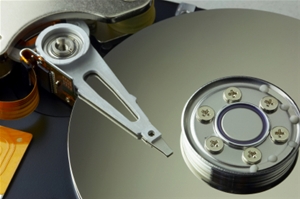
My dad's computer was running slowly, and I was starting to suspect he was running out of hard drive space. He had actually complete run out on his little 10 gig C: drive, and his system was thrashing. It was also 88% fragmented. I hadn't setup a scheduled defrag job - something that Windows XP kind of should have done for me, but I digress. As is the tradition, he dropped the computer off last week and I said, "come by next week to pick it up."
I installed a 20 gig D: drive and moved all his My Documents and what-not on to that drive. He runs Thunderbird (no reason for an Outlook license on his machine) and Thunderbird stores all it's mail in some profile directories deep in Documents and Settings\Application Data blah blah. I made a backup copy of that folder on my Home Server, moved it from his C: to a folder with the new D:\Dave's Documents and told Thunderbird it was over there. No problem, right?
Run Thunderbird and get..."Welcome to Thunderbird!" Ok. Copy the backup back into the C: drive. Run Thunderbird and get..."Welcome to Thunderbird!" Oh, Crap. Rinse, repeat. Repeat until 3am. Open files in Notepad2. Open files in a Hex Editor. Stare in horror at zero byte files. Grep. Pipe. Panic.
I didn't have a good backup plan in place for my Dad's machine. My mom makes CD backups and her My Documents sync'ed to my machine via FolderShare (dangerous because of sync'ed deletes, in fact) but Dad was living footloose and fancy-free and it was my fault.
Having a Family Backup Strategy
Dad was bummed, to be clear, but the first thing he said (after being bummed) was "are the pictures OK?" This simple question hit me hard when I realized that our extended family didn't have a formal backup strategy. Mo and I do, but the Family didn't. I'd be sick if we lost pictures. (Mental note: Blog about the coming end of civilizations that store all knowledge on magnetic media...)
Here's our new strategy. It might seem silly and obvious, but what I learned from this incident is that it's only obvious to the computer guy. You have a plan, a place, I'm sure, on where to meet in case of a fire or emergency. Does your spouse know where The Data is if you don't make it home? Does your spouse have the passwords? Does your sister know what a backup is? I'm learning that drawing up a simple plan like this makes everyone's data life easier. As for my Dad's Thunderbird Email, he's backing it up to My Documents with MozBackup, and everything in My Documents gets backed up. Everything else is backed up into three places: The Home Server at my house, The Rev Drives offsite at the bank, and Mozy.com.
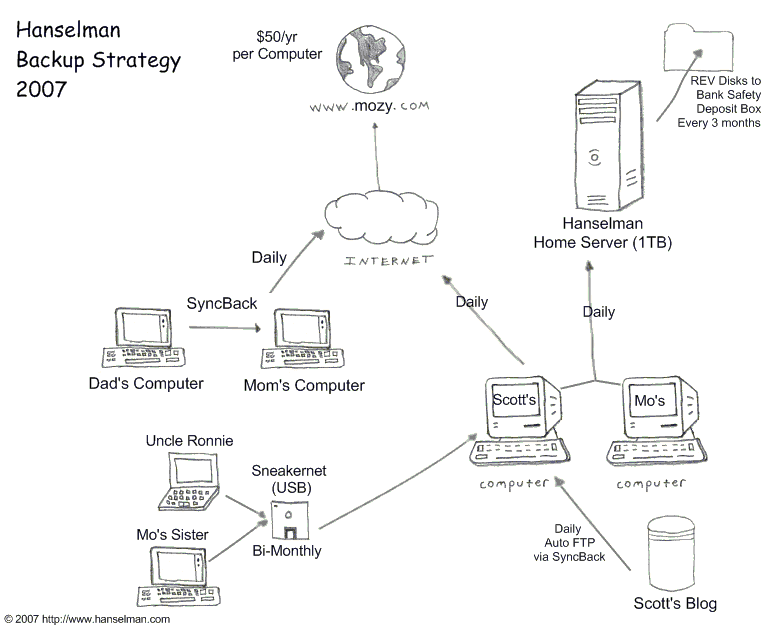
What's your backup strategy? Does it have family-wide visibility and understanding?
About Scott
Scott Hanselman is a former professor, former Chief Architect in finance, now speaker, consultant, father, diabetic, and Microsoft employee. He is a failed stand-up comic, a cornrower, and a book author.


About Newsletter

 Links from the Show