Scott Hanselman

What's better than ILDasm? ILSpy and dnSpy are tools to Decompile .NET Code

May 30, 2019 Comment on this post [19] Posted in Open Source | Tools
Sponsored By

.NET code (C#, VB, F#, etc) compiles (for the most part) into Intermediate Language (IL) and then makes it way to native code usually by Just-in-time (JIT) compilation on the target machine. When you get a DLL/Assembly, it's pre-chewed but not full juiced, to mix my metaphors.

Often you'll come along a DLL that you want to learn more about. Sometimes you'll want to just see the structure of classes, methods, etc, and other times you want to see the IL - or a close representation of the original C#/VB/F#, etc. You're not looking at the source, you're seeing a backwards projection of the IL as whatever language you want. You're basically taking this pre-chewed food and taking it out of your mouth and getting a decent idea of what it was originally.

I've used ILDasm for years, but it's old and lame and people tease you for using it because they are cruel. ;)

Seriously, though, I use ILDasm - the IL Disassembler - simply because it's already installed. Those tweets got me thinking though that I need to update my options, so I'm trying out ILSpy and dnSpy.

ILSpy

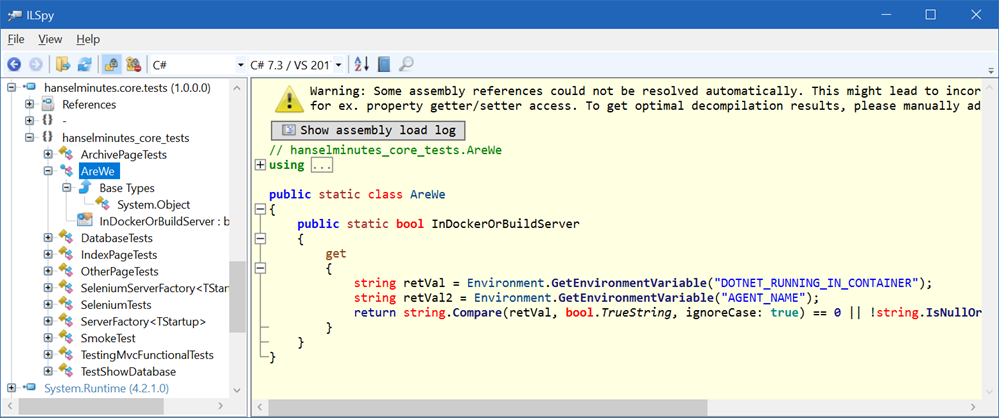
ILSpy has been around for a while and has multiple front-ends, including ones for Linux/Mac/Windows based on Avalonia in the form of AvaloniaSpy. You can also integrate ILSpy into Visual Studio 2017 or 2019 with this extension. There is also a console decompiler and, interestingly, cross-platform PowerShell cmdlets.

ILSpy is a solid .NET decompiler

I've always liked the "Open List" feature of ILSpy where you can open a preconfigured list of assemblies you want to browse, like ASP.NET MVC, .NET 4, etc. A fun open source contribution for you might be to update the included lists with newer defaults. There's so many folks doing great work in open source out there, why not jump in and help them out?

dnSpy

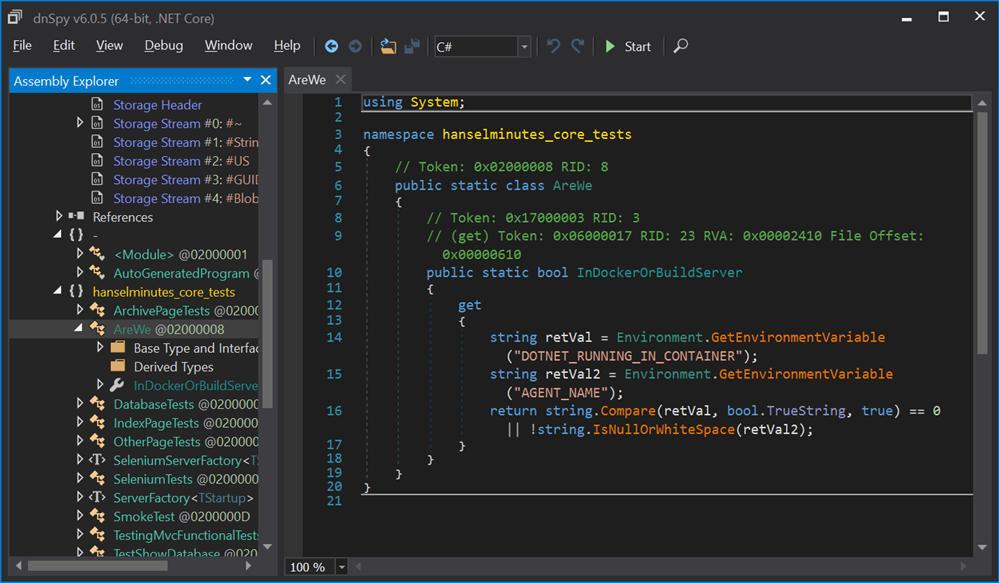
dnSpy has a lovely UI AND a great Console app using the same engine. It's amazingly polished and VERY complete. I was surprised that it also has a full hex editor as well as property pages for common EXE file headers. From their GitHub, dnSpy features

  • Debug .NET Framework, .NET Core and Unity game assemblies, no source code required
  • Edit assemblies in C# or Visual Basic or IL, and edit all metadata
  • Light and dark themes
  • Extensible, write your own extension
  • High DPI support (per-monitor DPI aware)

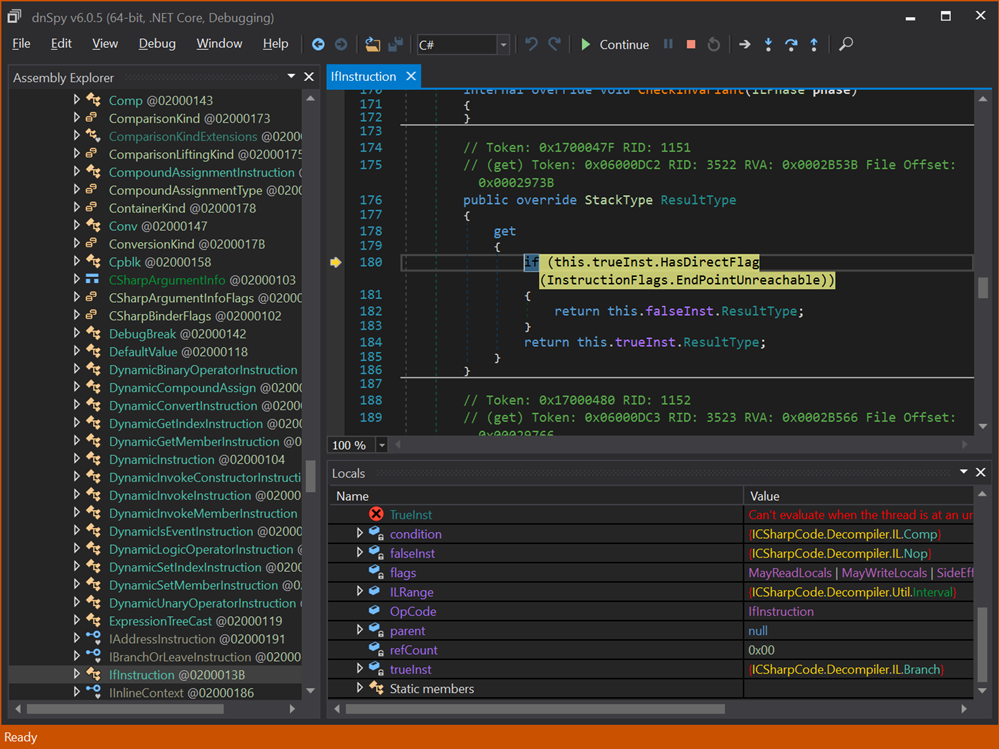
dnSpy takes it to the next level with an integrated Debugger, meaning you can attach to a running process and debug it without source code - but it feels like source code because it's decompiling for you. Note where it says C#, I can choose C#, VB, or IL as a "view" on my decompiled code.

dnSpy is amazing for looking inside .NET apps

Here is dnSpy actually debugging ILSpy and stopped at a decompiled breakpoint.

image

There's a lot of great low-level stuff in this space. Another cool tool is Reflexil, a .NET Assembly Editor as well as de4dot by the same mysterious author as dnSpy. JetBrains has the excellent dotPeek and Telerik has JustDecompile. Commercial Tools include Reflector.

What's your favorite?


Sponsor: Manage GitHub Pull Requests right from the IDE with the latest JetBrains Rider. An integrated performance profiler on Windows comes to the rescue as well.

About Scott

Scott Hanselman is a former professor, former Chief Architect in finance, now speaker, consultant, father, diabetic, and Microsoft employee. He is a failed stand-up comic, a cornrower, and a book author.

facebook bluesky subscribe
About   Newsletter
Hosting By
Hosted on Linux using .NET in an Azure App Service

Bringing the SpaceOrb game controller forward with an Arduino Bridge via The Orbotron 9001

May 28, 2019 Comment on this post [1] Posted in Gaming
Sponsored By

Thingotron brings your SpaceOrb back to lifeAlmost ten years ago I posted abut the SpaceTec SpaceOrb 360 Controller and that was 15 years after it came out. We are now 25 years into the legend of the SpaceOrb and I will continue to tell the tale. The SpaceOrb is one of a series of innovative "Spacemice" that offer more than just two degress of input freedom. In fact, they offer SIX.

"The puck or ball of a spacemouse can be moved along X, Y and Z axis as well as being twisted rotationally on each of those axis. (Roll, Pitch and Yaw)"

Vic Putz continues to carry a torch for the SpaceOrb, as do I, except he's actually doing something about it. A decade ago I bought an Arduino and an "OrbSheild" from Vic that sat on top and provided a realtime bridge between the RS-232 Serial Port and the modern USB "HID" (Hardware Input Devices) that are used today. The goal is to move behind unsigned device drivers and create a system-agnostic solution that would present an old device in a new driver-free way.

Vic has been working on a new version called the Orbotron 9000/9001 for the last few years and it's currently sold out at his little store. It acts as an interface for the SpaceOrb 360 and comes configured for that device, but should also work with the SpaceBall 5000, SpaceBall 4000FLX, and Magellan SpaceMouse. Code and plans on are GitHub, natch.

SpaceOrb

When you plug the SpaceOrb into the Orbotron 9001 then into your PC it shows up as a Game Controller!

The SpaceOrb as it presents inside Windows as a controller

There's several innovative "six degrees of freedom" games out there , like the "Overload" sequel to Decent on Steam, as well as Retrovirus, and NeonXSZ, as well as open source reimplementations of Descent like DXX Rebirth (give them some love!) and Forsaken.

Modern Xinput games are trickier, but you may have success with https://www.x360ce.com by mapping the orb buttons and axes to a gamepad.

Descent - DXX Re-birth

I'm still exploring this space, but I love that The Internet - with the help of the enterprising and patient - refused to let the good parts of history die, by making innovative and clean bridges between the past and the future.


Sponsor: Manage GitHub Pull Requests right from the IDE with the latest JetBrains Rider. An integrated performance profiler on Windows comes to the rescue as well.

About Scott

Scott Hanselman is a former professor, former Chief Architect in finance, now speaker, consultant, father, diabetic, and Microsoft employee. He is a failed stand-up comic, a cornrower, and a book author.

facebook bluesky subscribe
About   Newsletter
Hosting By
Hosted on Linux using .NET in an Azure App Service

Piper Command Center BETA - Build a game controller from scratch with Arduino

May 23, 2019 Comment on this post [0] Posted in Reviews
Sponsored By

Piper Command CenterBack in 2018 I posted my annual Christmas List of STEM Toys and the Piper Computer Kit 2 was on the list. My kids love this little wooden "laptop" comprised of a Raspberry Pi and an LCD screen. You spend time going through curated episodes of custom content and build and wire the computer LIVE while it's on!

The Piper folks saw my post and asked me to take a look at the BETA of their Piper Command Center, so my sons and I jumped at the chance. They are actively looking for feedback. It's a chance to build our own game controller!

The Piper Command Center BETA already has a ton of online content and things to try. Their "firmware" is an Arduino sketch and it's all up on GitHub. You'll want to get the Arduino IDE from the Windows Store.

Today the Command Center can look like a Keyboard or a Mouse.

  1. In Mouse Mode (default), the joystick controls cursor movement and the left and right buttons mimic left and right mouse clicks.
  2. In Keyboard Mode, the joystick mimics the arrow keys on a keyboard, and the buttons mimic Space Bar (Up), Z (Left), X (Down), and C (Right) keys on a keyboard.

Once it's built you can use the controller to play games in your browser, or soon, with new content on the Piper itself, which runs Minecraft usually. However, you DO NOT need the Piper to get the Piper Command Center. They are separate but complementary devices.

Assemble a real working game controller, understand the basics of an Arduino, and discover physical computing by configuring a joystick, buttons, and more. Ideal for ages 13+.

My son is looking at how he can modify the "firmware" on the Command Center to allow him to play emulators in the browser.

The parts ot the Piper Command Center Parts and Wires for the Piper Command Center

The Piper Command Center comes unassembled, of course, and you get to put it together with a cool blueprint instruction sheet. We had some fun with the wiring and a were off by one a few times, but they've got a troubleshooting video that helped us through it.

Blueprints for the Piper Command Center

It's a nice little bit of kit and I love that it's made of wood. I'd like to see one with a second joystick that could literally emulate an XInput control pad, although that might be more complex than just emulating a mouse or keyboard.

Go check it out. We're happy with it and we're looking forward to whatever direction it goes. The original Piper has updated itself many times in a few years we've had it, and we upgraded it to a 16gig SD Card to support the latest content and OS update.

Piper Command Center is in BETA and will be updated and actively developed as they explore this space and what they can do with the device. As of the time of this writing there were five sketches for this controller.


Sponsor: Manage GitHub Pull Requests right from the IDE with the latest JetBrains Rider. An integrated performance profiler on Windows comes to the rescue as well.

About Scott

Scott Hanselman is a former professor, former Chief Architect in finance, now speaker, consultant, father, diabetic, and Microsoft employee. He is a failed stand-up comic, a cornrower, and a book author.

facebook bluesky subscribe
About   Newsletter
Hosting By
Hosted on Linux using .NET in an Azure App Service

Visual Studio Code Remote Development may change everything

May 21, 2019 Comment on this post [18] Posted in Docker | Open Source
Sponsored By

DevContainer using RustOK, that's a little clickbaity but it's surely impressed the heck out of me. You can read more about VS Code Remote Development (at the time of this writing, available in the VS Code Insiders builds) but here's a little on my first experience with it.

The Remote Development extensions require Visual Studio Code Insiders.

Visual Studio Code Remote Development allows you to use a container, remote machine, or the Windows Subsystem for Linux (WSL) as a full-featured development environment. It effectively splits VS Code in half and runs the client part on your machine and the "VS Code Server" basically anywhere else. The Remote Development extension pack includes three extensions. See the following articles to get started with each of them:

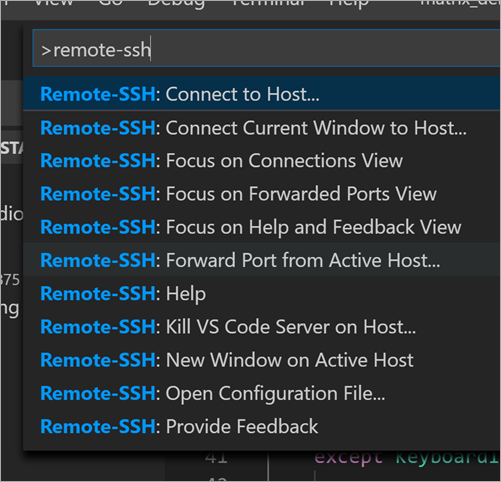
  • Remote - SSH - Connect to any location by opening folders on a remote machine/VM using SSH.
  • Remote - Containers - Work with a sandboxed toolchain or container-based application inside (or mounted into) a container.
  • Remote - WSL - Get a Linux-powered development experience in the Windows Subsystem for Linux.

Lemme give a concrete example. Let's say I want to do some work in any of these languages, except I don't have ANY of these languages/SDKS/tools on my machine.

Aside: You might, at this point, have already decided that I'm overreacting and this post is nonsense. Here's the thing though when it comes to remote development. Hang in there.

On the Windows side, lots of folks creating Windows VMs in someone's cloud and then they RDP (Remote Desktop) into that machine and push pixels around, letting the VM do all the work while you remote the screen. On the Linux side, lots of folks create Linux VMs or containers and then SSH into them with their favorite terminal, run vim and tmux or whatever, and then they push text around, letting the VM do all the work while you remote the screen. In both these scenarios you're not really client/server, you're terminal/server or thin client/server. VS Code is a thick client with clean, clear interfaces to language services that have location transparency.

I type some code, maybe an object instance, then intellisense is invoked with a press of "." - who does that work? Where does that list come from? If you're running code locally AND in the container, then you need to make sure both sides are in sync, same SDKs, etc. It's challenging.

OK, I don't have the Rust language or toolkit on my machine.

I'll clone this repository:

git clone https://github.com/Microsoft/vscode-remote-try-rust

Then I'll run Code, the Insiders version:

C:\github> git clone https://github.com/Microsoft/vscode-remote-try-rust   
Cloning into 'vscode-remote-try-rust'...
Unpacking objects: 100% (38/38), done.
C:\github> cd .\vscode-remote-try-rust\
C:\github\vscode-remote-try-rust [main =]> code-insiders .

Then VS Code says, hey, this is a Dev Container, want me to open it?

There's a devcontainer.json file that has a list of extensions that the project needs. And it will install those VS Extensions inside a Development Docker Container and then access them remotely. This isn't a list of extensions that your LOCAL system needs - you don't want to sully your system with 100 extensions. You want to have just those extensions that you need for the project you're working on. Compartmentalization. You could do development and never install anything on your local machine, but you're finding a sweet spot that doesn't involved pushing text or pixels around.

Reopen in Container

Now look at this screenshot and absorb. It's setting up a dockerfile, sure, with the development tools you want to use and then it runs docker exec and brings in the VS Code Server!

Setting up Rust

Check out the Extensions section of VS Code, and check out the lower left corner. That green status bar shows that we're in a client/server situation. The extensions specific to Rust are installed in the Dev Container and we are using them from VS Code.

Extensions

When I'm typing and working on my code in this way (by the way it took just minutes to get started) I've got a full experience with Intellisense, Debugging, etc.

Intellisense from a container running Rust and VS Code Remote Containers

Here I am doing a live debug session of a Rust app with zero setup other than VS Code Insiders, the Remote Extensions, and Docker (which I already had).

Debugging in VS Code a Rust app within a DevContainer

As I mentioned, you can run within WSL, Containers, or over SSH. It's early days but it's extraordinarily clean. I'm really looking forward to seeing how far and effortless this style of development can go. There's so much less yak shaving! It effectively removes the whole setup part of your coding experience and you get right to it.


Sponsor: Manage GitHub Pull Requests right from the IDE with the latest JetBrains Rider. An integrated performance profiler on Windows comes to the rescue as well.

About Scott

Scott Hanselman is a former professor, former Chief Architect in finance, now speaker, consultant, father, diabetic, and Microsoft employee. He is a failed stand-up comic, a cornrower, and a book author.

facebook bluesky subscribe
About   Newsletter
Hosting By
Hosted on Linux using .NET in an Azure App Service

Using the Steam Link app to stream PC Games directly to your iPhone or mobile device

May 16, 2019 Comment on this post [2] Posted in Gaming
Sponsored By

Steam Link on iOSI think that we, as an industry, are still figuring game streaming out. It's challenging to find that sweet spot between quality and frames per second, all while respecting the speed of light and the laws of physics.

That said, if you have a a rock solid 5Ghz wireless network, or better yet, a solid wired network, you can do some pretty cool stuff today.

You can use the Xbox app on Windows 10 to stream from your Xbox One to your PC. I use this to play on my Xbox while I walk on my treadmill in my garage. Works great even on my comparatively underpowered Surface Pro 3.

You can also do the opposite if you have a powerful PC. You can run the Xbox Wireless Display app and remote your PC to your Xbox.

I also have a Steam Link - it's odd to me that they discontinued this great little device - that I use to stream from my PC to my big TV. However, if you have a Raspberry Pi 3 or 3B+ running Stretch, you can try a beta of Steam Link and effectively make your own little Steam Link dedicated device. Bonus points if you 3D Print a replica case to make it look like a Steam Link.

sudo apt update
sudo apt install steamlink
steamlink

Today, however, Steam Link was released (after a rejection) to the Apple iOS App store so I had to try this out from my iPhone XS Max. I also have a Steam Controller, which, while weird (i.e. it's not an Xbox Controller) is the most configurable controller ever and it can emulate a mouse pretty well when needed. They released a new Firmware for the Steam Controller that enabled BLE support which allows it to be used as an MFi controller on an iOS device. You do need to memorize or write down the incantations to switch between original RF mode and BLE mode, though.

Aside: MFi is almost criminally neglected and a Apple has utterly dropped the ball and missed an opportunity to REALLY make iOS devices more than casual gaming devices. Only in the last few years have decent MFi Controllers been released and game support is still embarrassingly spotty. I've used my now-discontinued SteelSeries Stratus a handful of times.

You install the app, pair your controller with your iOS device/phone/tablet, then test your network. I'm using an Amplifi Mesh Network so I can control how my devices connect to the network, I can manage band selection, as well as Quality of Service (QoS) so I didn't have any trouble getting 55 Mb/s from my wired computer to my wireless iPhone.

Steaming bandwidth test successful up to 55 Mb/s

Steaming bandwidth test successful up to 55 Mb/s

The quality is up and down as it appears they are focused on maintaining a high framerate. Here's a captured local video of me playing Batman from my high end rig streaming to Steam Link on my iPhone.

What has been YOUR experience with Game Streaming?


Sponsor: Suffering from a lack of clarity around software bugs? Give your customers the experience they deserve and expect with error monitoring from Raygun.com. Installs in minutes, try it today!

About Scott

Scott Hanselman is a former professor, former Chief Architect in finance, now speaker, consultant, father, diabetic, and Microsoft employee. He is a failed stand-up comic, a cornrower, and a book author.

facebook bluesky subscribe
About   Newsletter
Hosting By
Hosted on Linux using .NET in an Azure App Service

Disclaimer: The opinions expressed herein are my own personal opinions and do not represent my employer's view in any way.