Scott Hanselman

Introducing the Try .NET Global Tool - interactive in-browser documentation and workshop creator

May 14, 2019 Comment on this post [10] Posted in DotNetCore | Open Source
Sponsored By

Learn .NET or easily author your own workshopIf you find yourself learning C# and .NET and come upon the "Run your first C# Program" documentation you may have noticed a "Try the code in your browser" button that lets you work through your first app entirely online, with no local installation! You're running C# and .NET in the browser! It's a great way to learn that is familiar to folks who learn JavaScript.

The language team at Microsoft wants to bring that easy on-ramp to everyone who wants to learn .NET.

The .NET Foundation has published a lot of free .NET presentations and workshops that you can use today to teach open source .NET to your friends, colleagues, or students. However these do encourage you to install a number of prerequisites and we believe that there might be an easier on-ramp to learning .NET.

Today we're announcing that on ramp - the Try .NET global tool!

Here's the experience. Once you have the .NET SDK - Pick the one that says you want to "Build Apps." Just get the "try" tool! Try it!

  • Open a terminal/command prompt and type dotnet tool install --global dotnet-try

Now you can either navigate to an empty folder and type

dotnet try demo

or, even better, do this!

ACTION: Clone the samples repo with
git clone https://github.com/dotnet/try -b samples
then run
"dotnet try"
and that's it!

NOTE: Make sure you get the samples branch until we have more samples!

C:\Users\scott\Desktop> git clone https://github.com/dotnet/try -b samples
Cloning into 'try'...
C:\Users\scott\Desktop> cd .\try\Samples\
C:\Users\scott\Desktop\try\Samples [samples ≡]> dotnet try
Hosting environment: Production
Content root path: C:\Users\scott\Desktop\try\Samples
Now listening on: http://localhost:5000
Now listening on: https://localhost:5001

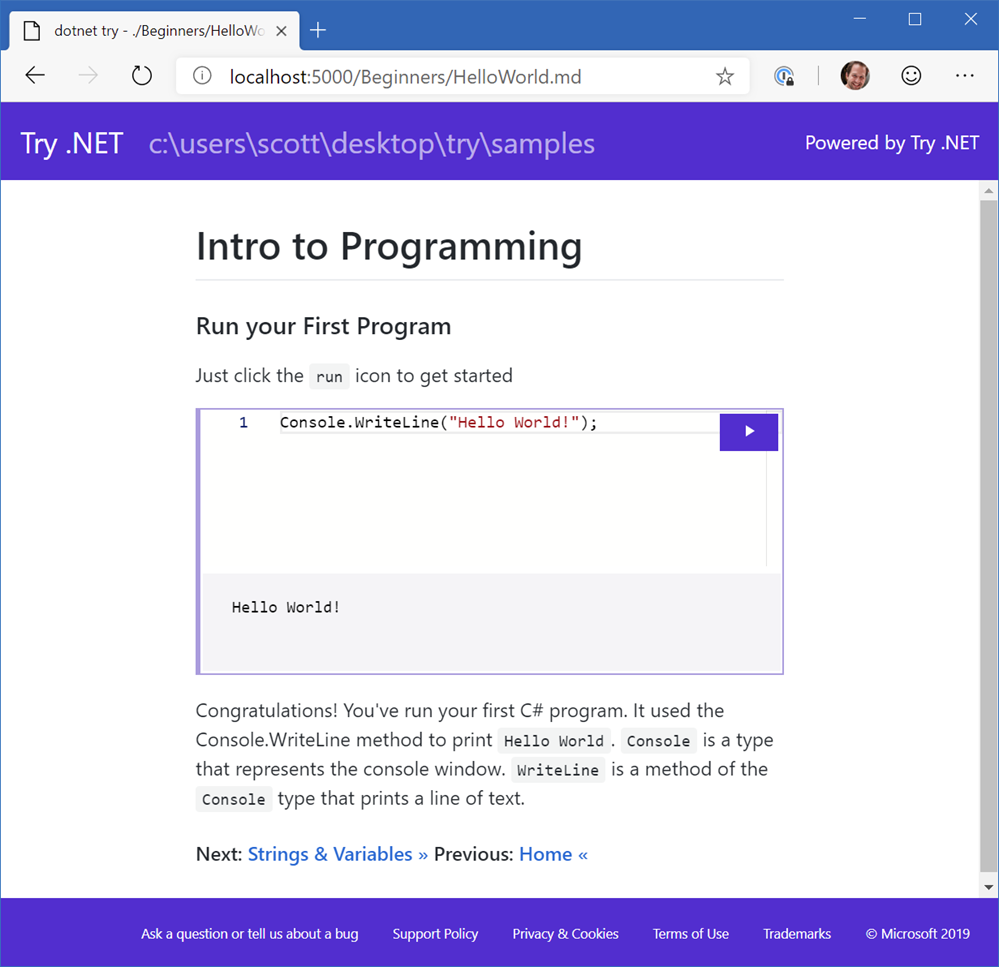
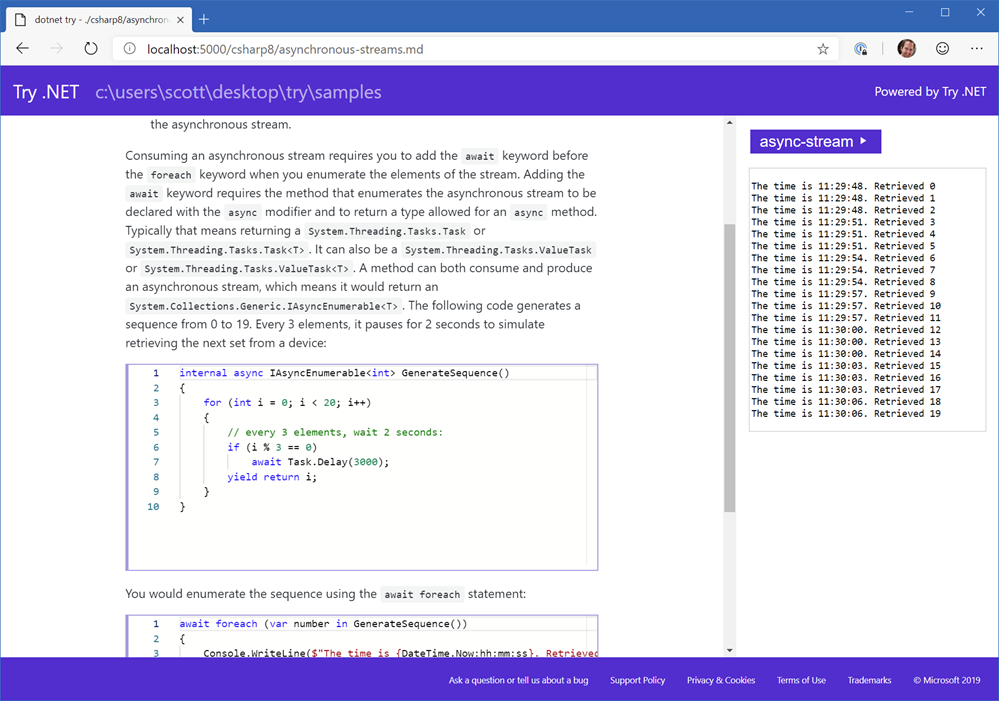
Your browser will pop up and you're inside a local interactive workshop! Notice the URL? You're browsing your *.md files and the code inside is runnable. It's all local to you! You can put this on a USB key and learn offline or in disconnected scenarios which is great for folks in developing countries. Take workshops home and remix! Run an entire workshop in the browser and the setup instructions for the room is basically "get this repository" and type "dotnet try!"

Try .NET interactive local documentation

This is not just a gentle on-ramp that teaches .NET without yet installing Visual Studio, but it also is a toolkit for you to light up your own Markdown.

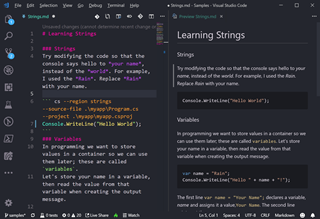
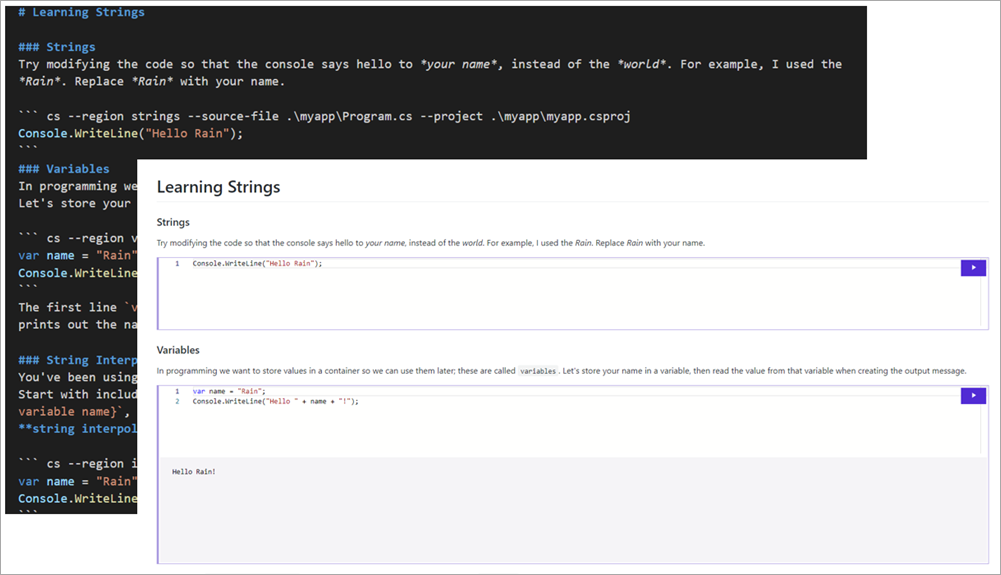
Just add a code fence - you may already be doing this! Note the named --region there? It's not actually running the visible code in the Markdown...it's not enough! It's compiling your app and capturing the result of the named region in your source! You could even make an entire .NET interactive online book.

### Methods
A **method** is a block of code that implements some action. `ToUpper()` is a method you can invoke on a string, like the *name* variable. It will return the same string, converted to uppercase.
``` cs --region methods --source-file .\myapp\Program.cs --project .\myapp\myapp.csproj
var name = "Friends";
Console.WriteLine($"Hello {name.ToUpper()}!");
```

And my app's code might look like:

using System;

namespace HelloWorld
{
class Program
{
static void Main(string[] args)
{
#region methods
var name = "Friends"
Console.WriteLine($"Hello {name.ToUpper()}!");
#endregion
}
}
}

Make sense?

NOTE: Closing code fences ``` must be on a newline.

Hey you! YOU have some markdown or just a readme.md in your project! Can you light it up and make a workshop for folks to TRY your project?

Code Fences within Markdown

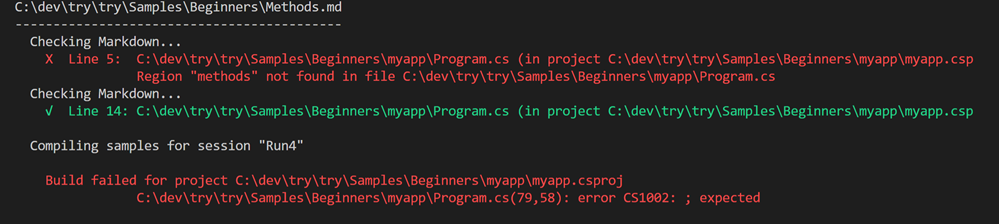
Here I've typed "dotnet try verify" to validate my markdown and ensure my samples compile. Dotnet Try is both a runner and a creator's toolkit.

Compiling your workshop

Today "dotnet try" uses .NET Core 2.1 but if you have .NET Core 3 installed you can explore the more complex C# samples here with even more interesting and sophisticated presentations. You'll note in the markdown the --session argument for the code fence allows for interesting scenarios where more than one editor runs in the context of one operation!

image

I'd love to see YOU create workshops with Try .NET. It's early days and this is an Alpha release but we think it's got a lot of promise. Try installing it and running it now and later head over to https://github.com/dotnet/try to file issues if you find something or have an idea.

Go install "dotnet try" locally now, and remember this is actively being developed so you can update it easily and often like this!

dotnet tool update -g dotnet-try

There's lots of ideas planned, as well as the ability to publish your local workshop as an online one with Blazor and WASM. Here's a live example.

Watch for an much more in-depth post from Maria from my team on Thursday on the .NET blog!


Sponsor: Suffering from a lack of clarity around software bugs? Give your customers the experience they deserve and expect with error monitoring from Raygun.com. Installs in minutes, try it today!

About Scott

Scott Hanselman is a former professor, former Chief Architect in finance, now speaker, consultant, father, diabetic, and Microsoft employee. He is a failed stand-up comic, a cornrower, and a book author.

facebook bluesky subscribe
About   Newsletter
Hosting By
Hosted on Linux using .NET in an Azure App Service

Systems Thinking as important as ever for new coders

May 09, 2019 Comment on this post [28] Posted in Musings
Sponsored By

Two programmers having a chatI was at the Microsoft BUILD conference last week and spent some time with a young university student who came prepared. I was walking between talks and he had a sheet of paper organized with questions. We sat down and went through the sheet.

One of his main questions that followed a larger theme was, since his class in South Africa was learning .NET Framework on Windows, should he be worried? Shouldn't they be learning the latest .NET Core and the latest C#? Would they be able to get jobs later if they aren't on the cutting edge? He was a little concerned.

I thought for a minute. This isn't a question one should just start talking about and see when their mouth takes them. I needed to absorb and breathe before answering. I'm still learning myself and I often need a refresher to confirm my understanding of systems.

It doesn't matter if you're a 21 year old university student learning C# from a book dated 2012, or a 45 year old senior engineer doing WinForms at a small company in the midwest. You want to make sure you are valuable, that your skills are appreciated, and that you'll be able to provide value at any company.

I told this young person to try not to focus on the syntax of C# and the details of the .NET Framework, and rather to think about the problems that it solves and the system around it.

This advice was .NET specific, but it can also apply to someone learning Rails 3 talking to someone who knows Rails 5, or someone who learned original Node and is now reentering the industry with modern JavaScript and Node 12.

Do you understand how your system talks to the file system? To the network? Do you understand latency and how it can affect your system? Do you have a general understanding of "the stack" from when your backend gets data from the database makes anglebrackets or curly braces, sends them over the network to a client/browser, and what that next system does with the info?

Squeezing an analogy, I'm not asking you to be able to build a car from scratch, or even rebuild an engine. But I am asking you for a passing familiarity with internal combustion engines, how to change a tire, or generally how to change your oil. Or at least know that these things exist so you can google them.

If you type Google.com into a browser, generally what happens? If your toaster breaks, do you buy a new toaster or do you check the power at the outlet, then the fuse, then call the neighbor to see if the power is out for your neighborhood? Think about systems and how they interoperate. Systems Thinking is more important than coding.

If your programming language or system is a magical black box to you, then I ask that you demystify it. Dig inside to understand it. Crack it open. Look in folders and directories you haven't before. Break things. Fix them.

Know what artifacts your system makes and what's needed for it to run. Know what kinds of things its good at and what it's bad at - in a non-zealous and non-egotistical way.

You don't need to know it all. In fact, you may dig in, look around inside the hood of a car and decide to take a ride-sharing or public transport the rest of your life, but you will at least know what's under the hood!

For the young person I spoke to, yes .NET Core may be a little different from .NET Framework, and they might both be different from Ruby or JavaScript, but strings are strings, loops are loops, memory is memory, disk I/O is what it is, and we all share the same networks. Processes and threads, ports, TCP/IP, and DNS - understanding the basic building blocks are important.

Drive a Honda or a Jeep, you'll still need to replace your tires and think about the road you're driving on, on the way to the grocery store.

What advice would you give to a young person who is not sure if what they are learning in school will serve them well in the next 10 years? Let us know in the comments.


Sponsor: Manage GitHub Pull Requests right from the IDE with the latest JetBrains Rider. An integrated performance profiler on Windows comes to the rescue as well.

About Scott

Scott Hanselman is a former professor, former Chief Architect in finance, now speaker, consultant, father, diabetic, and Microsoft employee. He is a failed stand-up comic, a cornrower, and a book author.

facebook bluesky subscribe
About   Newsletter
Hosting By
Hosted on Linux using .NET in an Azure App Service

An experiment - The Azure Cloud Shell at the command line with AZ SHELL

May 07, 2019 Comment on this post [3] Posted in Azure | Open Source
Sponsored By

I've blogged before about the Azure Cloud Shell. It's super cool and you can get your own easily in any browse by hitting https://shell.azure.com. You can have either bash or powershell, and you get a shared "cloud drive" that is persisted between sessions.

If you have Visual Studio Code you can get an Azure Cloud Shell integrated within VSCode by just installing Visual Studio Code and adding the Azure Account Extension.

I recently got a build of the new open source Windows Terminal on my machine and I set up some profiles with tabs for DOS, PowerShell, VS2019, Ubuntu but something was missing. Why can't I get my Azure Cloud Shell?

Sure, I can fire up a VM and ssh into it. But Azure Cloud Shell spins up a free container with a persistent cloud drive AND has a bunch of developer tools like python, node, dotnet, and go already installed. I'd love to use it! But it's not a VM and the container isn't exposed with SSH. Instead, we'll want to spin the Azure Cloud Shell up the same way the https://shell.azure.com site does, with web calls and web sockets. So...why not do it?

image

I thought I was pretty clever when I had this idea so I started a C# implementation myself. Then I talked to Anders Liu from work about how to do it right, and over the weekend he beat me to it with his own VERY nice and clean implementation in Go that he put on his github at https://github.com/yangl900/azshell. We shared this on an internal alias and found out that Noel Bundick had the same great idea and put it in his Az CLI extensions pack (which has a ton of other cool stuff you should see). Anders' is standalone and Noel's is an Az CLI extension.

Either way, we all together think this idea has merit and maybe it should be an official thing! What do you think? Regardless maybe it doesn't need to be since you can try it today with these open source options.

Just put "azshell.exe" in your PATH and make sure you have the latest Azure CLI installed and you're logged in.

By the way, you can also get a Cloud Shell inside the Portal. In fact there's a button for it at the top that looks like >_ Personally I think with the addition of "az shell" (or in this case, azshell.exe) from the command line) it completes the circle in a really cool way.

image

Let me know what you think in the comments!


Sponsor: Manage GitHub Pull Requests right from the IDE with the latest JetBrains Rider. An integrated performance profiler on Windows comes to the rescue as well.

About Scott

Scott Hanselman is a former professor, former Chief Architect in finance, now speaker, consultant, father, diabetic, and Microsoft employee. He is a failed stand-up comic, a cornrower, and a book author.

facebook bluesky subscribe
About   Newsletter
Hosting By
Hosted on Linux using .NET in an Azure App Service

A new Console for Windows - It's the open source Windows Terminal

May 02, 2019 Comment on this post [18] Posted in Open Source | Win10
Sponsored By

"My fellow Windows users, our long national nightmare is over." The Windows Terminal is here, it's open source, it's real, and it's spectacular. It's very early days to be clear, but the new Windows Terminal is open source and it's up at https://github.com/microsoft/Terminal for you to check out.

The repository includes

  • Windows Terminal
  • The Windows console host (conhost.exe) - a local copy that is separate from the built-in Windows one. 
  • Components shared between the two projects
  • ColorTool
  • Sample projects that show how to consume the Windows Console API

And even better, it'll be, as they say:

Windows Terminal will be delivered via the Microsoft Store in Windows 10 and will be updated regularly, ensuring you are always up to date and able to enjoy the newest features and latest improvements with minimum effort.

How do you get it? TODAY you clone the repo and build your own copy. There will be early builds in the Store this summer and 1.0 should be out before the end of the year.

As of today, the Windows Terminal and Windows Console have been made open source and you can clone, build, run, and test the code from the repository on GitHub: https://github.com/Microsoft/Terminal

This summer in 2019, Windows Terminal previews will be released to the Microsoft Store for early adopters to use and provide feedback.

This winter in 2019, our goal is to launch Windows Terminal 1.0 and we’ll work with the community to ensure it’s ready before we release!

So today, yes, it'll take some effort if you want to play with it today. But good things are worth a little effort. Here's some of the things I've done to mine. I hope you make your Windows Terminal your own as well!

Windows Terminal

When you click the menu, check out Settings, which will open your profile.json in your JSON editor. I use VS Code to edit. You'll need to run Format Document to make the JSON look nice as today it may show up on one line.

You can create color profiles in the "schemes" node. For example, here's my "UbuntuLegit" color theme in my profiles.json.

{
"name": "UbuntuLegit",
"foreground": "#EEEEEE",
"background": "#2C001E",
"colors": [
"#4E9A06", "#CC0000", "#300A24", "#C4A000",
"#3465A4", "#75507B", "#06989A", "#D3D7CF",
"#555753", "#EF2929", "#8AE234", "#FCE94F",
"#729FCF", "#AD7FA8", "#34E2E2", "#EEEEEE"
]
}

Here's an example profile with all the settings I know about set. This is for "CMD.exe"

"profiles": [
{
"startingDirectory": "C:/Users/Scott/Desktop",
"guid": "{7d04ce37-c00f-43ac-ba47-992cb1393215}",
"name": "DOS but not DOS",
"colorscheme": "Solarized Dark",
"historySize": 9001,
"snapOnInput": true,
"cursorColor": "#00FF00",
"cursorHeight": 25,
"cursorShape": "vintage",
"commandline": "cmd.exe",
"fontFace": "Cascadia Code",
"fontSize": 20,
"acrylicOpacity": 0.85,
"useAcrylic": true,
"closeOnExit": false,
"padding": "0, 0, 0, 0",
"icon": "ms-appdata:///roaming/cmd-32.png"
},

I like the "vintage" cursor and I make it bright green. I can also add icons in this location:

%LOCALAPPDATA%\packages\Microsoft.WindowsTerminal_8wekyb3d8bbwe\RoamingState

So I put some 32x32 PNGs in that folder and then I can reference them as seen above with ms-appdata://

Cool Icons

I'll go into more detail about what's happening in each of these profiles/tabs in the next post! I've got a few creative ideas for taking MY Windows Terminal to the next level.

"defaultProfile": "{7d04ce37-c00f-43ac-ba47-992cb1393215}",
"initialRows": 30,
"initialCols": 120,
"alwaysShowTabs": true,
"showTerminalTitleInTitlebar": true,
"experimental_showTabsInTitlebar": true,
"requestedTheme": "dark",

Here I've set the theme to dark using "requestedTheme" even though I run Windows in a light theme. I'm setting the tabs to be shown all the time and moved the tabs into the TitleBar.

Here's my Ubuntu tab with the UbuntuLegit color theme above:

Nice Ubuntu Colors

Notice I'm also using Powerline in my prompt. I'm using Fira Code which has the glyphs I need but you can certainly use patched Powerline fonts or make your own fonts with tools like those from Nerd Fonts and it's font patcher. This font patcher is often used to take your favorite monospace font and add Powerline glyphs to it.

NOTE: If you see any weird spacing issues with glyphs you might try using --use-single-width-glyphs to work around it. By release all these little issues I assume will be worked out. I had no issues with Fira Code in my case, your mileage may vary.

This new Windows Terminal is great. As mentioned, it's super early days but it's amazingly fast, runs on your GPU (the current conhost runs on your CPU) and it's VERY configurable.


Sponsor: Manage GitHub Pull Requests right from the IDE with the latest JetBrains Rider. An integrated performance profiler on Windows comes to the rescue as well.

About Scott

Scott Hanselman is a former professor, former Chief Architect in finance, now speaker, consultant, father, diabetic, and Microsoft employee. He is a failed stand-up comic, a cornrower, and a book author.

facebook bluesky subscribe
About   Newsletter
Hosting By
Hosted on Linux using .NET in an Azure App Service

Did I leave the garage door open? A no-code project with Azure IoT Central and the MXChip DevKit

April 30, 2019 Comment on this post [10] Posted in Azure | Hardware
Sponsored By

Azure IoT DevKitFor whatever reason when a programmer tries something out for the first time, they write a "Hello World!" application. In the IoT (Internet of Things) world of devices, it's always fun to make an LED blink as a good getting started sample project.

When I'm trying out an IoT platform or tiny microcontroller I have my own "Hello World" project - I try to build a simple system that tells me "Did I leave the garage door open?"

I wanted to see how hard it would be to use an Azure IoT MXChip DevKit to build this little system. The DevKit is small and thin but includes Wifi, OLED display, headphone, microphone, sensors like temperature, humidity, motion, pressure sensors. The kit isn't super expensive given all it does and you can buy it most anywhere. The DevKit is also super easy to update and it's actively developed. In fact, I just updated mine to Firmware 1.6.2 yesterday and there is an Azure IoT Device Workbench Extension for VS Code. There is also a fantastic IoT DevKit Project Catalog you should check out.

I wanted to use this little Arduino friendly device and have it talk to Azure. My goal was to see how quickly and simply I could make a solution that would:

  • Detect if my garage door is open
  • If it's open for more than 4 minutes, text me
  • Later, perhaps I'll figure out how to reply to the Text or take an action to close the door remotely.

However, there is an Azure IoT Hub and there's Azure IoT Central and this was initially confusing to me. It seems that Azure IoT Hub is a individual Azure service but it's not an end-to-end IoT solution - it's a tool in the toolbox. Azure IoT Central, on the other hand, is an browser-based system with templates that is a SaaS (Software as a Service) and hides most of the underlying systems. With IoT Central no coding is needed!

Slick. I was fully prepared to write Arduino code to get this garage door sensor working but if I can do it with no code, rock on. I may finish this before lunch is over. I have an Azure account so I went to https://azureiotcentral.com and created a new Application. I chose Pay as You Go but it's free for the first 5 devices so, swag.

Create a New Azure IoT Central App

You should totally check this out even if you don't have an IoT DevKit because you likely DO have a Raspberry Pi and it totally has device templates for Pis or even Windows 10 IoT Core Devices.

Azure IoT Central

Updating the firmware for the IoT DevKit couldn't be easier. You plug it into a free USB port, it shows up as a disk drive, and you drag in the new (or alternate) firmware. If you're doing something in production you'll likely want to do OTA (Over-the-air) firmware updates with Azure IoT Hub automatic device management, so it's good to know that's also an option. The default DevKit firmware is fun to explore but I am connecting this device to Azure (and my Wifi) so I used the firmware and instructions from here which is firmware specific to Azure IoT Central.

The device reboots as a temporary hotspot (very clever) and then you can connect to it's wifi, and then it'll connect to yours over WPA2. Once you're connected to Wifi, you can add a new Real (or Simulated - you can actually do everything I'm doing where without a real device!) device using a Device ID that you'll pair with your Mxchip IoT DevKit. After it's connect you'll see tons of telemetry pour into Azure. You can, of course, choose what you want to send and send just the least amount your projects needs, but it's still a very cool first experience to see temp, humidity, and on and on from this little device.

MxChip in Azure

Here's a wonderful HIGH QUALITY diagram of my Garage door planned system. You only wish your specifications were this sophisticated. ;)

Basically the idea is that when the door is closed I'll have the IoT DevKit taped to the door with a battery, then when it open it'll rotate 90 degrees and the Z axis of the Accelerometer will change! If it stays there for more than 5 minutes then it should text me!

image

In Azure IoT central I made a Device Template with a Telemetry Rule that listens to the changes in the accelerometer Z and when the average is less than 900 (I figured this number out by moving it around and testing) then it fires an Action.

The "Action" is using an Azure Monitor action group that can either SMS or even call me voice!

In this chart when the accelerometer is above the line the garage door is closed and when it drops below the line it's open!

The gyroscope Z changing with time

Here's the Azure Monitoring alert that texts me when I leave the garage door open too long.

Azure Activity Monitor

And here's my alert SMS!

mxchip

I was very impressed I didn't have to write any code to pull this off. I'm going to try this same "Hello World" later with custom code using a AdaFruit Huzzah Feather and an ADXL345 Accelerometer. I'll write Arduino C code and still have it talk to Azure for Alerts.

It's amazing how clean and simple the building blocks are for projects like this today.


Sponsor: Manage GitHub Pull Requests right from the IDE with the latest JetBrains Rider. An integrated performance profiler on Windows comes to the rescue as well.

About Scott

Scott Hanselman is a former professor, former Chief Architect in finance, now speaker, consultant, father, diabetic, and Microsoft employee. He is a failed stand-up comic, a cornrower, and a book author.

facebook bluesky subscribe
About   Newsletter
Hosting By
Hosted on Linux using .NET in an Azure App Service

Disclaimer: The opinions expressed herein are my own personal opinions and do not represent my employer's view in any way.