Scott Hanselman

Diary of a Vista RC1 Install - Upgrading My Main Machine to Windows Vista RC1

September 07, 2006 Comment on this post [17] Posted in Reviews
Sponsored By

VistadevicemanagerBEGIN - 10:50 PM 9/7/2006: Pray for me. I'm upgrading my main machine at home to Windows Vista Ultimate RC1 right now. We'll see if this list of tools is compatible with Vista...starting now.

COMPATIBILITY CHECK - 11:04 PM 9/7/2006: Hm...this doesn't bode well. I don't have a QuickCam installed, much less three. Not only that, but the Logitech QuickCam Express always supported in Windows XP with drivers that shipped with the OS; I wonder why that changed?

Looks like problems with SQL Server 2005 as well. I think I'll install SQL SP1 first. Weird about Nero, I already uninstalled that.

The following applications/drivers are not supported in Windows Vista
    The following devices will not work until the device driver software is updated. After the installation is complete, run Windows Update and check to see if there are any available updates for your devices. If this does not resolve your problem(s), contact the device manufacturer for updated driver software for these devices. :
    • Imaging devices: Logitech QuickCam Express
    • Imaging devices: Logitech QuickCam Express #3
    • Imaging devices: Logitech QuickCam Express #2
    Current versions of the following programs will not work with Windows Vista. After the installation is complete, get updated versions that are compatible with Windows Vista:
    • IntelliType Pro 5.x
    • Microsoft SQL Server 2005
    • Microsoft Powertoys for XP
    • ATI Control Panel
    • Nero 7 Premium
    • Sun Java Scheduler

EXPANDING FILES - 12:50 AM 9/8/2006: Oy. Still going. There's five steps here, Copying, Gathering, Expanding, Installing and Completing. I'm 21% into Expanding. Not sure what we were gathering or from where. The copying from DVD phase took about 15 minutes, but the "gathering" took forever. Now we're expanding. This is a 3GHz P4 on an Intel 925 MB with an SATA 7200 RPM Drive and 2 gigs of the fastest RAM the MB can take. Any one have any ideas why this is taking so long? Even as I type this I can hear the hard drive running like rain on a metal roof. Still 21% into Step 3. Time for bed methinks. This doesn't bode well for Mo's commodity Celeron with 512 MB of RAM. Hm...not at 22% yet...

PLEASE WAIT...PREPARING TO START... - 1:11 AM 9/8/2006: I nodded off there for a sec...I see a gray screen that says "Please wait a moment while Windows prepares to start for the first time." Not "while Windows starts for the first time," but "prepares to start." Hurry up and wait. Watching the dots........we are at 2 hours 21 minutes elapsed upgrade time thus far (counting the 6 minutes it took to apply SQL2k5SP1 after that warning above)....

BLACK SCREEN - 1:14 AM 9/8/2006: Rebooted automatically...I see a black screen...and a mouse cursor! Now, "completing upgrade"...oh, I thought we were starting. Psyche. Still upgrading...same image duplicated on both monitors, not sure if it's detected that I have two yet...cycling ellipses continue. Little trivia for you, did you know that ellipsis is Greek (e??e??e??) for omission? So far my upgrade is omitted.

MONITOR FLASHING - 1:18 AM 9/8/2006: My secondary monitor just flashed off and disappeared, it's black now and the mouse won't move off the edge of the primary. I think we've just reached the event horizon of this upgrade installation. Not sure if it's this event horizon or this Event Horizon. God help me if it's the latter.

COMPLETING UPGRADE - 1:21 AM 9/8/2006: Still "Completing Upgrade..."

--- The Next Day ---

CHECKING YOUR SYSTEM'S PERFORMANCE - 8:05 AM 9/8/2006: Ah! I awoke today to find a sea-green  screen asking me to press OK and confirm the time, time-zone and location. Not sure why it couldn't have gleaned all that information over th' intraweb, but que sera sera. I pressed OK, waiting for my Vista Desktop to appear in all its glory...and...Progress Bar! "Checking Your System's Performance..." Poop. I'm going to work.

PREPARING YOUR DESKTOP... - 8:15 PM 9/8/2006: The end is near! I see the fifth visual indicator to "hang on, we're really doing something, your computer ISN'T locked up!" This one is a spinning circle.

SUCCESS! - 8:27 PM 9/8/2006: I can see my stuff! Took a while, but pretty much all is well.

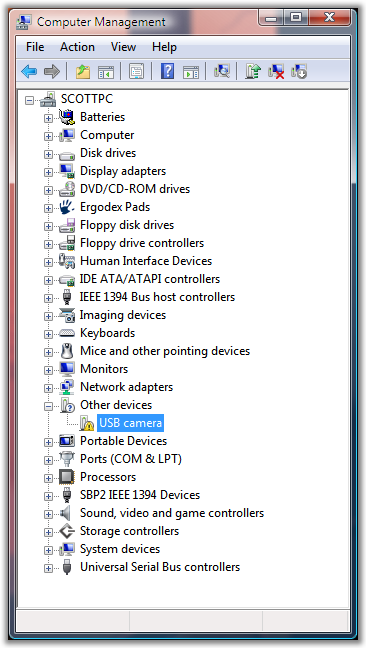
All the devices work save a generic random USB Camera with no Manufacturer. Not sure why the original driver didn't suffice..now it wants the disk that I don't have. I didn't like this camera anyway. Pretty good.

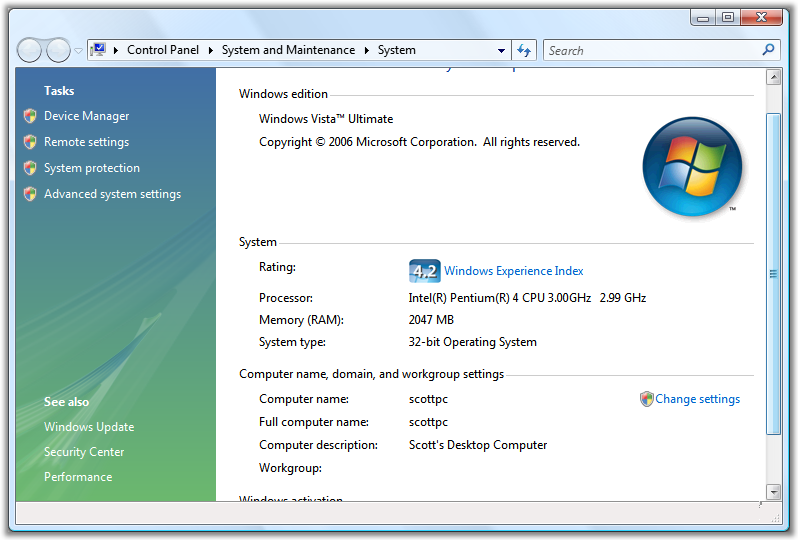
Now...what's this about be being a 4.2? Is that out of 5? 10? 100?

Myupgradedvista

UPDATE/CONCLUSION: For the most part everything works. Like 95% of things I use. Here's the jist:

  • The default Windows video drivers for my ATI Radeon 9800 Pro were poo. I got the Beta ATI Catalyst Drivers and the video is working OK.
    • Video Playback on the secondary monitor is unusable, as is Media Center. The Primary Monitor is fine.
  • Having Media Center (via having upgraded from XP Pro to Vista Ultimate) makes it almost worth the hassle for the whole thing. I just need to figure out a remote control situation. Still, the new Media Center is pretty cool, even if it (currently) is a Frankenstein's Monster of the new and old. If you're familiar with Media Center you'll find old looking sections that are jarring after you play with the new stuff.
  • I can't get Virtual PC's Network Drivers to work, so my VPCs have no networking...not sure what's up with that.
  • FinePrint doesn't work, it seems to have been quaranteened (incorrectly) by Windows Defender.
    • I can't figure out the interface to Defender...some items are disabled, but it's not allowing me to enable them.
  • TrueCrypt works, thank gosh, but you have to Shift-Right-Click and Run As Administrator to get it's drivers loaded.
    • Interestingly you can't make a shortcut and Shift-Right-Click the link. An irritating shell bug.
  • Opening new Tabs in IE7 is unacceptably slow.
  • There's some problems with Acronis True Image, but I'm hoping that'll get fixed soon.
  • Performance is a little slow, maybe 15% slower than it should be, but I think if I turned of the Flashy UI it'd be snapper. We'll see when I run it on Mo's little machine.
  • Windows Defender has a cheesy UI in that it's not integrated with the whole "Suite" of Security Stuff. There's Anti-Virus, Firewall, Phishing, Defender - you'll find yourself running around trying to find out where things are.

All in all, I'm happy I did it and I'm upgrading Mo's machine and my Media Center server as well. This will be the first time since 1995 that the whole family was running Beta software. I'm impressed so far.

About Scott

Scott Hanselman is a former professor, former Chief Architect in finance, now speaker, consultant, father, diabetic, and Microsoft employee. He is a failed stand-up comic, a cornrower, and a book author.

facebook bluesky subscribe
About   Newsletter
Hosting By
Hosted on Linux using .NET in an Azure App Service

Dark Room is a full screen, distraction free, writing environment

September 07, 2006 Comment on this post [7] Posted in Reviews | Tools
Sponsored By

Dark_roomNow THIS is what I needed. I was literally in the middle of writing this tool when I remembered to Google for one someone wrote first!

Dark Room (Feed) is a Windows Clone of WriteRoom, one of my favorite Mac applications. The fact that its default state is green text on black isn't the point; you can change the colors. It's the lack of distraction.

I often type Alt-V|U in Word to go Full Screen - get those damn toolbars out of my face. Dark Room, written in .NET 2.0 baby, will be a nice place to hide occasionally and help me get work done.

Head over to pick up a copy of Dark Room now and give it a try. If you're like me, you just can't get that <whatever> document done. Maybe you leave your office and hide out in a conference room. This is kind of the same thing, but virtually. And shut down Outlook while you're at it.

Whatever it takes to be productive, I say. Now I wonder if he'll let me write a blogging plugin for Dark Room...

About Scott

Scott Hanselman is a former professor, former Chief Architect in finance, now speaker, consultant, father, diabetic, and Microsoft employee. He is a failed stand-up comic, a cornrower, and a book author.

facebook bluesky subscribe
About   Newsletter
Hosting By
Hosted on Linux using .NET in an Azure App Service

Accessing EXIF Photo Data from JPEGs with PowerShell

September 07, 2006 Comment on this post [4] Posted in PowerShell
Sponsored By

Omar and I were chatting today and he wanted to to know how to access EXIF data from PowerShell. Omar wrote a nice little photo library a while back that extracts and interprets EXIF data from images. The .NET Framework 2.0 has some support for EXIF, but it doesn't attempt to interpret it.

Anyway, Omar wants to do some manipulation of his files, doing renaming and such, based on the EXIF data. He wanted to sort a directory by the date the format was actually TAKEN - this is stored inside the photo itself if the time is right on your camera - not the File System Dates.

We could write scripts to manipulate the files his library directly, but wouldn't it be very integrated with the whole PowerShell experience, now would it?

So, here's what we did:

  • Put Omar's PhotoLibrary.dll in your MyDocuments/PSConfiguration folder.
  • Add this to your Microsoft.PowerShell_profile.ps1 file (or make one if you don't have it):
    • $profileTypes = $profile | split-path | join-path -childPath "My.Types.ps1xml"
      Update-TypeData $profileTypes
      $photoLibrary = $profile | split-path | join-path -childPath "PhotoLibrary.dll"
      [System.Reflection.Assembly]::LoadFrom($photoLibrary)
  • Make (or add to) a My.Types.ps1xml file in your MyDocuments/PSConfiguration folder:
    • <Types>
           <Type>
              <Name>System.IO.FileInfo</Name>
              <Members>
                 <ScriptProperty>
                      <Name>DatePhotoTaken</Name>
                      <GetScriptBlock>
                      if ($this.Extension -match "jpg|raw")
                       {
                        $photo = new-object PhotoLibrary.Photo $this.FullName
                        $photo.DateTimeOriginal
                      }
                      </GetScriptBlock>
                  </ScriptProperty>
                </Members>
           </Type>
      </Types>

This is one of the most powerful aspect of PowerShell. Actually "spot-welding" new properties on to existing objects. Not object inheritance, mind you, "super-gluing." Like it or hate it, like super-glue, you have to respect that it solves problems.

Now we can do this from our PowerShell:

PS C:\Documents and Settings\shanselm\Desktop>
dir *.jpg | sort -desc DatePhotoTaken | select Name, LastWriteTime, DatePhotoTaken

Name                       LastWriteTime              DatePhotoTaken
----                       -------------              --------------
Z Q. at house Jan 1... 1/19/2006 4:26:00 PM       1/18/2006 8:01:00 AM
dadandscott.jpg            9/7/2006 2:37:32 PM        2/3/2002 2:57:03 PM

Since we're using Omar's library, we can do whatever we like with any the other EXIF details he expose:

PS C:\Documents and Settings\shanselm\Desktop>
$photo = new-object PhotoLibrary.Photo ((get-item dadandscott.jpg).Fullname)

PS C:\Documents and Settings\shanselm\Desktop>
$photo | select make, model, Width, Height, DateTimeOriginal | format-list

Make             : Eastman Kodak Company
Model            : KODAK DC265 ZOOM DIGITAL CAMERA (V01.00)
Width            : 1536
Height           : 1024
DateTimeOriginal : 2/3/2002 2:57:03 PM

Shiny.

About Scott

Scott Hanselman is a former professor, former Chief Architect in finance, now speaker, consultant, father, diabetic, and Microsoft employee. He is a failed stand-up comic, a cornrower, and a book author.

facebook bluesky subscribe
About   Newsletter
Hosting By
Hosted on Linux using .NET in an Azure App Service

Changing your colors in Visual Studio.NET - Black versus White

September 06, 2006 Comment on this post [31] Posted in Musings
Sponsored By

UPDATE: http://studiostyles.info/ for a great growing community of Visual Studio Styles and Themes. You can create, import and export themes in your browser!

VsbeforefontsI run my Visual Studio.NET with Consolas 15pt and have since I discovered Consolas. I like to run at a big(ger) font for a few reasons. First, it looks best at 15pt. 16pt? Crap. 13pt? Please. I also run it with a white (paper-like) background and the default colors. I also tend to run FullScreen with SHIFT-ALT-ENTER.

More and more though I hear that folks are vibing on the black background again. Personally, I've always found the black blackground folks to be a little creepy - just a little too black t-shirt, if you know what I mean.

Lately, though, it seems, that folks I respect have been trying the black background thing. A while back Atwood blogged about this.

There's a lovely theme for Mac folks running TextMate using the Monaco Font by this fellow at Vibrant Ink.

Folks with "TextMate Envy" can get a free Monaco Font for Windows here. Since that was so easy to find, I figured I'd try black background world also. But not just "switch to black background," no, no, that'd be too simplistic. I need to pump up the color on the foreground as well.

Vsafterfontsthumb

Now, that doesn't look too bad. Here's what I did from Tools|Options inside Visual Studio.NET

  • Changed the font to Monaco in Environment|Fonts and Colors under "Text Editor"
  • Changed:
    • Plain Text - White
    • Line Numbers - Silver
    • Comments - 213,0,213 (Purpley)
    • Identifier - 253,223,57 (Mustardy)
    • Keyword - 244,122,0 (Orangey)
    • Operator - White
    • String - Lime
    • UserTypes - 179,179,0 (Mustardy)

I think I'll leave it like this for a while and see what happens.

Feel free to post links to a screenshot of your colors and fonts in your editor in the comments. Put the link to your screenshot in the Home Page field in the comment and your name in the comments will automatically turn into a hyperlink.

Now, gray background people? Well, they're just freaks. ;)

About Scott

Scott Hanselman is a former professor, former Chief Architect in finance, now speaker, consultant, father, diabetic, and Microsoft employee. He is a failed stand-up comic, a cornrower, and a book author.

facebook bluesky subscribe
About   Newsletter
Hosting By
Hosted on Linux using .NET in an Azure App Service

Grandpa

September 06, 2006 Comment on this post [15] Posted in Musings
Sponsored By

John Joseph HanselmanForty-three years ago today my grandfather, John Joseph Hanselman died after a long struggle with MS. He was bedridden and in the hospital for 11 years, nearly silent until a final day of nearly complete lucidity before slipping away.

My grandmother, now 90 and a joy, saw my grandfather in the 7th grade and announced to her best friend that she would marry that man right there, and she did. They had three kids, Michael, David (my father), and Susan who died after a struggle with MS as well.

John and Jean HanselmanI often look at his face and think, what a kind man this fellow seems. I am proud to - as some have said - share my grandfather's face, if only in a small way.

My dad is now a Grandpa himself and although my parents live quite a few cities away, he's up playing with Z a couple of times a week at least.

He can't begin to imagine how much that means to me, for Z to have a Grandpa when I didn't. He can't begin to understand what at fine job he and Mom did raising my brother and I. Every few years, usually around the Holidays he says something like "You're both great boys, you're not on drugs, and you're doing what you love."

Some of my earliest memories of my dad were of him telling my brother and I that if Ditch Digging was our passion then we should dig the best damn ditches we could. He told me to open doors for women and treat them with respect.

When I wanted money, he encouraged me at 14 to get a job, and I did, folding shirts at Nordstrom. When I asked for a car at 16, he said "good luck with that!" but when I did buy my $300 Datsun he helped me fix it up. He always had that way of pushing without shoving, enabling without being a crutch.

I was a fantastic nerd in school (Scott? No, really? You don't say? Please, go on...) but when my Dad showed up for Show-And-Tell with the entire Fire Engine and dressed up my 4th grade class in all things Fire-Bureau, for a day I was the coolest kid in school. Dad does stuff like that. He's always thinking of others; what he can do for others.

Sometimes I'll see a shadow or a glimpse of my Dad in a window as I pass, and when I turn to greet him, it's me. Sometimes when I'll ask a sick child "You feelin' a little punky, kiddo?" and I hear my Dad's voice in mine.

When I stop by a local Fire Station to visit my younger brother, a fire-fighter like my dad was for 30 years, the old timers at the station squint and me and announce, "You're Hanselman's kid, right" before I open my mouth and I smile and ask "Is it that obvious?" (Of course, then next query is always "Are you the Computer One?" and my smile quickly fades, but that's another post. ;) )

My Dad didn't know his Dad, didn't have a father for nearly long enough. He was robbed of a Father and it makes me heartsick. But he persevered, raised in the 60's by a single mother when it wasn't fashionable - and it certainly wasn't easy.

I am so happy to have these experiences of my Dad and I forget how blessed I am every day that he's in my life, and now in my son's life as uKhulu kaZ*.

Thanks Dad for being a Grandfather to my son, a Father to Josh and I, and more and more, my Friend.

Scott and Dave Hanselman

*The Grandpa of Z

About Scott

Scott Hanselman is a former professor, former Chief Architect in finance, now speaker, consultant, father, diabetic, and Microsoft employee. He is a failed stand-up comic, a cornrower, and a book author.

facebook bluesky subscribe
About   Newsletter
Hosting By
Hosted on Linux using .NET in an Azure App Service

Disclaimer: The opinions expressed herein are my own personal opinions and do not represent my employer's view in any way.