Scott Hanselman

NUnit/Watir/Ruby Test Integration

January 13, 2006 Comment on this post [2] Posted in ASP.NET | Ruby | Watir | NUnit
Sponsored By

Travis Illig took my NUnit/Watir integration POC and ran screaming down the street with it and has released his code on CodeProject. There are also some other integration projects in a similar vein going on that I'll post about later.

Travis' solution is clever in it's use of attributes. It does everything automatically that I did manually with resource extraction. The easiest way to grok it is to look at a sample NUnit test you'd write:

using System;

using NUnit.Framework;

using RTE = Foo.RubyTestExecutor;


namespace Foo.Test

{

    [TestFixture]

    public class RubyTestExecutor

    {

        [Test(Description="Verifies you may run standard NUnit-only tests.")]

        public void NUnitOnly_NoRubyAttrib()

        {

            Assert.IsTrue(true, "This NUnit-only test should always pass.");

        }


        [RubyTest("Foo.Test.Scripts.RubyTest.rb", "test_Valid")]

        [Test(Description="Verifies a valid Ruby test will execute.")]

        public void RubyTest_Valid()

        {

            RTE.ExecuteTest();

        }


        [WatirTest("Foo.Test.Scripts.WatirTest.rb", "test_Valid")]

        [Test(Description="Verifies a valid WATIR test will execute.")]

        public void WatirTest_Valid()

        {

            RTE.ExecuteTest();

        }


        [RubySupportFile("Foo.Test.Scripts.supportfile.txt",

            "supportfile.txt")]

        [RubySupportFile("Foo.Test.Scripts.SubFolder1.supportfile1.txt",

            @"SubFolder1\supportfile1.txt")]

        [RubyTest("Foo.Test.Scripts.RubyTest.rb",

            "test_RubySupportFile")]

        [Test(Description="Verifies Ruby support files can be extracted.")]

        public void RubySupportFile_Valid()

        {

            RTE.ExecuteTest();

        }

    }

}

It's the ExecuteTest() of course that does all the heavy lifting by walking the call stack looking for Attributes and acting on them. Check out his article and get involved.

About Scott

Scott Hanselman is a former professor, former Chief Architect in finance, now speaker, consultant, father, diabetic, and Microsoft employee. He is a failed stand-up comic, a cornrower, and a book author.

facebook bluesky subscribe
About   Newsletter
Hosting By
Hosted on Linux using .NET in an Azure App Service

Clicking a JavaScript Dialog using Watir

January 13, 2006 Comment on this post [2] Posted in Ruby | Watir | Javascript
Sponsored By

There will soon be an easy way to click and generally deal with JavaScript Dialogs with Watir (Web Application Testing in Ruby, pronounced "WATER"). It's always been possible, but the team is working on ways to make it easier. Until that day comes, we use the old way. Mark Cain posted sample code recently on the Wtr-General Mailing List. I'd been meaning to post my code that fires up another Ruby "thread," but his is arguably simpler if not slightly brute force. Thanks Mark!

#Put this method in your script:

def startClicker( button , waitTime = 3)
   w = WinClicker.new
   longName = $ie.dir.gsub("/" , "\\" )
   shortName = w.getShortFileName(longName)
   c = "start ruby #{shortName}\\watir\\clickJSDialog.rb #{button}
#{waitTime} "
   puts "Starting #{c}"
   w.winsystem(c)
   w=nil
 end

#Then call it right before you click the button (or whatever) that
causes the javascript popup to display:

startClicker("OK" , 3)
$ie.button("Submit").click

About Scott

Scott Hanselman is a former professor, former Chief Architect in finance, now speaker, consultant, father, diabetic, and Microsoft employee. He is a failed stand-up comic, a cornrower, and a book author.

facebook bluesky subscribe
About   Newsletter
Hosting By
Hosted on Linux using .NET in an Azure App Service

Feed Auto Discovery

January 13, 2006 Comment on this post [1] Posted in ASP.NET | DasBlog | XML
Sponsored By

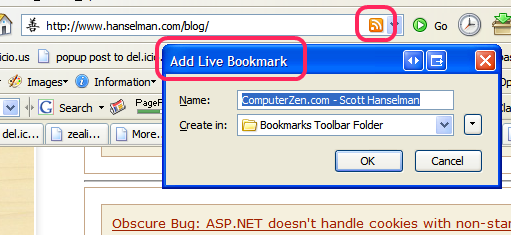
Firefox LivebookmarkThis is an older tip, but a lot of folks don't realize that it exists and its easy to miss.

If you've got a blog and you want folks to subscribe to it, make sure you're set up for Feed Auto-Discovery. FireFox supports it, almost every feed reader like FeedDemon supports it. Basically it saves you this whole process: Go to a site, search everywhere for an orange XML badge, right-click on it, select Copy Link Location, go to your reader, paste in the XML URL to the Add Feed dialog.

Add markup like before the </head> tag in your site. You can have different links for different feeds or different protocols if you like.

<base href="http://www.hanselman.com/blog/" />
<link rel="alternate" type="application/rss+xml" title="ComputerZen.com - Scott Hanselman" href="http://feeds.feedburner.com/ScottHanselman" />

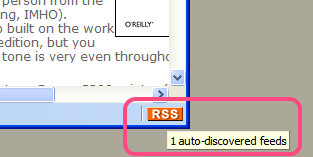
feed autodiscoveryIf you're using a blog engine like DasBlog you likely already have this, however, if you've added to or modified a theme you might want to confirm that your theme HTML contains this autodiscovery info. You can just hard-code it in the main blog template's, there's no harm.

I also like to add one-click subscription support like this feed:http://feeds.feedburner.com/ScottHanselman with the feed protocol. Many readers will catch clicks that start with feed://.

We'll add autodiscovery to Hanselminutes very soon. :)

About Scott

Scott Hanselman is a former professor, former Chief Architect in finance, now speaker, consultant, father, diabetic, and Microsoft employee. He is a failed stand-up comic, a cornrower, and a book author.

facebook bluesky subscribe
About   Newsletter
Hosting By
Hosted on Linux using .NET in an Azure App Service

Running Mac OS X Tiger

January 12, 2006 Comment on this post [7] Posted in Reviews | Tools
Sponsored By

Runmacx2.sI'm still using the Free MiniMac and digging it more each day. I got a copy of Running Mac OS X Tiger from O'Reilly. It's really an excellent book. It's got a great, casual tone that realizes that there is a kind of user that isn't a newbie, but isn't a *nix or Mac freak. Just a "prosumer" who wants to get the most out of the new Mac. It's also, as an aside, written by a Portlander, which explains the general tone of the book. This second edition book feels like the work of a person from the NW (which is a very good thing, IMHO). Apparently the second autho built on the work of the first who did the first edition, but you really wouldn't notice as the tone is very even throughout.

I still haven't been able to get my Canon S300 printer (shared via Windows) to work with my Mac. I'm not sure that the Canon drivers I install work for remote printers running under Windows. Even though I installed the new drivers, the S300 doesn't appear in the Printer Browser; only the S400 and S450, and when I print a whole page it only shows up at 1/4 size. Hm. Underneath it's still voodoo.

Anyway, the book walks a nice fine line between the Unix underlayman and the Mac UI. The opening section on the history of the OS refrains from Microsoft bashing and is a very interesting read. I'd forgotten about the whole Rhapsody fiasco and the NeXtSTEP stuff.

2006-01 Mac DesktopHere's a current screenshot of my Mac's Application's folder.Thanks to Scott and Grant from the comments of my Mac post for getting me started...maybe it's time for a Mac Ultimate Tools List? Maybe in a few more years when I know what I'm doing.

If you've got a Mac, you've got some Unix experience but you don't consider yourself a Mac-person, this book is a good way to head in that direction.

About Scott

Scott Hanselman is a former professor, former Chief Architect in finance, now speaker, consultant, father, diabetic, and Microsoft employee. He is a failed stand-up comic, a cornrower, and a book author.

facebook bluesky subscribe
About   Newsletter
Hosting By
Hosted on Linux using .NET in an Azure App Service

Obscure Bug: ASP.NET doesn't handle cookies with non-standard server names

January 12, 2006 Comment on this post [4] Posted in ASP.NET | Bugs
Sponsored By

Jon Box ran into a crazy bug today with ASP.NET, IIS and Cookie handling. These are my favorite bugs. I love sniffing HTTP traffic; not sure why.

I had thought that his cookie was being dropped due to a missing P3P privacy policy. Turns out, it seems, that his server name was like SERVER_NAME and that an underscore is outside of the RFC guidelines, specificaly RFC 1034 and RFC 1035. His IIS support guy at Microsoft pointed to Q222823 that mentions a warning message you'd get when naming your server in this non-standard way:

"The computer name "computer name" contains one or more non-standard characters. Standard characters include letters (A-Z, a-z), digits (0-9), and hyphens. Using a non-standard name will prevent other users from finding your computer on the network, unless your network is using the Microsoft DNS Server. Do you wish to use this non-standard name?"

The conclusion is that ASP.NET doesn't handle cookies properly unless the DNS name of the server in question is within specifications for standard naming. Seems obivous in retrospect, but the fact that the cookie is just dropped doesn't automatically lead one to this conclusion. Kudos to Jon for sticking to the problem. If he posts more details on his blog, I'll add a link.

UPDATE: Looks like it's IE, not ASP.NET, and for security purposes. Thanks Jeff Berkowitz!

About Scott

Scott Hanselman is a former professor, former Chief Architect in finance, now speaker, consultant, father, diabetic, and Microsoft employee. He is a failed stand-up comic, a cornrower, and a book author.

facebook bluesky subscribe
About   Newsletter
Hosting By
Hosted on Linux using .NET in an Azure App Service

Disclaimer: The opinions expressed herein are my own personal opinions and do not represent my employer's view in any way.