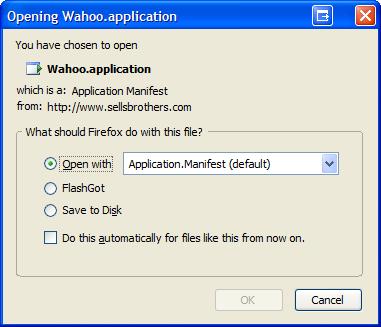
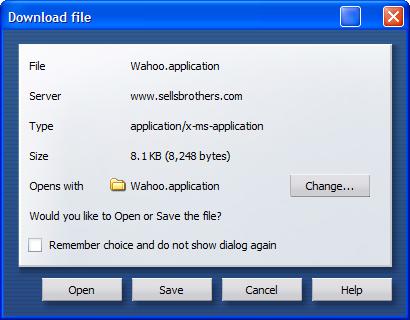
 Chris Sells via Michael Weinhardt ported Wahoo (a Tetris Clone) to ClickOnce/.NET2.0. I happily visited and attempted to download, expecting to click once. I run Firefox as my default browser and am currently running FireFox 1.5 RC2. However, Brian Noyes via Greg Robinson says
"ClickOnce does not have a dependency on browser flavour, so it should work with Firefox or IE (5.0.3 and up), provided the FX 2.0 is installed."
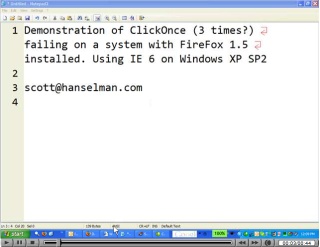
so I figured I'd be OK. But, just to be careful, I loaded up IE and ran it from there. Here's the result as a screencast.
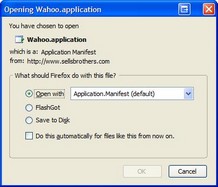
There are two ways to launch this particular app. You can launch the setup.exe that confirms you have Windows Installer 3.1 (a requirement of MicrosoftUpdate.com) or you can launch it directly via the .application file. The application's manifest gets sent based on it's mime/type to the ClickOnce engine, dfsvc.exe. This application is responsible for reading the manifest and downloading the application into a per-user*per-application cache in C:\Documents and Settings\<you>\local settings\Apps\2.0. The application.manifest mime-type is application/x-ms-application and if you look in Windows (not Internet) Explorer's FileTypes dialog you see that it's open command is "rundll32.exe dfshim.dll,ShOpenVerbApplication %1" which tells rundll32.exe to call the ShOpenVerbApplication method on dfshim.dll also known as the Application Deployment Support Library. Since the setup.exe is calling ShellExecuteEx, it seems that Firefox as the default browser gets first dibs.
Note that the setup.exe isn't a requirement of ClickOnce, just a decision that MichaelW made to ensure a certain prereqs are available. (UPDATE: This has since been updated on the site but still doesn't work in FireFox) The ClickOnce deployment creates a .html file that does some interesting javascript in order to "do the right thing." The Javascript parses the UserAgent, looking for the presence of the CLR. This works on IE because IE's UserAgent string is modified when you install the .NET CLR and various other things. For example, my IE UserAgent is "Mozilla/4.0 (compatible; MSIE 6.0; Windows NT 5.1; SV1; .NET CLR 1.1.4322; InfoPath.1; .NET CLR 2.0.50727; Avalon 6.0.5070; WinFX RunTime 3.0.50727)" while my FireFox one is "Mozilla/5.0 (Windows; U; Windows NT 5.1; en-US; rv:1.8) Gecko/20051107 Firefox/1.5".
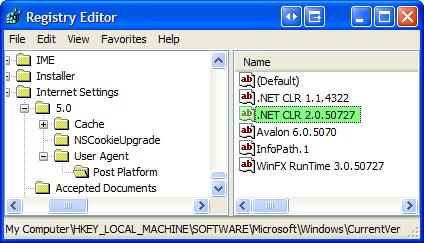 NOTE: These User Agents are added in a list in the registry under HKEY_LOCAL_MACHINE\SOFTWARE\
Microsoft\Windows\CurrentVersion\Internet Settings\5.0\User Agent\Post Platform. See screenshot at next.
THOUGHT: Seems to me that FireFox on Windows could save us a hassle if it would respect and use this list in its own User-Agent string.
function Initialize()
{
if (HasRuntimeVersion(runtimeVersion))
{
InstallButton.href = directLink;
BootstrapperSection.style.display = "none";
}
}
 function HasRuntimeVersion(v)
{
var va = GetVersion(v);
var i;
var a = navigator.userAgent.match(/\.NET CLR [0-9.]+/g);
if (a != null)
for (i = 0; i < a.length; ++i)
if (CompareVersions(va, GetVersion(a[i])) <= 0)
return true;
return false;
}
function HasRuntimeVersion(v)
{
var va = GetVersion(v);
var i;
var a = navigator.userAgent.match(/\.NET CLR [0-9.]+/g);
if (a != null)
for (i = 0; i < a.length; ++i)
if (CompareVersions(va, GetVersion(a[i])) <= 0)
return true;
return false;
}
Nutshell is, one page is generated by the deployment wizard, but different browsers get different client-side-modified pages based on this (and other) Javascript.
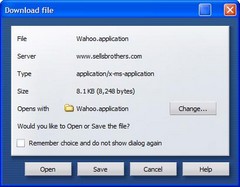 Interestingly the identical problem occurs when I use Opera 8.0. It downloads to a temp folder and runs, failing in the exact same way. Both Opera and Firefox download to the Local Settings\Temp, while IE downloads to the bowels of Temporary Internet Files\schmutz.
Hacking
I opened the XML-based .application file and noted this:
<dependentAssembly dependencyType="install" codebase="Wahoo_1_0_0_16\Wahoo.exe.manifest" size="10640">
which was mentioned in the error log file
* Activation of C:\DOCUME~1\shanselm\LOCALS~1\Temp\wahoo-5.application resulted in exception. Following failure messages were detected:
+ Downloading http://www.hanselman.com/blog/content/binary/Wahoo.exe.manifest did not succeed.
+ Could not find file 'C:\Documents and Settings\shanselm\Local Settings\Temp\Wahoo_1_0_0_16\Wahoo.exe.manifest'.
So, I downloaded http://www.sellsbrothers.com/wahoo2/Wahoo_1_0_0_16\Wahoo.exe.manifest and saved it to C:\Documents and Settings\shanselm\Local Settings\Temp\Wahoo_1_0_0_16 manually. Then I tried to run Wahoo.application again from FireFox and everything worked. Seems to me that could be a security hole. Dfsvc.exe shouldn't be thrilled to find a file it was responsible for downloading already present in the folder it was responsible for populating. I would have expected a failure to download, not success just because I did its work for it. However, what do I know about security? I tried to edit the .application file and of course was greeted with a tamper proof label, as expected:
System.Deployment.Application.InvalidDeploymentException (SignatureValidation) - Manifest XML signature is not valid.
That's comforting, though.
No conclusion here yet, folks. I was unable to get either the setup.exe version or the .application version to work any on of three machines, all running FireFox as the default browser. Of course, if I switch to IE as the default, everything works great.
Seems to me that I should be able to download and click on a .application file anywhere and have dfsvc.exe just handle it, copying things to wherever it needs to. It doesn't seem to expect to have .application downloaded to other locations.
Good news is, it's been reported as a bug and I expect we will here something soon. I'll post as soon as I get more info. Feel free to comment if I've gotten something wrong.
Hosting By