Scott Hanselman

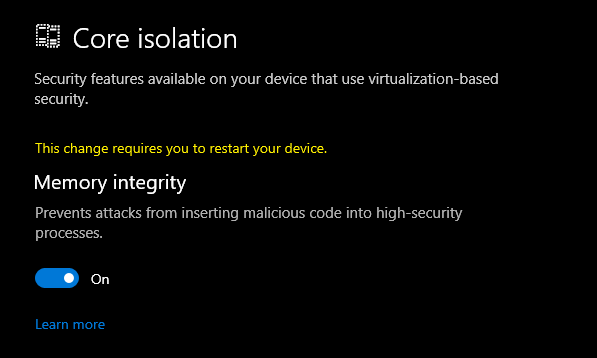
How to turn on Memory Integrity and Core Isolation in Windows 10

July 06, 2021 Comment on this post [11] Posted in Win10 | Win11
Sponsored By

According to the Microsoft Support website:

"Core isolation is a security feature of Microsoft Windows that protects important core processes of Windows from malicious software by isolating them in memory. It does this by running those core processes in a virtualized environment.

Memory integrity is one feature of core isolation which regularly verifies the integrity of the code running those core processes in an attempt to prevent any attacks from altering them.

We recommend that you leave this setting on, if your system supports it."

Cool. Before we start

MASSIVE WARNING

Be aware:

Do be conscious of each driver and what it does and consider what functionality - if any - you'll be losing if you remove them. If this blog post or specifically, you following the directions of this blog post, renders your machine unusable or unbootable, I'm sorry but you gotta do your research and back up your system. You should be able to turn it off and reinstall, but still, be careful.

Ok, ready? Feeling technically confident and have backups? Now continue.

Turns out this was added way back in 2017 in Windows 10 build 17093. In fact, Hypervisor-Protected Code Integrity (HVCI) has been around since the dawn of Windows 10 itself!

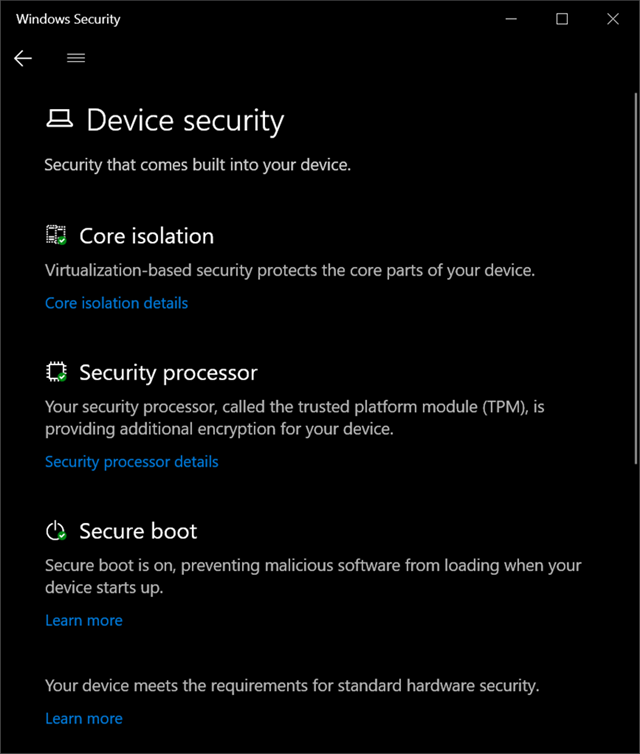
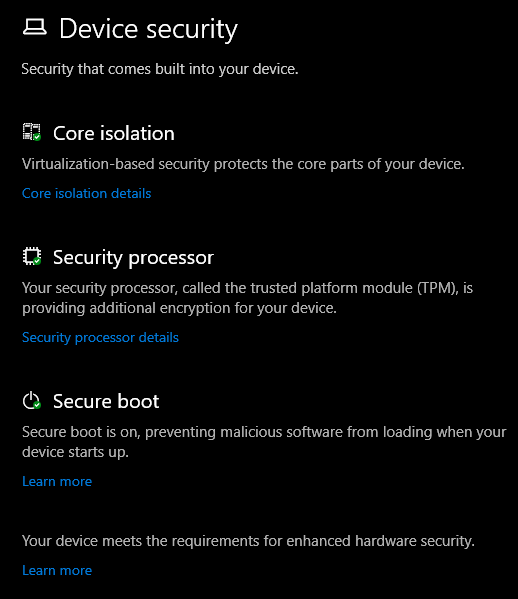
I ran the Windows Security app on my system and noticed a few things. First, at the bottom it says "Your device meets the requirements for standard hardware security" but this can read "...for enhanced hardware security."

In order to be considered enhanced, your system needs to support:

  • TPM 2.0
  • Secure boot
  • DEP - Data Execution Prevention
  • UEFI MAT - Unified Extensible Firmware Interface Memory Memory Attributes Table

Some of these technologies are quite old and have been in Windows for a while. It's the collection of all them together, working as a team, that enhances your systems security. Virtualization-based Security (VBS) isolates a secure region of memory from the rest of the OS.

I started digging to understand what was interesting or unique about my system that was preventing me from turning these new features on. Additionally I wanted to make sure I was ready for Windows 11 whenever it arrives and adds more security features and requirements.

Go to the Windows Security app and click Device Security.

Windows Security

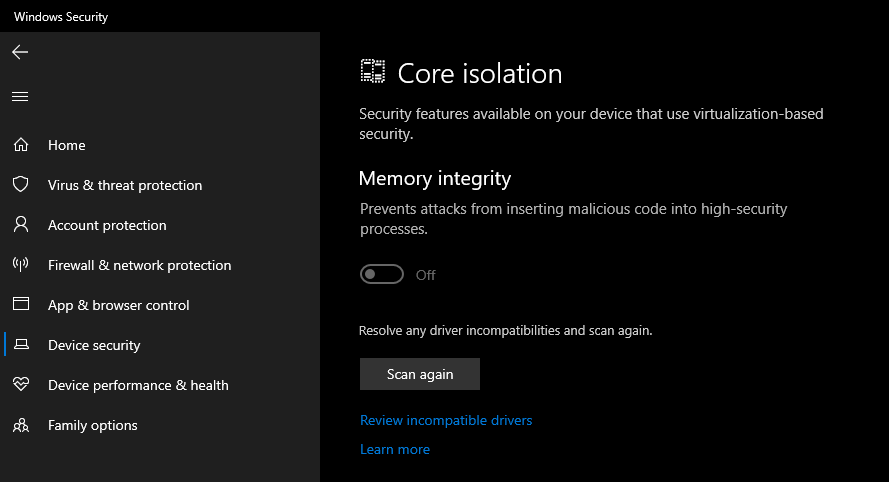
I clicked on Core Isolation to turn on VBS and noticed that the on/off switch was grayed out and I could scan for driver incompatibilities. I want to ensure that drivers I have loaded into the kernel are secure. Windows 10 has a feature where drivers can use HVCI but those drivers need to be written in certain ways to ensure they have a clear separation between data and code, and can't load data files as executable, or use dynamic code in the kernel. Again, NONE of this is new and goes back as far as 2015 or earlier.

Core Isolation

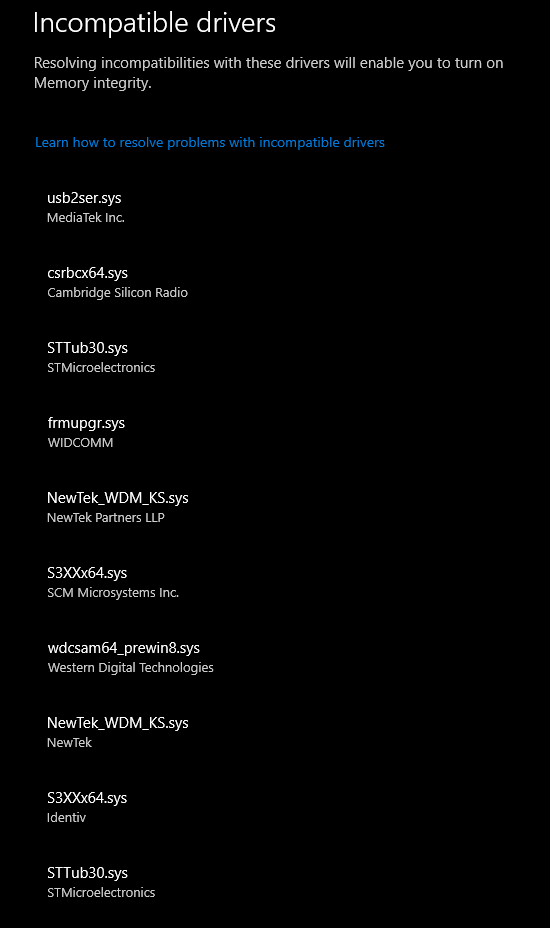
What do I have installed? Well, friends, a ton of crap, it turns out! LOL. All off these drivers are either super old or are using insecure coding techniques that are preventing my system from turning on the Core Isolation Memory Integrity feature.

Incompatible Drivers

I can start searching for each of these and I see a few interesting culprits. Remember, these are all either old or poorly written drivers that are loaded into the kernel on my desktop machine, chillin'.

That Western Digital one? Notice that it evens says "_prewin8.sys" so I hope someone from WDC reads this blog and feels just a little bit bad about it. This is from an external USB hard drive. I certainly don't need whatever extra feature that driver lights up. My USB Hard drive is just fine without it.

The STT*.sys and S3x*.sys drivers are all from various Arduino COM Port utilities and DFU-util firmware flashers. Remember those unsigned warnings you thought nothing of years ago? Well, those drivers are still with you...I mean, me.

Bad drivers and Incompatible Drivers

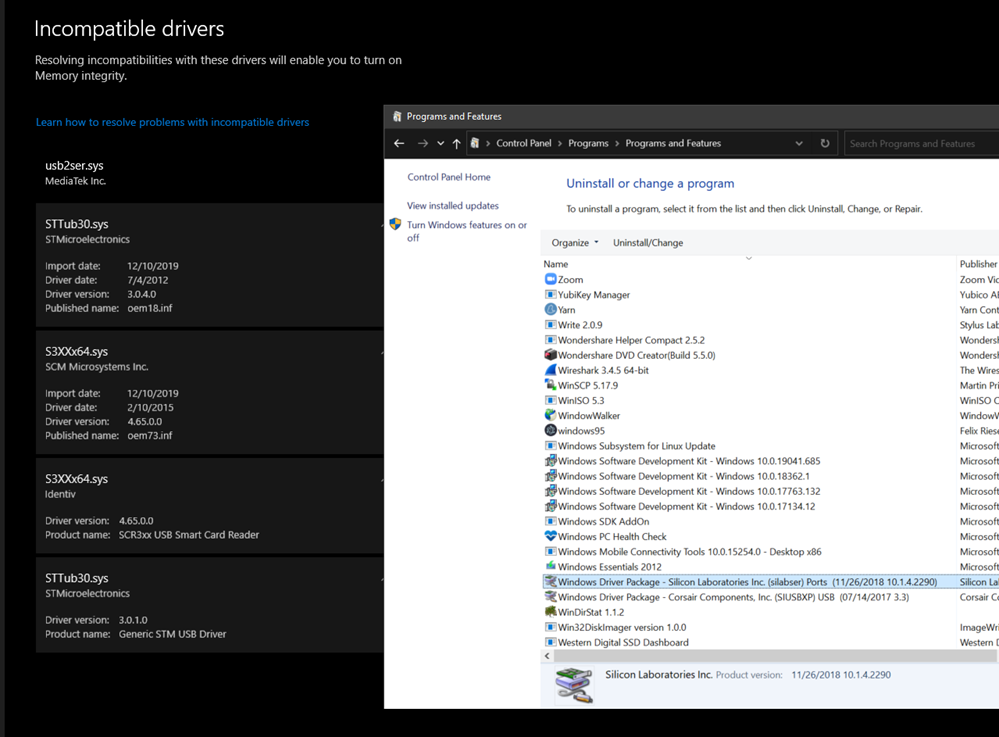
It's easy to look for "Windows Driver Package" and line up some of these drivers with actual installers and remove from Add/Remove Programs.

However, since I do a lot of IoT stuff and install random INFs manually...many of these drivers won't show up in ARP (Add/Remove Programs).

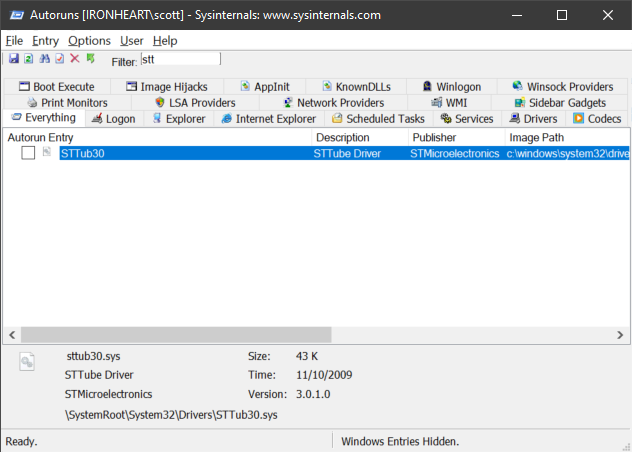
I could use Autoruns.exe and click the Drivers tab, but not every one shows up there, and even if you uncheck a driver here it won't be removed from the Windows Security Scan. It needs to be uninstalled and deleted.

Autoruns

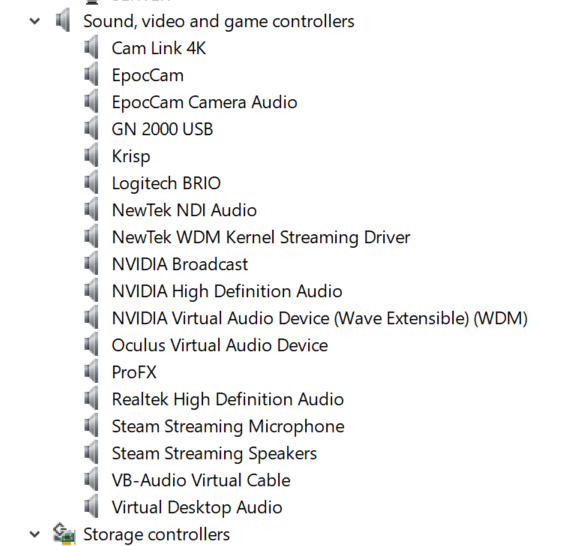
For visible drivers, I can open Device Manager and look at the Driver details for each one.

Device Manager

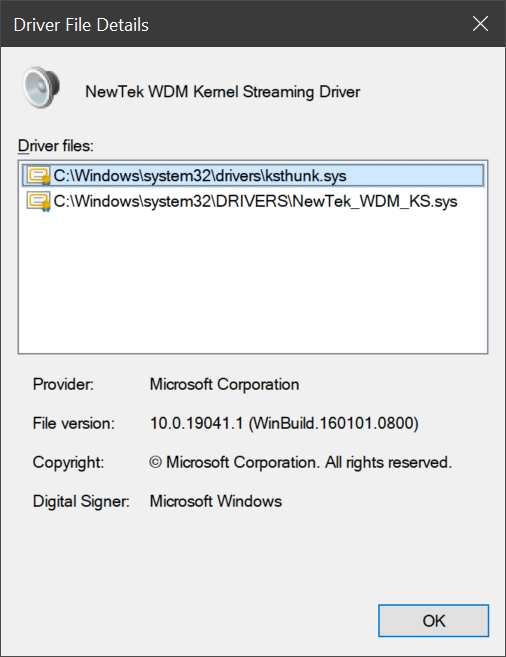
If the .sys file matches, I can right click uninstall and check the delete checkbox to remove the driver entirely.

NDI NewTek WDM Kernel Streaming Driver

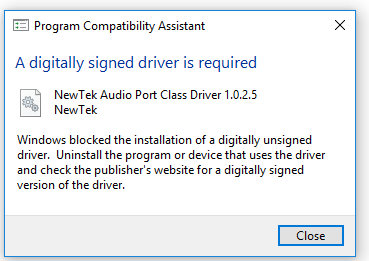
This NDI Webcam Input (NDI Virtual Input) driver knowledge base literally tells you to turn off Secure Boot and turn off Memory Integrity to install their unsigned driver. No thanks.

NDI Virtual Cam Digitally Signed Driver Error

From an admin command line you can get a list of drivers. This one gets a list in PowerShell and puts it in your clipboard.

get-windowsdriver -online | clip.exe

While this one works anywhere and gets a simple list:

wmic sysdriver get name 

TL;DR - Find the oem.inf from the Incompatible Drivers list and remove it at the Command Line.

But when you have the list from the Incompatible Drivers scan as seen in the screenshot above, just click each driver and you'll see the "oemXX.inf" file that describes the driver. Note your numbers will vary.

pnputil /delete-driver <example.inf> /uninstall

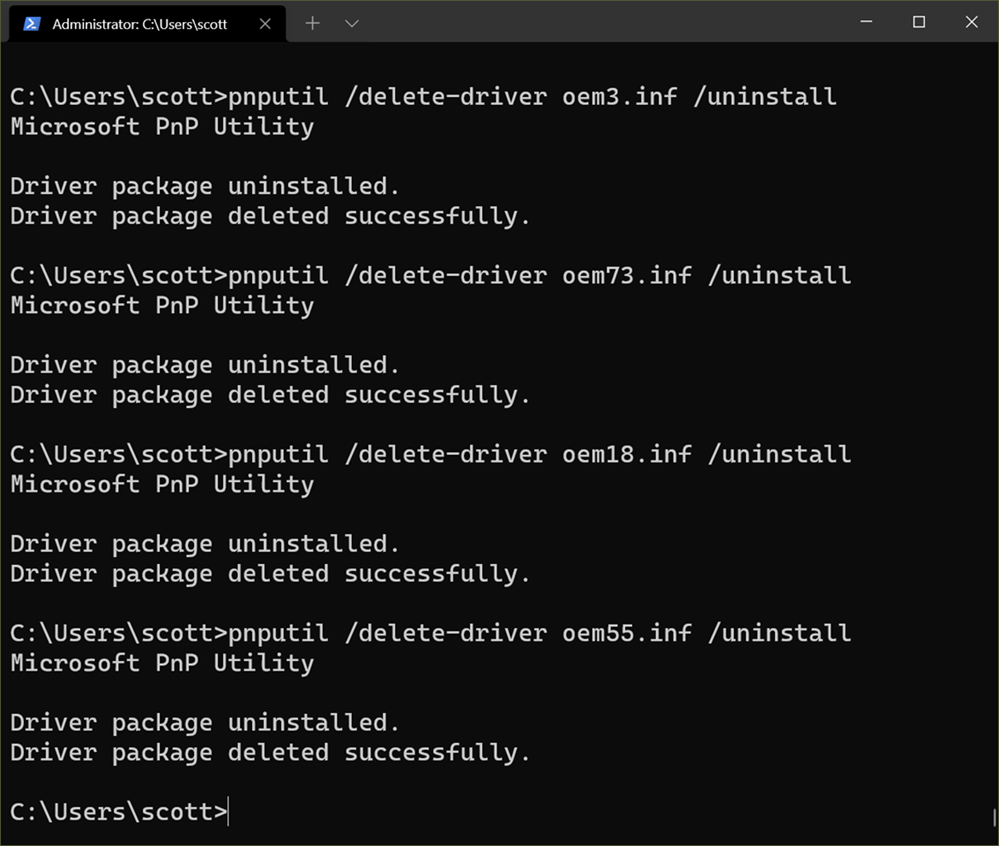
Then you can use pnputil that comes with Windows to delete the driver package from your system's driver store. Here is me doing that:

pnputil /delete-driver

Do be conscious of each driver and what it does and consider what functionality - if any - you'll be losing if you remove them. If this blog post or specifically, you following the directions of this blog post, renders your machine unusable or unbootable, I'm sorry but you gotta do your research and back up your system. You should be able to turn it off and reinstall, but still, be careful.

If you're removing a Graphics Driver or something that looks or feels essential you'd be better off finding an updated version of that driver than just removing it.

Now I'm all set:

Core Isolation

And my system says "meets the requirements for enhanced hardware security." Sweet.

image

Hope this helps you and sets you up for future success. I did a LOT of searching to figure this out and spent many hours to break this down for y'all.


Sponsor: This week's sponsor is...me! This blog and my podcast has been a labor of love for over 18 years. Your sponsorship pays my hosting bills for both AND allows me to buy gadgets to review AND the occasional taco. Join me!

About Scott

Scott Hanselman is a former professor, former Chief Architect in finance, now speaker, consultant, father, diabetic, and Microsoft employee. He is a failed stand-up comic, a cornrower, and a book author.

facebook bluesky subscribe
About   Newsletter
Hosting By
Hosted on Linux using .NET in an Azure App Service

Adding Predictive IntelliSense to my Windows Terminal PowerShell Prompt with PSReadline

July 01, 2021 Comment on this post [7] Posted in PowerShell
Sponsored By

I've long said You should be customizing your PowerShell Prompt with PSReadLine. Go to your PowerShell prompt, and

Install-Module PSReadLine -AllowPrerelease -Force

Then, after running code $profile or nodepad $profile, add

Import-Module PSReadLine

Sure, but next, add these:

Set-PSReadLineOption -PredictionSource History
Set-PSReadLineOption -PredictionViewStyle ListView
Set-PSReadLineOption -EditMode Windows

This means that PSReadLine (and hence, your prompt in general) will use your prompt history to make predictions on what you want to see next. These predictions can be on one line in light gray (full details on Jason's blog) but I like them to pop down in a ANSI style ListView. Then you can edit them with up and down arrows (or Emacs or VI soon).

I'm loving PSReadLine an will be doing a video on setting up your best prompt soon.


Sponsor: Pluralsight helps teams build better tech skills through expert-led, hands-on practice and clear development paths. For a limited time, get 50% off your first month and start building stronger skills.

About Scott

Scott Hanselman is a former professor, former Chief Architect in finance, now speaker, consultant, father, diabetic, and Microsoft employee. He is a failed stand-up comic, a cornrower, and a book author.

facebook bluesky subscribe
About   Newsletter
Hosting By
Hosted on Linux using .NET in an Azure App Service

C sharp or B flat? Experiments in self-contained native executables in .NET

June 29, 2021 Comment on this post [4] Posted in Open Source
Sponsored By

One of the best parts of the .NET ecosystem is the excitement around experimentation. Someone is always taking .NET to the next level, trying new things, pushing the envelope.

Michal Strehovsky has an interesting experiment on his GitHub called "bflat." This is not a product, it's a playground.

bflat is a concoction of Roslyn - the "official" C# compiler that produces .NET executables - and NativeAOT (née CoreRT) - the experimental ahead of time compiler for .NET based on CoreCLR's crossgen2. Thanks to this, you get access to the latest C# features using the high performance CoreCLR GC and native code generator (RyuJIT).

bflat merges the two components together into a single ahead of time crosscompiler and runtime for C#.

I find this characterization funny:

bflat is to dotnet as VS Code is to VS.

Michal is basically stripping .NET down to the bare minimum and combining the official compiler and and the experimental AOT (Ahead of Time) compiler to make single small EXEs that are totally self-contained.

Michal says you can get involved if you like!

If you think bflat is useful, you can leave me a tip in my tip jar and include your GitHub user name in a note so that I can give you access to a private repo when I'm ready.

Hello World today is about 2 megs. He says it's because:

By default, bflat produces executables that are between 2 MB and 3 MB in size, even for the simplest apps. There are multiple reasons for this:

  • bflat includes stack trace data about all compiled methods so that it can print pretty exception stack traces
  • even the simplest apps might end up calling into reflection (to e.g. get the name of the OutOfMemoryException class), globalization, etc.
  • method bodies are aligned at 16-byte boundaries to optimize CPU cache line utilization
  • (Doesn't apply to Windows) DWARF debug information is included in the executable

So when I ran bflat build, here was my output.

2.8 meg hello world

But when I run

bflat.exe build --no-reflection --no-stacktrace-data --no-globalization --no-exception-messages .\hello.cs

I end up with a 750kb file!

750kb Hello World

Sure, it's not C code because it'll never be C code. You get access to a LOT MORE with C#.

This could be a useful system for creating tiny apps in C# for Linux or Windows command line administration. It also showcases how the open pieces of .NET can be plugged together differently to achieve interesting results.

I'm sure there's lot of AOT limitations around Reflection, Attributes, and more, but this is still a very cool experiment, go check it out at https://github.com/MichalStrehovsky/bflat!


Sponsor: Pluralsight helps teams build better tech skills through expert-led, hands-on practice and clear development paths. For a limited time, get 50% off your first month and start building stronger skills.

About Scott

Scott Hanselman is a former professor, former Chief Architect in finance, now speaker, consultant, father, diabetic, and Microsoft employee. He is a failed stand-up comic, a cornrower, and a book author.

facebook bluesky subscribe
About   Newsletter
Hosting By
Hosted on Linux using .NET in an Azure App Service

dotnet repl

June 10, 2021 Comment on this post [9] Posted in Learning .NET
Sponsored By

Go get .NET 5 for Windows, Mac, or Linux, over at https://dotnet.microsoft.com/

Then install Jon Sequeria's "dotnet repl" with this one line global tool install:

dotnet tool install --global dotnet-repl 

Then just type dotnet repl at the command line. Use the Windows Terminal ideally. That will drop you here!

.NET REPL

With .NET Interactive/.NET Notebooks at the heart, consider this command-line experimental REPL (Read Evaluate Print Loop) to be a text-based notebook!

Start typing! If you make a mistake and press enter, type Ctrl-UpArrow to bring that line down to try again.

for looping over fruit

You can even add NuGet packages with #r "nuget:YourPackage"

Rendering ANSI pictures in .NET REPL

Go learn more and give feedback at https://github.com/jonsequitur/dotnet-repl. You can even run .NET Notebooks with this, as a script! This REPL supports #F and C#. Love it.


Sponsor: Extend your runway and expand your reach. Oracle for Startups delivers enterprise cloud at a startup price tag with free cloud credits to help you reel in the big fish—confidently. Learn more.

About Scott

Scott Hanselman is a former professor, former Chief Architect in finance, now speaker, consultant, father, diabetic, and Microsoft employee. He is a failed stand-up comic, a cornrower, and a book author.

facebook bluesky subscribe
About   Newsletter
Hosting By
Hosted on Linux using .NET in an Azure App Service

The quiet rise of E Ink Tablets and Infinite Paper Note Takers - reMarkable 2 vs Onyx Boox Note Air

June 08, 2021 Comment on this post [16] Posted in Reviews
Sponsored By

Onyx Boox Note AirThere's something happening in the E Ink space, somewhat quietly, but consistently. It's going to be interesting to see if it's a fad or if E Ink tablets are here to stay. I love my Amazon Kindle and I love its E Ink display. I'd say 90% of my reading in the last 5 years has been on a Kindle with E Ink. They are bright in direct sunlight, and the newer ones have color temperature settings. The starter Kindle is about $90 and you'll often find sales.

For mostly static content like books or magazines, E Ink is an amazing paper-like technology. We seem to be putting a huge amount of technology and work into creating displays to replace paper. First the look, and most recently the feel of writing on paper. These one page digital devices promise to act as Infinite Paper.

E Ink is easier on the eyes than OLED and iPads and the like. How does it work? The simple explanation is that there's tiny capsules of negatively charged black pigment and positively charged white pigment. We can apply negative or positive charge and the black or the white pigments will jump to the top. It's kind of like an Etch a Sketch, except with electricity rather than a surface covered in aluminum powder. These displays are as close to paper as you can get, today, digitally.

This week I did a LIVE Review of three really interesting "E Ink" tablets on my YouTube.

  • The reMarkable 2 - This is the second-gen reMarkable. It's a dedicated and distraction-free note taker. It has no browser, no apps to speak of, but an enthusiastic community of hackers and 3rd party projects. This device is NOT an iPad and if your first thought is, "but I have an iPad" then this isn't for you. However, if you like Moleskine notebooks and have filled many a year and your shelves are filled with many years' worth, then take a good look. This 10.3 inch unlit screen is the best device for taking notes, reading PDFs, and...taking notes. It's incredibly well built, feels high quality, is light but substantial, it doesn't warp or feel cheap. If you pair it with a their Marker Plus that includes an eraser, the feeling is top notch. It has a great Desktop App that also has a Beta "Live View" feature where you can share your screen in Teams or Zoom and see what you're writing on your reMarkable. There's so much potential here if they'd open up the APIs and integrate into things like OneNote, Teams, etc. I'd love to see someone be able to connect two of these and write as a shared whiteboard!
    -  One small downer, I did drop a Marker and it landed just right and broke off not just the tip (no big deal, it comes with a dozen replacements) but also the tiny hole the tip goes into (not replaceable). So, treat the pens with reverence.
  • Onyx Boox Note Air - This could pass for the reMarkable from a distance, but it's actually an Android 10 devices that can have Google Play added. Also 10.3" and E Ink but adds a backlight, this hybrid device is a note taker and PDF viewer until you are suddenly installing Microsoft Office or Netflix. The surreal part is that what the device thinks its displaying doesn't always jive with what is being displayed. For example, it's a black and white device, so some shading and subtleties are lost...but they are there, in video memory. That means you can easily share this Android Device's screen to your TV or monitor and it's...Android! There is some ghosting which is a feature, not a bug, but the Onyx Boox Note Air has a surprisingly large array of basically "ghosting display choices" that allow you to select the right balance between ghosting and eventual consistency. It takes a moment to figure out but it's quite good when dialed in. Combine the Note Air with a Bluetooth Keyboard and you've got an E Ink Word Processor. If you have $500 and can't decide between a reMarkable and a Boox Note Air, it comes down to the fact that the Note Air is Android. You're getting more functionality, if slightly less software policy. As a note taker, the polish of the reMarkable 2 is the winner. But the Note Air is the best general purpose E Ink Tablet.
    • Boox Nova3 ColorOnyx Boox Nova3 Color - This device is just 7.8" but has a color Kaleido Plus E Ink screen. COLOR E Ink is really something to see. Do check out my video review on YouTube - here's a link right to the color parts. It's not a rich deep marker type color, it's a muted older comic book type color...but it works. It adds something, and reading comics on it in Comixology is magical, albeit with some ghosting. This device is also Android so consider it a 2 inch smaller version of the Note Air. It's the "color iPad Mini" to the Note Air's "black and white iPad Pro."

reMarkable 2

Later this month I'll take a look at Supernote which already has a enthusiastic community and promises to have a rich API for 3rd parties to explore and expand.

E Ink and "E Paper" are becoming more prominent on sites like Kickstarter and IndieGogo. This India-based company called paperd.ink is creating a low power E-paper development board. The rise of inexpensive E-paper/E Ink displays along with ESP32s with WiFi is creating tiny low power computers that blur the user's perception of what a Microcontroller can do.

What are your thoughts and opinions about E Ink? Will your next tablet be an E Ink display?

I often use Amazon Affiliate links and you're helping this blog when you use them, thanks!


Sponsor: Extend your runway and expand your reach. Oracle for Startups delivers enterprise cloud at a startup price tag with free cloud credits to help you reel in the big fish—confidently. Learn more.

About Scott

Scott Hanselman is a former professor, former Chief Architect in finance, now speaker, consultant, father, diabetic, and Microsoft employee. He is a failed stand-up comic, a cornrower, and a book author.

facebook bluesky subscribe
About   Newsletter
Hosting By
Hosted on Linux using .NET in an Azure App Service

Disclaimer: The opinions expressed herein are my own personal opinions and do not represent my employer's view in any way.