Scott Hanselman

Learning WPF with BabySmash - Customer Feedback and a WPF Font ComboBox

July 17, 2008 Comment on this post [8] Posted in BabySmash | Windows Client | WPF
Sponsored By

NOTE: If you haven't read the first post in this series, I would encourage you do to that first, or check out the BabySmash category. Also check out http://windowsclient.net/ for more developer info on WPF.

BACKGROUND: This is one of a series of posts on learning WPF. I wrote an application for my 2 year old using WPF, but as I'm a Win32-minded programmer, my working app is full of Win32-isms. It's not a good example of a WPF application even though it uses the technology. I'm calling on community (that's you, Dear Reader) to blog about your solutions to different (horrible) selections of my code. You can get the code http://www.codeplex.com/babysmash. Post your solutions on your blog, in the comments, or in the Issue Tracker and we'll all learn WPF together. Pick a single line, a section, or subsystem or the whole app!

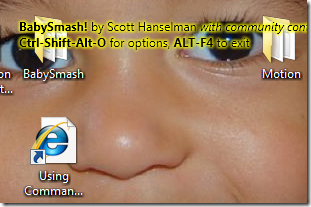
When I decided I was running out of ideas for BabySmash! I decided that I needed to get some customer feedback. The babies had less to say that expected, but there are many videos of babies testing the application popping up on Flickr and YouTube, so I'll call that End User Testing.

I found a site called UserVoice.com (another similar one is GetSatisfaction.com) that is basically a hosted instant customer feedback site. Poof. UserVoice.com even supports a few widgets via Javascript like this one for embedding on your site.

It also supports DNS CName aliasing, so http://feedback.babysmash.com looks like it's hosted by me at http://www.babysmash.com, but instead it's at UserVoice. It's really professional and takes literally minutes. I had the whole thing installed an integrated in under 15 minutes, including color customization and logo.

After I put the site up and inserted links to BabySmash Feedback on the site, there were two ideas that didn't get many votes but had great potential and I figured would be fun to do. One person suggested using Wingdigs (the silly font) to use letter keystrokes to show the fun pictures embedded in the font, while the other suggestion was just to allow a custom font.

When I make the Letters, I create a single object of FormattedText and had hardcoded "Arial," then I call BuildGeometry() on that which basically creates a Path or Outline of the letter that I can mess with. I fill it, and outline it and sent it on its way. I hadn't even given alternative fonts a second thought.

private static Geometry MakeCharacterGeometry(string t)
{
var fText = new FormattedText(
t,
CultureInfo.CurrentCulture,
FlowDirection.LeftToRight,
new Typeface(
new FontFamily(Properties.Settings.Default.FontFamily),
FontStyles.Normal,
FontWeights.Heavy,
FontStretches.Normal),
300,
Brushes.Black
);
return fText.BuildGeometry(new Point(0, 0)).GetAsFrozen() as Geometry;
}

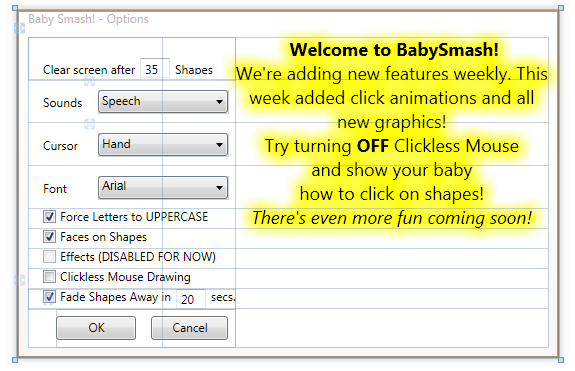
So armed with this idea, I added FontFamily as an option in Visual Studio Settings for this project. Remember that I refactored the Options Dialog a few weeks back using Jason Kemp's code. This made it easy to just add one additional ComboBox. I'm getting good enough that I added the XAML in the Text Editor pane in Visual Studio rather than the designer.

image

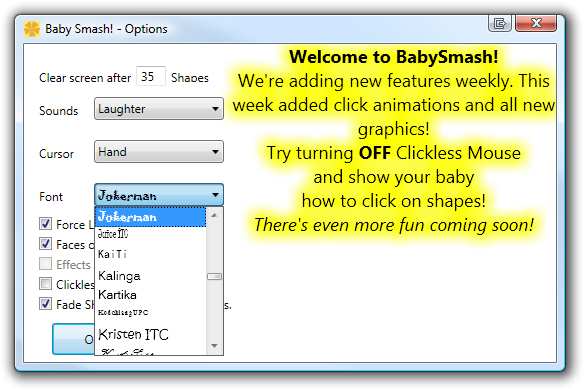
I figured, since this WPF, can't I make that ComboBox more interesting than just a bunch of strings? Why not have the FontNames show up in the style of the Font like in Word? Well, System.Windows.Media.Fonts.SystemFontFamilies has the list of the fonts on the machine. I searched around and found part of what I needed at Norbert Eder's WPF blog. (BTW, congrats on being a newly minted MVP!)

<Window.Resources>
<local:Settings x:Key="settings" />
<CollectionViewSource Source="{Binding Source={x:Static Fonts.SystemFontFamilies}}" x:Key="myFonts"/>
</Window.Resources>

I can make a CollectionViewSource and make it a resource that is available to the Window, as seen above. The source is the collection of FontFamilies. Next, I make a regular ComboBox, which usually looks like this if you are just holding strings:

<Label Height="23" Grid.Row="2" Margin="10">Cursor</Label>
<ComboBox
SelectedValue="{Binding Path=Default.CursorType}"
SelectedValuePath="Content" Grid.Row="2" Height="23" Margin="70,10,7,0" Grid.ColumnSpan="2" VerticalAlignment="Top">
<ComboBoxItem>Hand</ComboBoxItem>
<ComboBoxItem>Arrow</ComboBoxItem>
</ComboBox>
But in mine, I'm going to bind the ItemsSource to the list of Fonts from the Resources above. I'll say that the ItemsPanel will be a VirtualizingStackPanel which is amazing. You know when you have a long list of potentially expensive-to-show stuff? The VirtualizingStackPanel knows it's expensive takes care of doing the minimal amount of work it takes to show just those items that are visible. This makes rendering hundreds of fonts way faster.
<ComboBox x:Name="FontChooser" Grid.Row="3" Margin="70,10,7,0" 
ItemsSource="{Binding Source={StaticResource myFonts}}"
SelectedValue="{Binding Path=Default.FontFamily}" SelectedValuePath="Source" Height="23" VerticalAlignment="Top" Grid.ColumnSpan="2">
<ComboBox.ItemsPanel>
<ItemsPanelTemplate>
<VirtualizingStackPanel />
</ItemsPanelTemplate>
</ComboBox.ItemsPanel>
<ComboBox.ItemTemplate>
<DataTemplate>
<TextBlock Text="{Binding}" FontFamily="{Binding}" Height="20"/>
</DataTemplate>
</ComboBox.ItemTemplate>
</ComboBox>

The Data Template is what each item looks like, which is just the name of the font and setting the FontFamily to that item's FontFamily! Hard to write until you've done it once, then you start thinking of other cool stuff you can do with this knowledge elsewhere in your app.

The one thing that it flummox me for a half-hour was that I was binding the ComboBox to the list of Fonts from my Resources, but I wanted the SelectedValue (the item that is selected in the ComboBox) to be bound like all the other controls in my options dialog, to my application's Settings. That's where these attributes came in:

SelectedValue="{Binding Path=Default.FontFamily}" SelectedValuePath="Source" 

There the SelectedValue the FontFamily string from my Settings class (just like the Default.CursorType and others in the dialog) and the SelectedValuePath shows how to dig into that value. In this case, the Source property had the name (string) of the FontFamily.

The result looks like this:

 Baby Smash! - Options

I'm starting to "grok" WPF more each evening I code on BabySmash. I know I'm still just barely scratching the surface. I'm looking forward to implementing (with your help) more of the BabySmash Feedback Items.

About Scott

Scott Hanselman is a former professor, former Chief Architect in finance, now speaker, consultant, father, diabetic, and Microsoft employee. He is a failed stand-up comic, a cornrower, and a book author.

facebook bluesky subscribe
About   Newsletter
Hosting By
Hosted on Linux using .NET in an Azure App Service

Developer != Designer

July 17, 2008 Comment on this post [28] Posted in BabySmash | Windows Client | WPF
Sponsored By

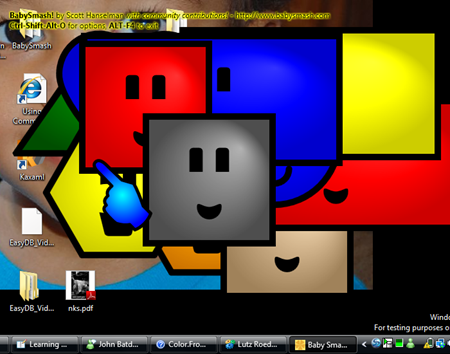
I wanted a custom cursor for BabySmash! My son was having trouble associating the mouse cursor on the screen and the movement of the mouse. Clearly a shiny new Kids Cursor was in order.

I went into Expression Blend and drew this hand cursor. I drew it with the spliney-liney pully-thing-tool. (That's the official name for it, I'm sure.

image

I was feeling pretty good about this cursor. It had a gradient and everything. I put it up, but mentioned to Felix The Designer that maybe he wanted to have a go at making a cursor. Seven minutes later I received this. If you want to understand what real design talent is like, read about Felix's thought process as he redesigned the Mix site.

image

At this point I declared, in the style of American Comedian Larry Miller:

"The difference between a Designer and Developer, when it comes to design skills, is the difference between shooting a bullet and throwing it." - Scott Hanselman with apologies to Larry Miller

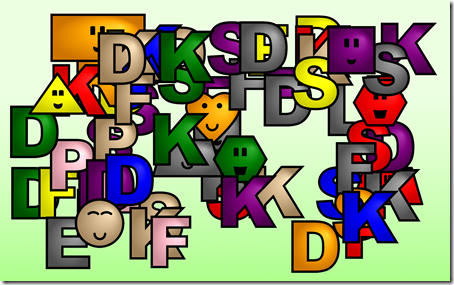
More on the Designer/Developer relationship later, but for now, thanks to Felix and Conchango, BabySmash is looking pretty professional, IMHO.

image

Developer != Designer. Sigh.

About Scott

Scott Hanselman is a former professor, former Chief Architect in finance, now speaker, consultant, father, diabetic, and Microsoft employee. He is a failed stand-up comic, a cornrower, and a book author.

facebook bluesky subscribe
About   Newsletter
Hosting By
Hosted on Linux using .NET in an Azure App Service

Hanselminutes Podcast 121 - LineRider - Porting a Flash Game to Silverlight 2

July 16, 2008 Comment on this post [10] Posted in Podcast | Silverlight
Sponsored By
My one-hundred-and-twentyfirst podcast is up.image In this episode, I talk to Rick Barraza, an Experience Architect from Cynergy with a background in Flash, and Bryan Perfetto, a Developer from Inxile writing his first Silverlight application. We chat about how and why they ported the popular Flash Game LineRider.com to Silverlight 2.

Subscribe: Subscribe to Hanselminutes Subscribe to my Podcast in iTunes

If you have trouble downloading, or your download is slow, do try the torrent with µtorrent or another BitTorrent Downloader.

Do also remember the complete archives are always up and they have PDF Transcripts, a little known feature that show up a few weeks after each show.

Telerik is our sponsor for this show.

Telerik's new stuff is pretty sweet, check out the ONLINE DEMO of their new ASP.NET AJAX suite. RadGrid handles sorting, filtering, and paging of hundreds of thousands of records in milliseconds, and the RadEditor loads up to 4 times faster and the navigation controls now support binding to web services on the client.

As I've said before this show comes to you with the audio expertise and stewardship of Carl Franklin. The name comes from Travis Illig, but the goal of the show is simple. Avoid wasting the listener's time. (and make the commute less boring)

Enjoy. Who knows what'll happen in the next show?

About Scott

Scott Hanselman is a former professor, former Chief Architect in finance, now speaker, consultant, father, diabetic, and Microsoft employee. He is a failed stand-up comic, a cornrower, and a book author.

facebook bluesky subscribe
About   Newsletter
Hosting By
Hosted on Linux using .NET in an Azure App Service

ASP.NET MVC Preview 4 - Using Ajax and Ajax.Form

July 16, 2008 Comment on this post [51] Posted in ASP.NET | ASP.NET MVC
Sponsored By

ASP.NET MVC Preview 4 is up on CodePlex. The Gu has all the exquisite Gu-Like Detail on his blog. Phil Haack has some notes on this release on his blog.

If you take a look at the generated "changes" document, it shows a bunch of new stuff like AjaxHelpers and AjaxExtensions that set the stage for some interesting things the community could do with ASP.NET MVC and Ajax. I'd like to see some JQuery love in there, maybe with some MVCContrib as they've been quiet lately.

Using the new Preview 4 bits, here's what I was able to get running in just a few minutes.

Given a ViewPage that has a TextBox and a Button on it, when I click the button (and submit the form) I'll call back to the server and get some text that should then go in the div next to the button.

mvcpreview4ajax

The View looks like:

<asp:Content ID="indexContent" ContentPlaceHolderID="MainContent" runat="server">
<p>
<%using (Ajax.Form("ExamineTextBox", new AjaxOptions { UpdateTargetId = "result" }))
{ %>
<%= Html.TextBox("textBox1")%>
<input type="submit" value="Button"/>
<span id="result"/>
<% } %>
</p>
</asp:Content>

Notice the Ajax.Form helper and the UpdateTargetID that refers to the span. There's more AjaxOptions in there to explore as well, that we'll see in a second. The controller action looks like this:

public class HomeController : Controller
{
public string ExamineTextBox(string textBox1)
{
if (textBox1 != "Initial Data")
{
return "This text is MVC different from before!";
}
return String.Empty;
}
}

Notice that the return method of the ExamineTextBox isn't an ActionResult, it's a string. In fact, the string result is being wrapped for you into a ContentResult. You could certainly make a ContentResult yourself, but this makes for a nicer looking method signature.

The result of that method is returned via the AJAX call, then put into that span via magic and pixie dust. Actually, the request looks like this:

POST /Home/ExamineTextBox HTTP/1.1
Referer: http://localhost.:45210/Home
Content-Type: application/x-www-form-urlencoded; charset=utf-8
Accept-Encoding: gzip, deflate
Host: localhost.:45210
Content-Length: 28
Connection: Keep-Alive
Pragma: no-cache

textBox1=dude&__MVCAJAX=true

and the Response like this:

HTTP/1.1 200 OK
Server: ASP.NET Development Server/9.0.0.0
Cache-Control: private
Content-Type: text/html; charset=utf-8
Content-Length: 39
Connection: Close

This text is MVC different from before!

And that UpdateTargetID (the span) mentioned in the Ajax Form helper above? That's swapped in via the magic in MicrosoftMvcAjax.debug.js. There are options for before, after and replace.

// Insert the results into the target element
if (targetElement) {
switch (insertionMode) {
case Sys.Mvc.InsertionMode.Replace:
targetElement.innerHTML = executor.get_responseData();
break;
case Sys.Mvc.InsertionMode.InsertBefore:
targetElement.innerHTML = executor.get_responseData() + targetElement.innerHTML;
break;
case Sys.Mvc.InsertionMode.InsertAfter:
targetElement.innerHTML = targetElement.innerHTML + executor.get_responseData();
break;
}
}

Note that I had to manually (for now) add the JavaScript libraries, so I put them in my Site.Master View.

<script src="/Content/MicrosoftAjax.debug.js" type="text/javascript"></script>
<script src="/Content/MicrosoftMvcAjax.debug.js" type="text/javascript"></script>

Also, notice that the MicrosoftMvcAjax.js is new and it's in your /Content folder if you make a new MVC Application. Congrats to Phil and Eilon and the team for this release!

Related Links

About Scott

Scott Hanselman is a former professor, former Chief Architect in finance, now speaker, consultant, father, diabetic, and Microsoft employee. He is a failed stand-up comic, a cornrower, and a book author.

facebook bluesky subscribe
About   Newsletter
Hosting By
Hosted on Linux using .NET in an Azure App Service

Learning Opportunity - .NET Terrarium is back!

July 16, 2008 Comment on this post [17] Posted in Back to Basics | Learning .NET
Sponsored By

Bil Simser has just done the .NET Community a huge solid. Bil has dug up and re-released Terrarium to CodePlex wtih the intent to update it to use new language features and new usability features like ClickOnce.

If you're newish to the .NET Community (<3-5 years?) you might not have heard of Terrarium. There was a time when it was the tool for getting newbies excited about learning .NET. I showed dozens of high-school and college students how to program using Terrarium. Back at my last company one of our engineers did brown bag lunches on good bug design and ran a Terrarium Server internally.

terriarium

Terrarium hasn't been even looked at by the Microsoft SDK team in two years, as live happens, you know. Bil hunted them down, did a bunch of paperwork and it's back. You can check out the source or download the release.

You can run it alone, just a world in a box, or you can hook it up to a server and that's where it gets interesting, as your bugs all live in a connected world.

Your animals have Idle (event-based) loops that you can react to, and who amongst us hasn't wanted to write these lines of code at least once?

// Reproduce as often as possible 
if (CanReproduce)
BeginReproduction(null);

Now you have the chance.

A great lunchtime project is to get a bunch of the nerds from your company in a room, teach them Terrarium and have a battle!

Personally, I'm a lover, not a fighter, so I run away when attacked.

private void MyAnimal_Attacked(object sender, AttackedEventArgs e)
{
if (e.Attacker.IsAlive)
{
AnimalState TheAttacker = e.Attacker;

BeginDefending(TheAttacker); //defend against the attacker
WriteTrace("Run away to some random point");

int X = OrganismRandom.Next(0, WorldWidth - 1);
int Y = OrganismRandom.Next(0, WorldHeight - 1);

BeginMoving(new MovementVector(new Point(X, Y), 10));
}
}

Go check out the release of Terrarium and download the app, SDK and server. There will be more to come on Bil's Blog, I'm sure. He'll also be running a public Terrarium Server. It's exciting to see this blast from the past. Now I think it's time for me to visit a local High School Computer Science class again some lunchtime...

One of the things I think will be interesting to see, is if folks come up with better patterns for managing state within these animals. Many Terrarium animals end up with Idle loops that look like Arrow Code.

if
if
if
if
do something
endif
endif
endif
endif

This isn't nice to look at, and it would promote bad habits if it was the first kind of code someone new to programming ever saw.

The world has changed since this was released in 2002. The race is on and now I ask:

  • Who will write the first aesthetically pleasing (from a code perspective) Terrarium Animal?
  • The first F# Terrarium animal?
  • The first Ruby (DLR) Terrarium animal?
  • Boo? Nemerle? IronPython?

Enjoy!

UPDATE: I've got this running on my XP machine and my XP VMs but because of missing DirectX 6/7 DLLs I can't get it running under Vista. Possible workaround in the comments below. It'll likely be faster to just recompile it. I'll talk to Bil and see what's up.


Related Links

About Scott

Scott Hanselman is a former professor, former Chief Architect in finance, now speaker, consultant, father, diabetic, and Microsoft employee. He is a failed stand-up comic, a cornrower, and a book author.

facebook bluesky subscribe
About   Newsletter
Hosting By
Hosted on Linux using .NET in an Azure App Service

Disclaimer: The opinions expressed herein are my own personal opinions and do not represent my employer's view in any way.