If you could go back and give your 20-something-year-old self some advice, what would you say?
I’m about to graduate and I’m sort of terrified to enter the real world, so I’ve sort of been asking everyone.
What a great question! Off the top of my head - while sitting on the tarmac waiting for takeoff and frantically thumb-typing - I offered this brainstorm.
First Avoid drama. In relationships and friends Discard negative people There’s 8 billion people out there You don’t have to be friends with them all Don’t let anyone hold you back or down We waste hours and days and years with negative people Collect awesome people like Pokémon Network your butt off. Talk to everyone nice Make sure they aren’t transactional networkers Nice people don’t keep score They generously share their network And ask for nothing in return but your professionalism Don’t use a credit card and get into debt if you can Whatever you want to buy you likely don’t need it Get a laptop and an iPad and buy experiences Don’t buy things. Avoid wanting things Molecules are expensive Electrons are basically free If you can avoid want now, you’ll be happier later None of us are getting out of this alive And we don’t get to take any of the stuff So ask yourself what do I want What is happiness for you And optimize your existence around that thing Enjoy the simple. street food. Good friends If you don’t want things then you’ll enjoy people of all types Use a password system like @1Password and manage your digital shit tightly Be focused And it will be ok Does this help?
What's YOUR advice to your 20 year old self?
Sponsor: Like C#? We do too! That’s why we've developed a fast, smart, cross-platform .NET IDE which gives you even more coding power. Clever code analysis, rich code completion, instant search and navigation, an advanced debugger... With JetBrains Rider, everything you need is at your fingertips. Code C# at the speed of thought on Linux, Mac, or Windows. Try JetBrains Rider today!
About Scott
Scott Hanselman is a former professor, former Chief Architect in finance, now speaker, consultant, father, diabetic, and Microsoft employee. He is a failed stand-up comic, a cornrower, and a book author.
VS Code is a great Code Editor but it's not a full IDE (Integrated Development Environment) so there's still lots of reasons for me to use and enjoy Visual Studio on Windows (or Mac).
I wanted to see if it's possible to do 'remote' debugging with WSL and Visual Studio (not Code) and if so, is it something YOU are interested in, Dear Reader.
To start, I've got WSL (specifically WSL2) on my Windows 10 machine. You can get WSL1 today on Windows from "windows features" just by adding it. You can get WSL2 today in the Windows Insiders "Slow Ring."
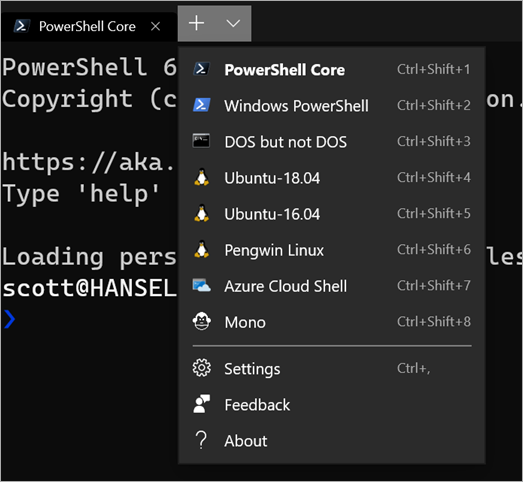
Then I've got the new Windows Terminal. Not needed for this, but it's awesome if you like the command line.
I'm also using .NET Core with C# for my platform and language of choice. I've installed from https://dot.net/ inside Ubuntu 18.04, under Windows. I've got a web app (dotnet new razor) that runs great in Linux now.
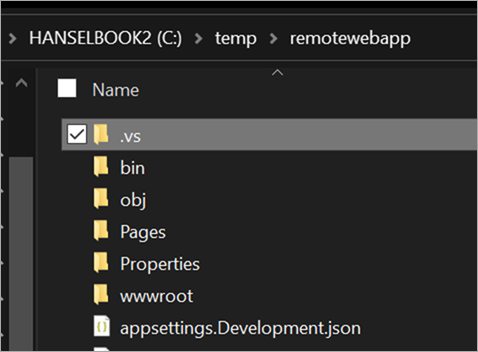
From the WSL prompt within terminal, I can run "explorer.exe ." and it will launch Windows Explorer at the path \\wsl$\Ubuntu-18.04\home\scott\remotewebapp, but VS currently has some issues opening projects across this network boundary. I'll instead put my stuff at c:\temp\remotewebapp and access it from Linux as /mnt/c/temp/remotewebapp.
In a perfect world - this is future speculation/brainstorming, Visual Studio would detect when you opened a project from a Linux path and "Do The Right Thing(tm)."
I'll need to make sure the VSDbg is installed in WSL/Linux first. That's done automatically with VS Code but I'll do it manually in one line like this:
We'll need a launch.json file with enough information to launch the project, attach to it with the debugger, and notice when things have started. VS Code will make this for you. In some theoretical future Visual Studio would also detect the context and generate this file for you. Here's mine, I put it in .vs/launch.json in the project folder.
VS will make a launch.json also but you'll need to add the two most important parts, the $adapter and $adapterArgs part as I have here.
{
   // Use IntelliSense to find out which attributes exist for C# debugging
   // Use hover for the description of the existing attributes
   // For further information visit https://github.com/OmniSharp/omnisharp-vscode/blob/master/debugger-launchjson.md
   "version": "0.2.0",
   "configurations": [
    {
      "$adapter": "C:\\windows\\sysnative\\bash.exe",
      "$adapterArgs": "-c ~/vsdbg/vsdbg",
      "name": ".NET Core Launch (web)",
      "type": "coreclr",
      "request": "launch",
      "preLaunchTask": "build",
      // If you have changed target frameworks, make sure to update the program path.
      "program": "/mnt/c/temp/remotewebapp/bin/Debug/netcoreapp3.0/remotewebapp.dll",
      "args": [],
      "cwd": "/mnt/c/temp/remotewebapp",
      "stopAtEntry": false,
      // Enable launching a web browser when ASP.NET Core starts. For more information: https://aka.ms/VSCode-CS-LaunchJson-WebBrowser
      "serverReadyAction": {
        "action": "openExternally",
        "pattern": "^\\s*Now listening on:\\s+(https?://\\S+)"
      },
      "env": {
        "ASPNETCORE_ENVIRONMENT": "Development"
      },
      "sourceFileMap": {
        "/Views": "${workspaceFolder}/Views"
      },
      "pipeTransport": {
        "pipeCwd": "${workspaceRoot}",
        "pipeProgram": "bash.exe",
        "pipeArgs": [ "-c" ],
        "debuggerPath": "~/vsdbg/vsdbg"
      },
      "logging": { "engineLogging": true }
    }
    ]
}
These launch.json files are used by VS and VS Code and other stuff and give the system and debugger enough to go on. There's no way I know of to automate this next step and attach it to a button like "Start Debugging" - that would be new work in VS - but you can start it like this by calling a VS2019 automation command from the "Command Window" you can access with View | Other Windows | Command Window, or Ctrl-Alt-A.
Once I've typed this once in the Command Window, I can start the next Debug session by just pressing Up Arrow to get the command from history and hitting enter. Again, not perfect, but a start.
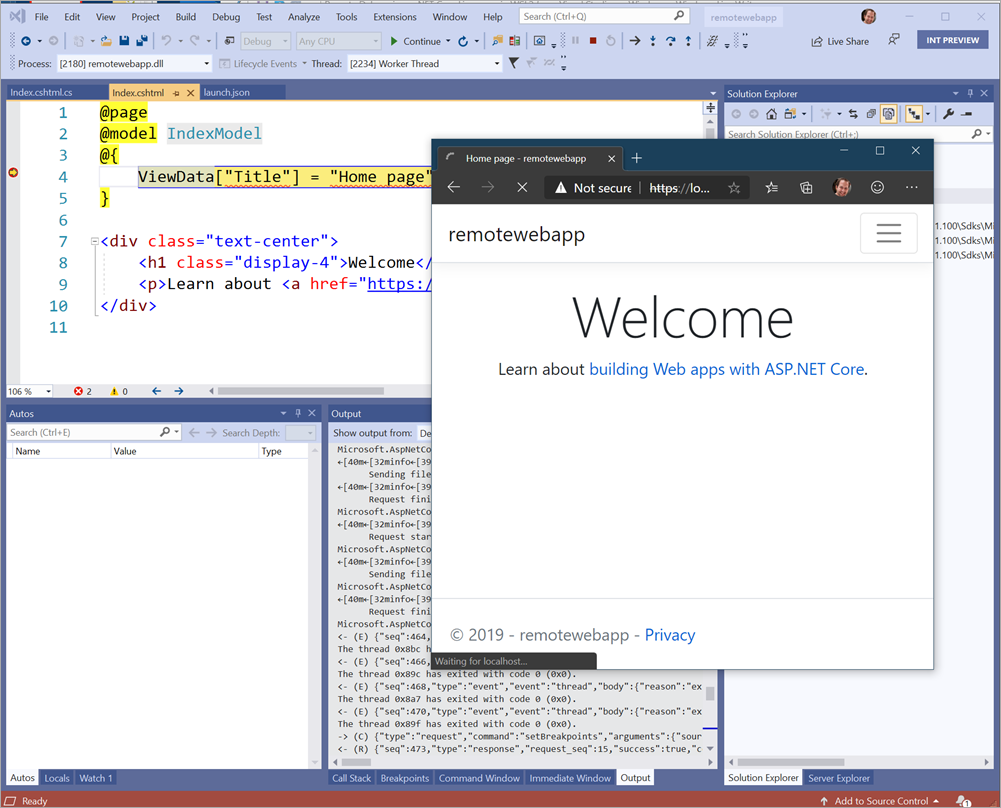
Here's a screenshot of me debugging a .NET Core app running in Linux under WSL from Windows Visual Studio 2019.
Thanks to Andy Sterland for helping me get this working.
So, it's possible, but it's not falling-off-a-log automatic. Should this setup and prep be automatic? Is development in WSL from Visual Studio (not Code) something you want? There is great support for Docker development within a container including interactive debugging already, so where do you see this fitting in...if at all? Does this add something or is it more convenient? Would you like "F5" debugging for WSL apps within VS like you can in VS Code?
Sponsor: Like C#? We do too! That’s why we've developed a fast, smart, cross-platform .NET IDE which gives you even more coding power. Clever code analysis, rich code completion, instant search and navigation, an advanced debugger... With JetBrains Rider, everything you need is at your fingertips. Code C# at the speed of thought on Linux, Mac, or Windows. Try JetBrains Rider today!
About Scott
Scott Hanselman is a former professor, former Chief Architect in finance, now speaker, consultant, father, diabetic, and Microsoft employee. He is a failed stand-up comic, a cornrower, and a book author.
Seriously, though, sometimes folks comment on my busy schedule and I joke that I'm "playing tetris with Outlook" where appointments are falling blocks and I'm twisting and turning them and trying to make it all fit. I also often take some time and actively defrag my calendar.
Defraggging your system's disk usually happens automatically - in the past it didn't - as background processes attempt to "reduce the fragmentation of (a file) by concatenating parts stored in separate locations on a disk." That's a techie explanation.
Here's a basic one. Ever look at your bookshelf and you've got no system? Books all over, no plan. Even worse, imagine someone ripped a book in half along the spine and stored half the book on the top and the rest on the bottom shelf? Why, you'd be scandalized and you'd want to tidy up.
Sometimes folks organize their books by color, sometimes by topic, usually by author. Point is, it can get messy, and you need to take a moment to get organized. The result is a nice tidy bookshelf that has less psychic weight and where the books you want are where you can get to them quickly.
Defragment your schedule
Why not do the same to our calendars? Often we'll just look for an open lot and a 30 min meeting will just drop in there, like an unwanted Tetris piece. If we had more time and energy we might be more aggressive and put the meeting (especially if it's a recurring meeting) in a specific slot.
What slot though? What are we optimizing for? That's up to you, but I'd consider optimizing for context switching - specifically, avoiding context switches before and after meetings.
For example, if you're a coder and you enjoy getting into the flow, avoid putting a meeting in the middle of that flow.
If you are mentoring people - perhaps like me you have a half dozen - then put them all on the same day so your brain is in "mentoring mode." Batch up your code reviews. Make email management an appointment. Is Tuesday creative day? What about No-Meetings Mondays?
Also, make sure you're color coding - just like the defragger! I use categories in my calendar and give meaning to each color so I can easily and quickly tell at a glance if this is a "Balanced Week" or if it's gonna feel weird. If you use colors that clash next to meetings with topics that clash then you can mentally prep yourself for the Context Switch.
What do YOU want your defragmented calendar to look like? Typically it takes just willpower and awareness to defrag your calendar. And just like disk defragmenting, things might run slower for a bit while you're doing it, but the result will be neater and tidier and allow you to be more effective! It'll also, ahem, improve your Outlook.
Sponsor: Like C#? We do too! That’s why we've developed a fast, smart, cross-platform .NET IDE which gives you even more coding power. Clever code analysis, rich code completion, instant search and navigation, an advanced debugger... With JetBrains Rider, everything you need is at your fingertips. Code C# at the speed of thought on Linux, Mac, or Windows. Try JetBrains Rider today!
About Scott
Scott Hanselman is a former professor, former Chief Architect in finance, now speaker, consultant, father, diabetic, and Microsoft employee. He is a failed stand-up comic, a cornrower, and a book author.
I blogged about NancyFX 6 years ago and since then lots of ASP.NET open source frameworks that build upon - and improve! - web development on .NET have become popular.
There's more than one way to serve and angle bracket (or curly brace) my friends!
Jonathan Channon and the Carter Community (JC was a core Nancy contributor as well) have been making a thin layer of extension methods and conventions on top of ASP.NET Core to make URL routing "more elegant." Carter adds and formalizes a more opinionated framework and also adds direct support for the amazing FluentValidation.
One of the best things about ASP.NET Core is its extensibility model and Carter takes full advantage of that. Carter is ASP.NET.
You can add Carter to your existing ASP.NET Core app by just "dotnet add package carter" and adding it to your Startup.cs:
public class Startup { public void ConfigureServices(IServiceCollection services) { services.AddCarter(); }
At this point you can make a quick "microservice" - in this case just handle an HTTP GET - in almost no code, and it's super clear to read:
public class HomeModule : CarterModule
{
    public HomeModule()
    {
        Get("/", async (req, res) => await res.WriteAsync("Hello from Carter!"));
    }
}
Or you can add Carter as a template so you can later "dotnet new carter." Start by adding the Carter Template with "dotnet new -i CarterTemplate" and now you can make a new boilerplate starter app anytime.
Carter can also cleanly integrate with your existing ASP.NET apps because, again, it's extensions and improvements on top of ASP.NET. Now how you can add Carter to a ASP.NET Core app that's using Controllers in the MVC pattern just like this:
Sponsor: Like C#? We do too! That’s why we've developed a fast, smart, cross-platform .NET IDE which gives you even more coding power. Clever code analysis, rich code completion, instant search and navigation, an advanced debugger... With JetBrains Rider, everything you need is at your fingertips. Code C# at the speed of thought on Linux, Mac, or Windows. Try JetBrains Rider today!
About Scott
Scott Hanselman is a former professor, former Chief Architect in finance, now speaker, consultant, father, diabetic, and Microsoft employee. He is a failed stand-up comic, a cornrower, and a book author.
My colleague Tara and I were working on prepping a system for Azure IoT development and were using WSL2 on our respective machines. The scripts we were running were long-running and tedious and by the time they were done we basically had a totally customized perfect distro.
Rather than sharing our scripts and having folks run them for hours, we instead decided to export the distro and import it on n number of machines. That way Tara could set up the distro perfectly and then give it to me.
Then I can share the resulting tar and give it to a friend and they can do this! (Note that I'm using ~ which is your home directory from PowerShell. If you're using cmd.exe you'll want to include the full path like c:\users\scott\Appdata\Local\PerfectDistro)
Sponsor: Like C#? We do too! That’s why we've developed a fast, smart, cross-platform .NET IDE which gives you even more coding power. Clever code analysis, rich code completion, instant search and navigation, an advanced debugger... With JetBrains Rider, everything you need is at your fingertips. Code C# at the speed of thought on Linux, Mac, or Windows. Try JetBrains Rider today!
About Scott
Scott Hanselman is a former professor, former Chief Architect in finance, now speaker, consultant, father, diabetic, and Microsoft employee. He is a failed stand-up comic, a cornrower, and a book author.
 I had a lovely interaction on Twitter recently where a young person reached out to me over Twitter DM.