Virtual PC Tips and Hardware Assisted Virtualization
 I posted a list of tips on Optimizing Performance on Virtual PC a while back, and I'm a big fan of Invirtus VM Optimizer. Jeff prefers to do the optimizations himself, but the time saved is worth the $70 for a tool like this. With the new Orcas March CTP available as a VM and weighing in at 9 gigs, I need to save all the time I can. Frankly, anything I can do to squeeze performance out of a VM is a good thing.
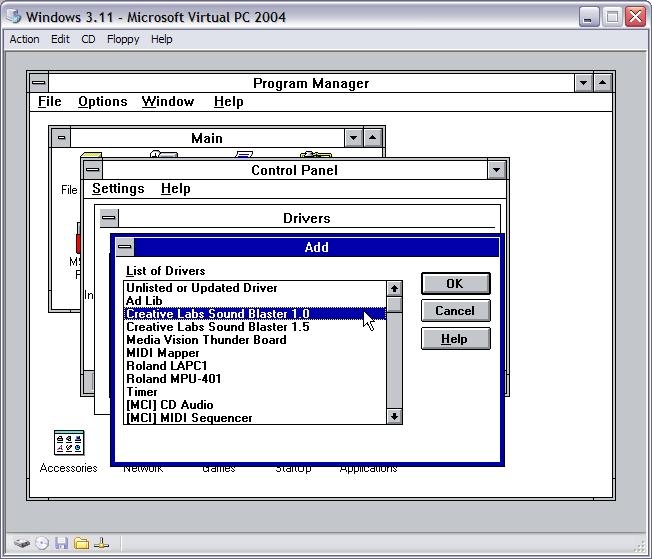
Be sure to check out Tim Sneath's VM Museum - that's where I snarfed the Windows 3.1 VPC picture.
- I always run my VMs on a different spindle:
- I swear by the WDC My Book drives, I've got two at work that we run VMs on and one at home.
- At work, because we're in banking, virtually EVERYTHING is encrypted. If it's not chained down, it's either encrypted, or encrypting. I use TrueCrypt at the Partition-level with AES on my 500gig drives - the ones I run my VMs on, and you'd think it'd cramp my style, but it's actually not all that bad.
- I run VM Optimizer (the automated version) on all my drives.
- I have 4 gigs of RAM on one machine, and 2 gigs on the other...I tend to dedicate between 512M and 768M to my VMs.
- I run my VMs without swap files if I have dedicated enough RAM to them.
- I always make sure my VM is running the latest version of the Virtual PC Additions.
- I turn off features I don't need in the VM. Sound and USB support are often the first to go.
I run both Virtual PC and Virtual Server on my work machine. Why, you ask? Here's my reasoning, from a very good paper comparing Virtual PC and Virtual Server.
- Host multiprocessor support. Virtual Server scales across multiple processors on the host computer—up to 32. Each running virtual machine can take advantage of up to one CPU. For example, on a 32-processor host computer, you could allocate your CPU capacity so that 31 simultaneously running virtual machines would each use up to one CPU, leaving a CPU free for the host operating system.
- Multithreading. Virtual Server 2005 is a multithreaded application that runs as a system service, with each virtual machine running in its own thread of execution. In contrast, Virtual PC is a single-threaded application in which all simultaneously running virtual machines run on the same processor.
- Virtual networking. With Virtual Server, you can create an unlimited number of virtual networks, each with its own virtual Dynamic Host Configuration Protocol (DHCP) server. You can also configure Domain Name System (DNS) and Windows Internet Name Service (WINS) servers, Internet Protocol (IP) addresses, and IP address lease time.
Since I've got a Core Duo machine, this made sense to me. I can dedicate (mostly) a VM to one processor, or more importantly, I can run multiple VMs (often done when doing large demos) and get better performance. When running multiple VMs as a group, you can get better performance by using separate external disks for each VM, and ensuring, if they are USB2, that each disk has its own dedicated USB2 "Root Hub." Avoid during concurrent disk access with two drives on the same USB root hub.
Another interesting feature in both Virtual Server 2005 R2 and Virtual PC 2007 is Hardware Assisted Virtualization or VT Technology. You'll need to turn it on in both apps (Here's how to turn on Hardware Virtualization in Virtual Server).
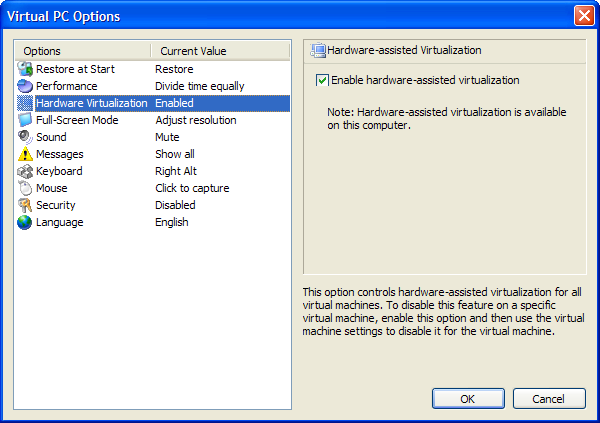
Note the check box. Here's the trick, though. You not only have to have a CPU that supports this - nearly all newer Intels and AMDs - but often you have to turn it on in the BIOs. My IBM T60 and T60p had this turned OFF by default. Another thing to note is that it's often turned off again after BIOs upgrades. I'm not sure why that is, as it seems harmless, but either way, be aware.
If you're running Intel, refer to this table at Intel to see if your chip supports VT. All the Core Duos support VT except the ones that end in "E" like the Intel Core Duo processor T2300E .
Here's some more details about VT from Intel. Since Operating Systems, by their nature and definition, don't expect to have to share physical resources, they tend to get pissy when asked to. Hardware Virtualization moves a bunch of the "platform management" computational tasks off to the hardware, removing a layer of abstraction. Without hardware help, lots of CPU state information is stored in memory, while with virtualization, it's stored in memory that's dedicated. In a data-center or hosted virtual environment that means that you can't take down the whole "Virtual Farm" by taking down the one VM.
So, now the real question is, does Hardware Virtualization actually make things faster?
Yes, of course it does. But for Windows VMs, it's not like "night and day" different. It's not twice as fast, which some folks feel it should, mostly based on the words "Hardware Assisted" and fueled by past pain of running within a slow VM.
Both Virtual PC Guy and John Howard have done some analysis in this area. Before we get to the nitty gritty, let's just drink in these paragraphs from Virtual PC Guy (emphasis mine):
Now - in order to provide improved performance, our Virtual Machine Additions will (on Windows virtual machines) make appropriate changes to the guest operating system such that we can run the virtual machines kernel mode code directly on the processor too (please note that there are some major simplifications in the above statements).
Hardware virtualization support allows us to run all of the virtual machine code directly on the processor in virtualized mode (with a few edge case exceptions). So getting back to the original question - what does this all mean for Virtual Server?
Well the first interesting point to make is that it does not make much difference for people running Windows virtual machines with the Virtual Machine Additions installed. As I mentioned we had already managed to get these virtual machines running almost entirely virtualized (from a processor perspective).
Basically, this jibes with what I found. It's faster, but it's not like WOW faster when running a tuned VM that has Virtual PC Additions - which is what you should be doing anyway. (Some folks haven't discovered those Additions...make sure you've installed them.)
That said, John did an install of Windows Server 2003 on two VMs, on with hardware virtualization and one without:
| Step | With Hardware Assistance (Seconds) | Without Hardware Assistance (Seconds) | Improvement (Seconds/%) |
| 1: Text Mode Install | 236 | 334 | 98s=29% |
| 2: Initial GUI Install | 167 | 287 | 120s=42% |
| 3: GUI Install Completion | 733 | 985 | 252=26% |
| 4: Boot with additions | 10 | 14 | 4=29% |
| * From John Howard's Blog | |||
He's got some nice charts to check out as well.
From my point of view, check a box, get 10-30% performance improvement. Seems good to me.
About Scott
Scott Hanselman is a former professor, former Chief Architect in finance, now speaker, consultant, father, diabetic, and Microsoft employee. He is a failed stand-up comic, a cornrower, and a book author.


About Newsletter


 Tim Heuer gives to the community