Scott Hanselman

A new Console for Windows - It's the open source Windows Terminal

May 02, 2019 Comment on this post [18] Posted in Open Source | Win10
Sponsored By

"My fellow Windows users, our long national nightmare is over." The Windows Terminal is here, it's open source, it's real, and it's spectacular. It's very early days to be clear, but the new Windows Terminal is open source and it's up at https://github.com/microsoft/Terminal for you to check out.

The repository includes

  • Windows Terminal
  • The Windows console host (conhost.exe) - a local copy that is separate from the built-in Windows one. 
  • Components shared between the two projects
  • ColorTool
  • Sample projects that show how to consume the Windows Console API

And even better, it'll be, as they say:

Windows Terminal will be delivered via the Microsoft Store in Windows 10 and will be updated regularly, ensuring you are always up to date and able to enjoy the newest features and latest improvements with minimum effort.

How do you get it? TODAY you clone the repo and build your own copy. There will be early builds in the Store this summer and 1.0 should be out before the end of the year.

As of today, the Windows Terminal and Windows Console have been made open source and you can clone, build, run, and test the code from the repository on GitHub: https://github.com/Microsoft/Terminal

This summer in 2019, Windows Terminal previews will be released to the Microsoft Store for early adopters to use and provide feedback.

This winter in 2019, our goal is to launch Windows Terminal 1.0 and we’ll work with the community to ensure it’s ready before we release!

So today, yes, it'll take some effort if you want to play with it today. But good things are worth a little effort. Here's some of the things I've done to mine. I hope you make your Windows Terminal your own as well!

Windows Terminal

When you click the menu, check out Settings, which will open your profile.json in your JSON editor. I use VS Code to edit. You'll need to run Format Document to make the JSON look nice as today it may show up on one line.

You can create color profiles in the "schemes" node. For example, here's my "UbuntuLegit" color theme in my profiles.json.

{
"name": "UbuntuLegit",
"foreground": "#EEEEEE",
"background": "#2C001E",
"colors": [
"#4E9A06", "#CC0000", "#300A24", "#C4A000",
"#3465A4", "#75507B", "#06989A", "#D3D7CF",
"#555753", "#EF2929", "#8AE234", "#FCE94F",
"#729FCF", "#AD7FA8", "#34E2E2", "#EEEEEE"
]
}

Here's an example profile with all the settings I know about set. This is for "CMD.exe"

"profiles": [
{
"startingDirectory": "C:/Users/Scott/Desktop",
"guid": "{7d04ce37-c00f-43ac-ba47-992cb1393215}",
"name": "DOS but not DOS",
"colorscheme": "Solarized Dark",
"historySize": 9001,
"snapOnInput": true,
"cursorColor": "#00FF00",
"cursorHeight": 25,
"cursorShape": "vintage",
"commandline": "cmd.exe",
"fontFace": "Cascadia Code",
"fontSize": 20,
"acrylicOpacity": 0.85,
"useAcrylic": true,
"closeOnExit": false,
"padding": "0, 0, 0, 0",
"icon": "ms-appdata:///roaming/cmd-32.png"
},

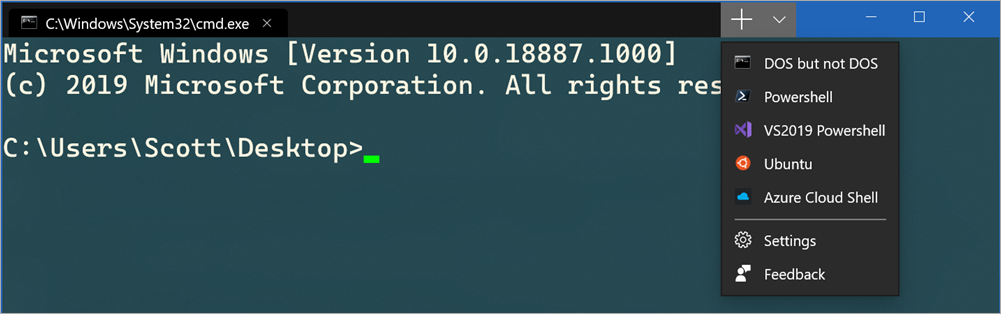
I like the "vintage" cursor and I make it bright green. I can also add icons in this location:

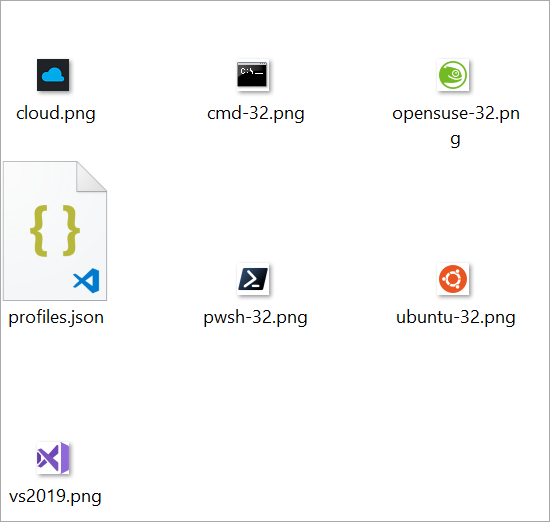
%LOCALAPPDATA%\packages\Microsoft.WindowsTerminal_8wekyb3d8bbwe\RoamingState

So I put some 32x32 PNGs in that folder and then I can reference them as seen above with ms-appdata://

Cool Icons

I'll go into more detail about what's happening in each of these profiles/tabs in the next post! I've got a few creative ideas for taking MY Windows Terminal to the next level.

"defaultProfile": "{7d04ce37-c00f-43ac-ba47-992cb1393215}",
"initialRows": 30,
"initialCols": 120,
"alwaysShowTabs": true,
"showTerminalTitleInTitlebar": true,
"experimental_showTabsInTitlebar": true,
"requestedTheme": "dark",

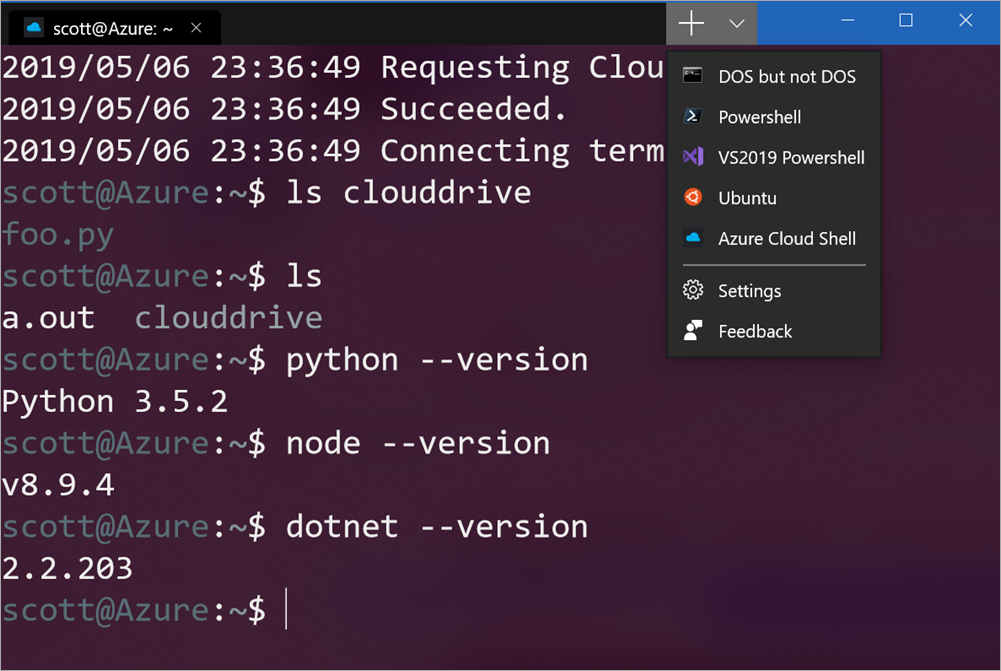
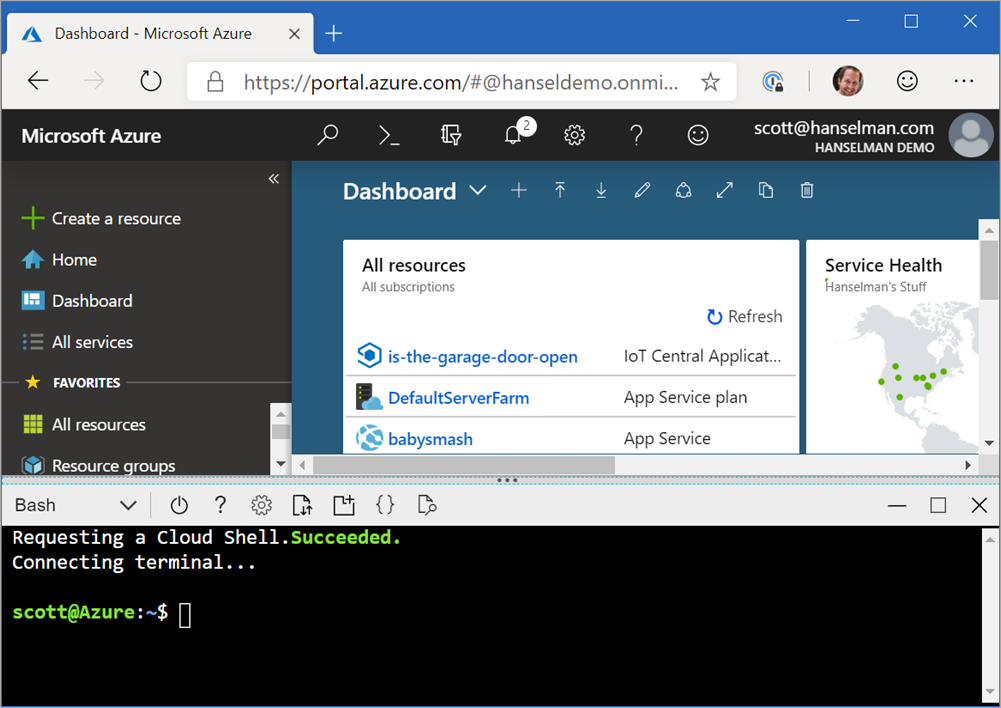
Here I've set the theme to dark using "requestedTheme" even though I run Windows in a light theme. I'm setting the tabs to be shown all the time and moved the tabs into the TitleBar.

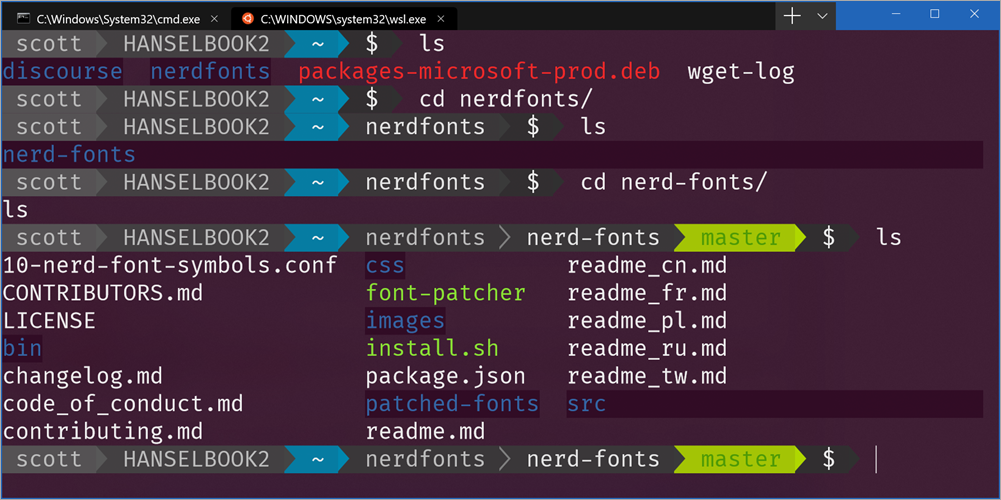
Here's my Ubuntu tab with the UbuntuLegit color theme above:

Nice Ubuntu Colors

Notice I'm also using Powerline in my prompt. I'm using Fira Code which has the glyphs I need but you can certainly use patched Powerline fonts or make your own fonts with tools like those from Nerd Fonts and it's font patcher. This font patcher is often used to take your favorite monospace font and add Powerline glyphs to it.

NOTE: If you see any weird spacing issues with glyphs you might try using --use-single-width-glyphs to work around it. By release all these little issues I assume will be worked out. I had no issues with Fira Code in my case, your mileage may vary.

This new Windows Terminal is great. As mentioned, it's super early days but it's amazingly fast, runs on your GPU (the current conhost runs on your CPU) and it's VERY configurable.


Sponsor: Manage GitHub Pull Requests right from the IDE with the latest JetBrains Rider. An integrated performance profiler on Windows comes to the rescue as well.

About Scott

Scott Hanselman is a former professor, former Chief Architect in finance, now speaker, consultant, father, diabetic, and Microsoft employee. He is a failed stand-up comic, a cornrower, and a book author.

facebook bluesky subscribe
About   Newsletter
Hosting By
Hosted on Linux using .NET in an Azure App Service

Did I leave the garage door open? A no-code project with Azure IoT Central and the MXChip DevKit

April 30, 2019 Comment on this post [10] Posted in Azure | Hardware
Sponsored By

Azure IoT DevKitFor whatever reason when a programmer tries something out for the first time, they write a "Hello World!" application. In the IoT (Internet of Things) world of devices, it's always fun to make an LED blink as a good getting started sample project.

When I'm trying out an IoT platform or tiny microcontroller I have my own "Hello World" project - I try to build a simple system that tells me "Did I leave the garage door open?"

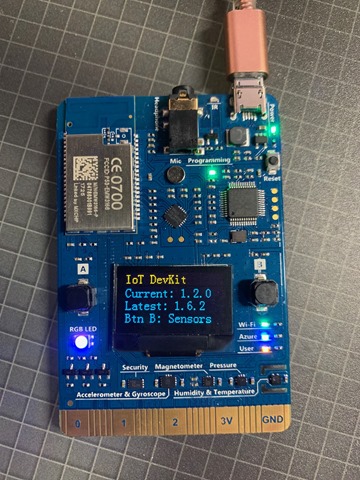
I wanted to see how hard it would be to use an Azure IoT MXChip DevKit to build this little system. The DevKit is small and thin but includes Wifi, OLED display, headphone, microphone, sensors like temperature, humidity, motion, pressure sensors. The kit isn't super expensive given all it does and you can buy it most anywhere. The DevKit is also super easy to update and it's actively developed. In fact, I just updated mine to Firmware 1.6.2 yesterday and there is an Azure IoT Device Workbench Extension for VS Code. There is also a fantastic IoT DevKit Project Catalog you should check out.

I wanted to use this little Arduino friendly device and have it talk to Azure. My goal was to see how quickly and simply I could make a solution that would:

  • Detect if my garage door is open
  • If it's open for more than 4 minutes, text me
  • Later, perhaps I'll figure out how to reply to the Text or take an action to close the door remotely.

However, there is an Azure IoT Hub and there's Azure IoT Central and this was initially confusing to me. It seems that Azure IoT Hub is a individual Azure service but it's not an end-to-end IoT solution - it's a tool in the toolbox. Azure IoT Central, on the other hand, is an browser-based system with templates that is a SaaS (Software as a Service) and hides most of the underlying systems. With IoT Central no coding is needed!

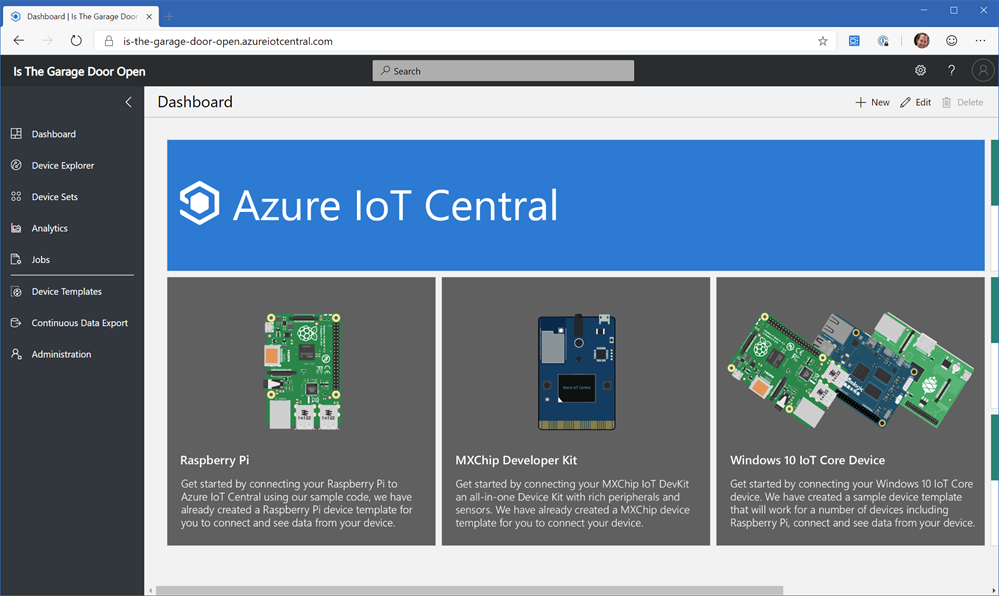
Slick. I was fully prepared to write Arduino code to get this garage door sensor working but if I can do it with no code, rock on. I may finish this before lunch is over. I have an Azure account so I went to https://azureiotcentral.com and created a new Application. I chose Pay as You Go but it's free for the first 5 devices so, swag.

Create a New Azure IoT Central App

You should totally check this out even if you don't have an IoT DevKit because you likely DO have a Raspberry Pi and it totally has device templates for Pis or even Windows 10 IoT Core Devices.

Azure IoT Central

Updating the firmware for the IoT DevKit couldn't be easier. You plug it into a free USB port, it shows up as a disk drive, and you drag in the new (or alternate) firmware. If you're doing something in production you'll likely want to do OTA (Over-the-air) firmware updates with Azure IoT Hub automatic device management, so it's good to know that's also an option. The default DevKit firmware is fun to explore but I am connecting this device to Azure (and my Wifi) so I used the firmware and instructions from here which is firmware specific to Azure IoT Central.

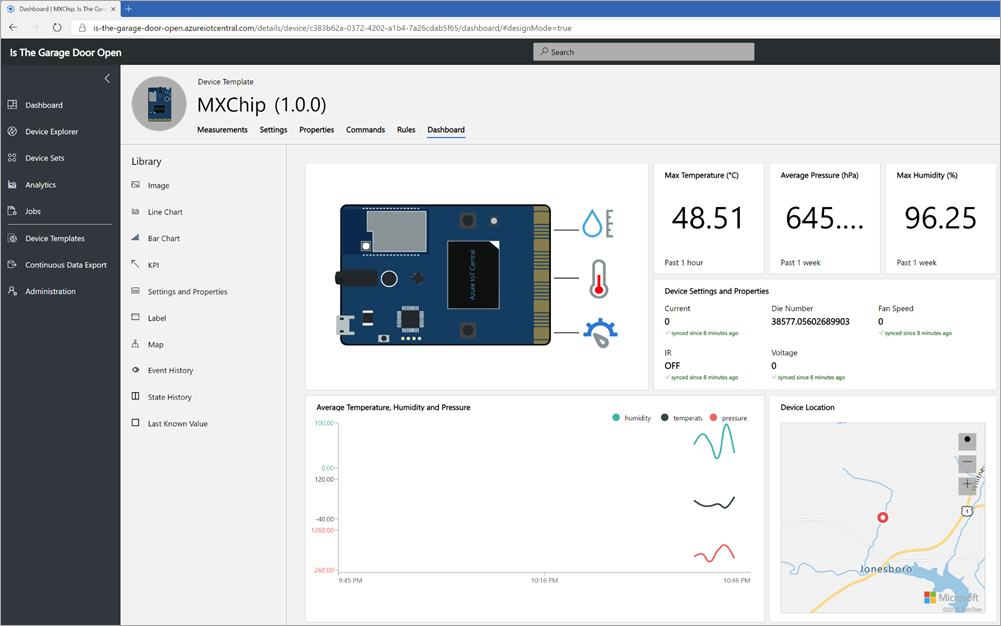
The device reboots as a temporary hotspot (very clever) and then you can connect to it's wifi, and then it'll connect to yours over WPA2. Once you're connected to Wifi, you can add a new Real (or Simulated - you can actually do everything I'm doing where without a real device!) device using a Device ID that you'll pair with your Mxchip IoT DevKit. After it's connect you'll see tons of telemetry pour into Azure. You can, of course, choose what you want to send and send just the least amount your projects needs, but it's still a very cool first experience to see temp, humidity, and on and on from this little device.

MxChip in Azure

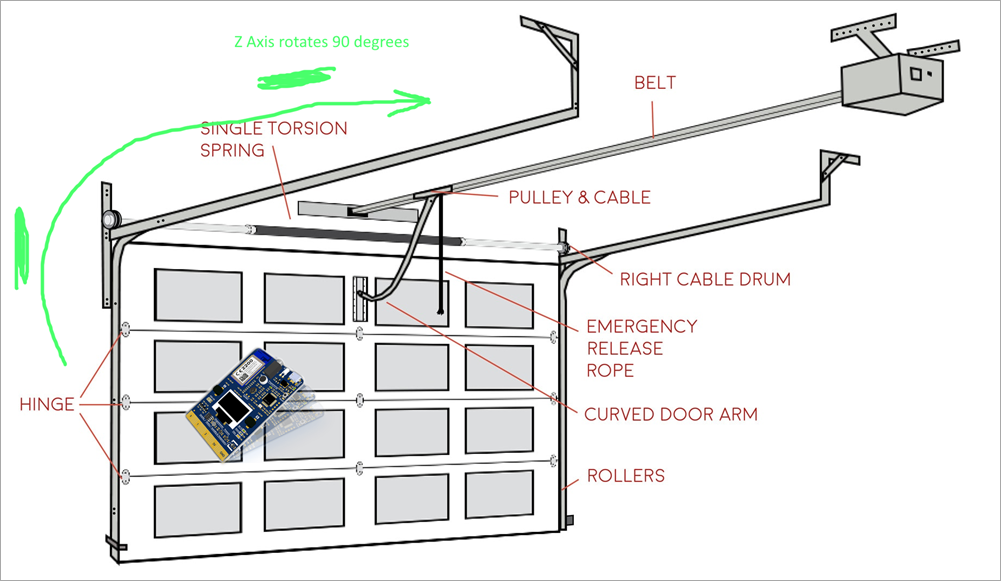
Here's a wonderful HIGH QUALITY diagram of my Garage door planned system. You only wish your specifications were this sophisticated. ;)

Basically the idea is that when the door is closed I'll have the IoT DevKit taped to the door with a battery, then when it open it'll rotate 90 degrees and the Z axis of the Accelerometer will change! If it stays there for more than 5 minutes then it should text me!

image

In Azure IoT central I made a Device Template with a Telemetry Rule that listens to the changes in the accelerometer Z and when the average is less than 900 (I figured this number out by moving it around and testing) then it fires an Action.

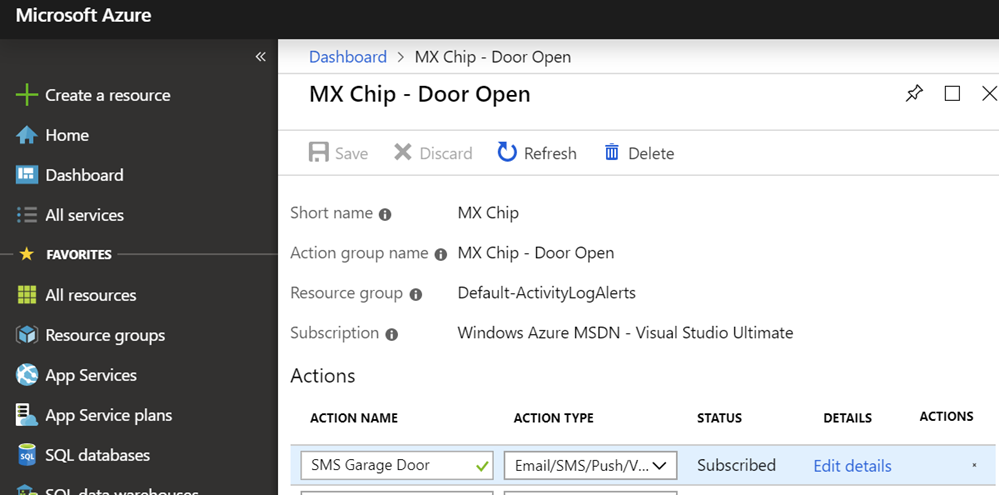
The "Action" is using an Azure Monitor action group that can either SMS or even call me voice!

In this chart when the accelerometer is above the line the garage door is closed and when it drops below the line it's open!

The gyroscope Z changing with time

Here's the Azure Monitoring alert that texts me when I leave the garage door open too long.

Azure Activity Monitor

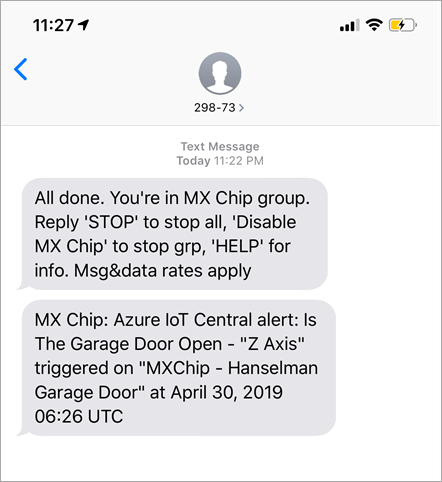
And here's my alert SMS!

mxchip

I was very impressed I didn't have to write any code to pull this off. I'm going to try this same "Hello World" later with custom code using a AdaFruit Huzzah Feather and an ADXL345 Accelerometer. I'll write Arduino C code and still have it talk to Azure for Alerts.

It's amazing how clean and simple the building blocks are for projects like this today.


Sponsor: Manage GitHub Pull Requests right from the IDE with the latest JetBrains Rider. An integrated performance profiler on Windows comes to the rescue as well.

About Scott

Scott Hanselman is a former professor, former Chief Architect in finance, now speaker, consultant, father, diabetic, and Microsoft employee. He is a failed stand-up comic, a cornrower, and a book author.

facebook bluesky subscribe
About   Newsletter
Hosting By
Hosted on Linux using .NET in an Azure App Service

Software Defined Radio is a great way to bridge the physical and the digital and teach STEM

April 25, 2019 Comment on this post [7] Posted in Hardware | Open Source
Sponsored By

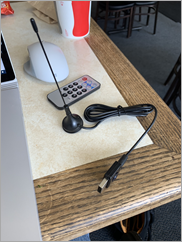
Software Defined Radio AdapterOne of the magical technologies that makes an Open Source Artificial Pancreas possible is "Software-defined Radio" or SDR. I have found that SDR is one of those technologies that you've either heard of and agree it's amazing or you've literally never heard of it. Well, buckle up, friends
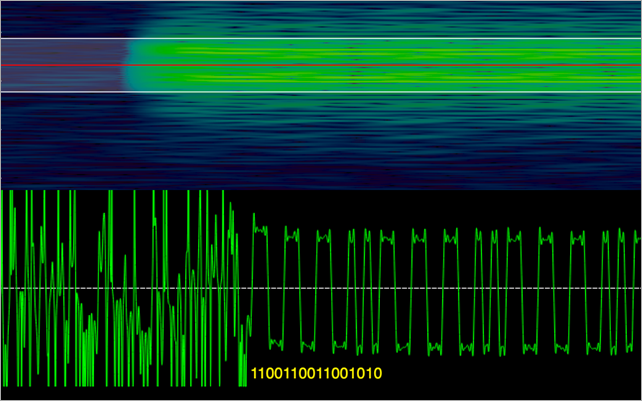
There's an amazing write up by Pete Schwamb, one of the core members of the community who works on Loop full time now, on how Software Defined Radios have allowed the community to "sniff" the communication protocols of insulin pumps in the RF spectrum and reverse engineer the communications for the Medtronic and now Omnipod Eros Insulin Pumps. It's a fascinating read that really illustrates how you just need the right people and a good cause and you can do anything.

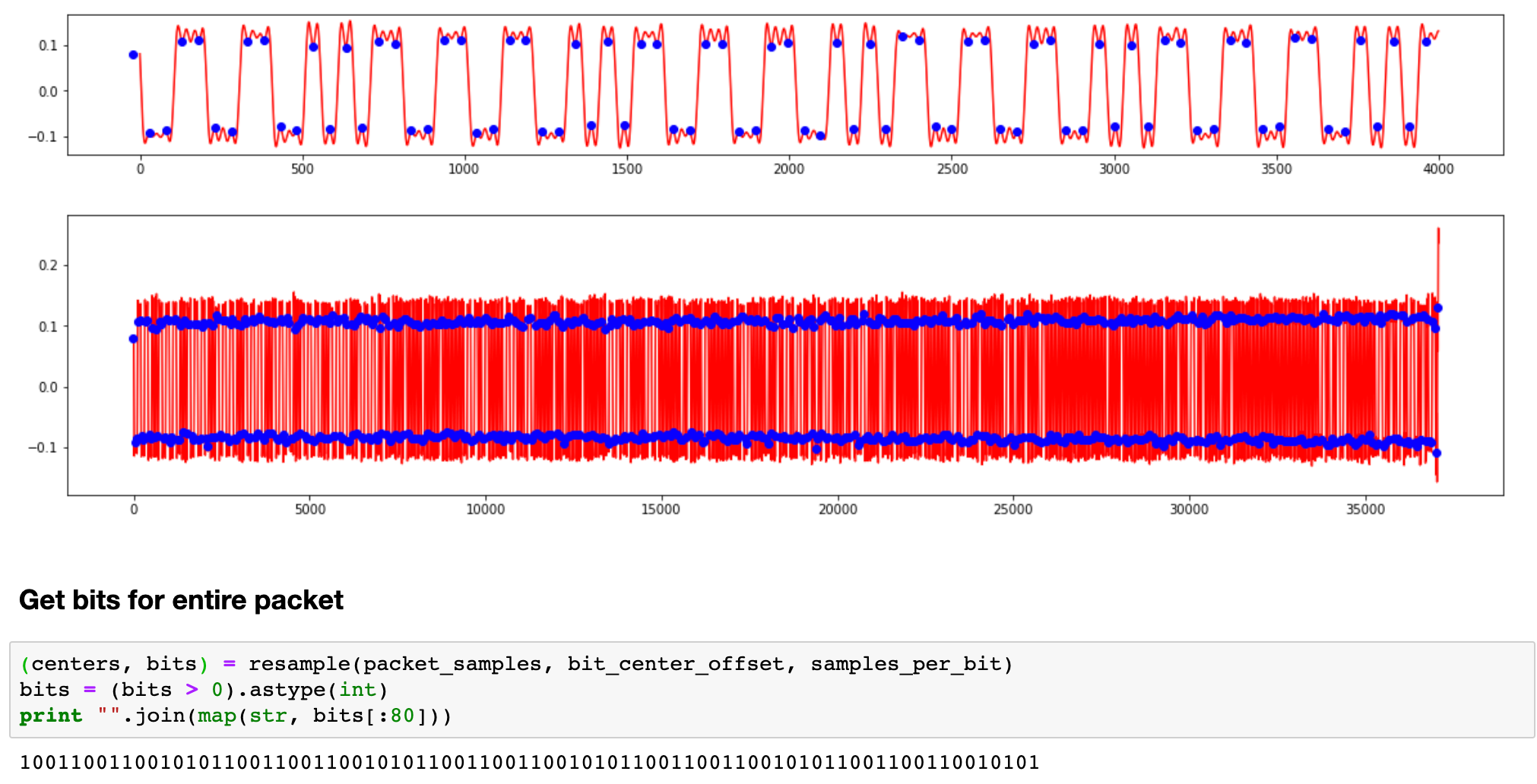
In his post, Pete explains how he configured the SDR attached to his computer to listen into the 433MHz range and capture the RF (radio frequencies) coming to and from an insulin pump. He shows how the shifts between a slightly higher and slightly lower frequency is used to express 1s and 0s, just like a high voltage is a 1 and a low or no voltage is a 0.

Radio Frequency to 1s and 0s

Then he gets a whole "packet," plucks it out of the thin air, and then manipulates it from Python. Insert Major Motion Picture Programmer Montage and a open source pancreas pops out the other side.

1s and 0s from RF into a string in Python

Lemme tell you, Dear Reader, Hello World is nice, but pulling binary data out of electromagnetic radiation with wavelengths in the electromagnetic spectrum longer than infrared light is THE HOTNESS.

From a STEM perspective, SDR is more fun than Console Apps when educating kids about the world and it's a great way to make the abstract REAL while teaching programming and science.

You can get a SDR kit for as little as US$20 as a USB device. They are so simple and small it's hard to believe they work at all.

Just plug it in and download Airspy (Formerly SDRSharp, there are many choices in the SDR space). and run the install-rtlsdr.bat to setup a few drivers.

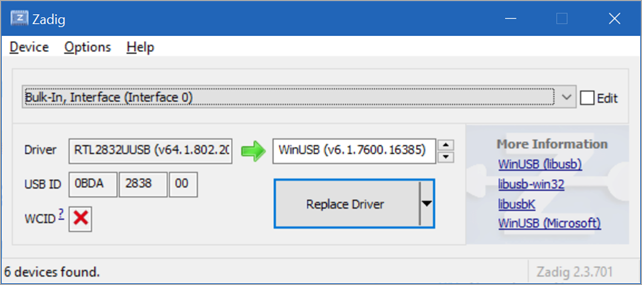
You'll want to run zadig.exe and change the default driver for listening to radio (FM, TV) over to something more low-level. Run it, select "List All Interfaces," and select "Bulk Interface 0"

Updating SDR wtih Zadig

After you hit Replace Driver with WinUSB, you can close this and run SDRSharp.exe.

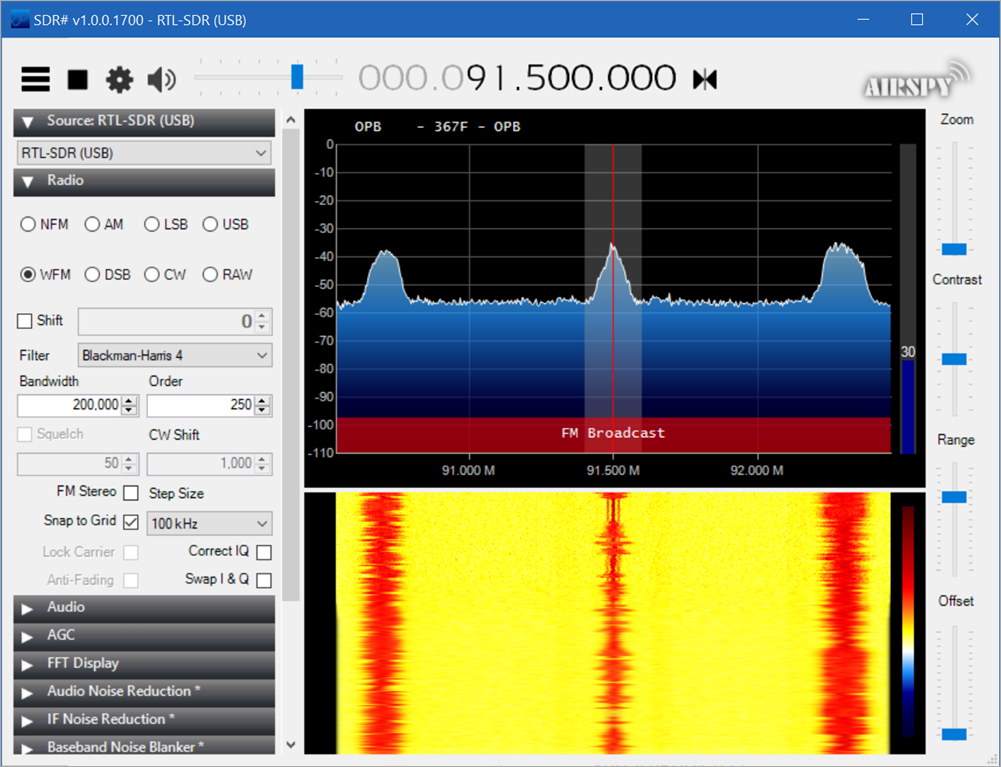
I've set my SDRSharp to WFM (FM Radio) and turned the Gain up and OMG it's the radio.

Listening to the Radio with SDR

In this pic I'm listening to 91.5 FM in Portland, Oregon which is National Public Radio. The news is the center red line moving down, while the far right is 92.3, a rock station, and 90.7 on the far left is more jazz. You can almost see it!

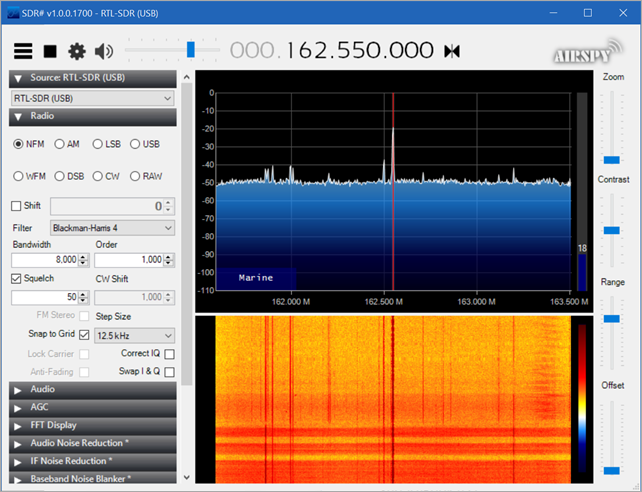
AdaFruit has as great SDR tutorial and I'll use it to find the local station for National Weather Radio. This is the weather alert that is available anywhere here in America. Mine was Narrow Band (WFM) at 162.550 FM! It was harder to hear but it was there when I turned up the gain.

The weather report

But wait, it's more than radio, it's the whole spectrum!

Here I am sending a "Get Pump Model" command to my insulin pump in the 900Mhz range! The meaty part is in the red.

Talking to an Insulin Pump

Here's the heartbeat and requests that are sent to my Insulin Pump from my Loop app through a RileyLink (BT to RF Bridge). I'm seeing the Looping communications of my Open Source Artificial Pancreas here, live.

Watching RF Pump Communications

Next post or two I'll try to get the raw bits off of the RF signal of something interesting. If you haven't messed with SDR you should really give it a try! As I said before you can get a SDR kit for as little as US$20 as a USB device.


Sponsor: Suffering from a lack of clarity around software bugs? Give your customers the experience they deserve and expect with error monitoring from Raygun.com. Installs in minutes, try it today!

About Scott

Scott Hanselman is a former professor, former Chief Architect in finance, now speaker, consultant, father, diabetic, and Microsoft employee. He is a failed stand-up comic, a cornrower, and a book author.

facebook bluesky subscribe
About   Newsletter
Hosting By
Hosted on Linux using .NET in an Azure App Service

Open Source Artificial Pancreases will become the new standard of care for Diabetes in 2019

April 23, 2019 Comment on this post [12] Posted in Diabetes
Sponsored By

Loop is an open source pancreas for iPhoneI've been a Type 1 diabetic for over 25 years. Diabetes sucks. They actually give you an award for staying alive for years on insulin. Diabetics don't usually die of old age, they die of heart disease or stroke, kidney failure, and while they're at it they may go blind, get nerve damage, amputation, and a bunch of other stuff. It used to be a death sentence but when insulin was introduced as a treatment in 1921, there was a chance for something new.

The idea is if you keep your blood sugars close to normal - if you can simulate your non-working pancreas - you'll get hit by an ice cream truck! At least, that's how I hope I go. :)

  • Early on it was boiling big gauge steel needles and pork insulin to dose, and peeing on a stick to get a sense of sugar levels.
  • Then it was a dozen finger pricks a day and a half dozens manual shots with a syringe.
  • Then it was inserted continuous glucose meters and insulin pumps that - while not automatic - mean less invasive treatment and greater control.

Today, we are closing the loop. What's the loop? It's this:

  1. Consider my glucose levels, what I'm about to eat, and what I'm about to to (and dozens of other environmental factors)
  2. Dose myself with insulin
  3. GOTO 1. Every few hours, or every few minutes, depending on the situation.

I do that. Manually. Every diabetic does, and the mental pressure - the intense background psychic weight of it all - is overwhelming. We want to lower the cognitive load of diabetes. This is a disease where you may not live as long if you're not good at math. Literally. That's unfair.

The community is "looping" by allowing an algorithm to make some of those decisions for me.

I've personally been looping with an open source artificial pancreas for over two years. It's night and day from where I started with finger sticks and a half dozen needle sticks a day. It's not perfect, it's not automatic, but Open Source Pancreas are "Tesla autopilot for diabetes." It doesn't always park the car right or stop at every stop light, but it works very hard to keep me in-between the lines and going straight ahead and now that I have it, I can't imagine living without it.

I sleep through the night while my Loop makes tiny adjustments every five minutes to keep my sugars as flat as possible. I don't know about you but my pancreas sits on my nightstand.

It's happening and it can't be stopped

Seven years ago I wrote about The Sad State of Diabetes Technology in 2012. Three years ago The Promising State of Diabetes Technology in 2016 and last year The Extremely Promising State of Diabetes Technology in 2018. There's a great comment from the first blog post in 2012 where Howard Loop shared his frustration with the state of things. Unlike most commenters on the Internet, amazingly Howard took action and started the Tidepool Organization! Everything in his comment from 7 years ago is happening.
Great article, Scott. You've accurately captured the frustration I've felt since my 12 year old daughter was diagnosed with T1D nine months ago. She also wears a pump and CGM and bravely performs the ritual you demonstrate in your video every three days. The technology is so retro it's embarrassing.

It's 2019 and things are really looking up. The open source DIY diabetes community is thriving. There are SEVERAL open pancreas systems to choose from and there's constant innovation happening with OpenAPS and Loop/LoopKit.

  • OpenAPS runs on devices like Raspberry Pi Zeros and is a self-contained pancreas with the communications and brain/algorithm all on the main device.
  • Loop runs on an iPhone and uses a "RileyLink" devices that bridges the RF (Radio Frequency) insulin pump communications with modern Bluetooth.

The first bad part is I am running a 15 year old out of warranty cracked insulin pump I bought on Craigslist. Most new pumps are locked down, and my old pump is the last version that supported remote control. However, the Loop open source project announced support for a second pump this week, the OmniPod Eros. This is the first time an "in warranty" pump has been supported and it also proves the larger point made by the diabetes community. We Are Not Waiting. We want open choice and open data and open choices that put us in control.

Read about the history of Loop by original developer Nate Racklyeft. As he points out, a thing like Loop or OpenAPS is the result of a thousand little steps and innovation by countless community members who are so generous with their time.

The first system to run it was a Raspberry Pi; the code was a series of plugins, written with the help of Chris Hannemann, to the openaps toolkit developed by Ben West in collaboration with Dana Lewis and Scott Leibrand. I’m still in awe of the elegant premise in Ben’s design: a system of repeatable, recordable, and extendable transform commands, all backed by Git. The central plugin of the toolkit is decocare: Ben’s 5-year magnum opus, a reverse-engineered protocol of the Minimed Carelink USB radio to command insulin pumps.

There's an amazing write up by Pete Schwamb, one of the core members of the community who works on Loop full time now,  on how Software Defined Radios have allowed the community to "sniff" the communication protocols of insulin pumps in the RF spectrum and reverse engineer the communications for the Medtronic and now Omnipod Eros Insulin Pumps. It's a fascinating read that really illustrates how you just need the right people and a good cause and you can do anything.

You can watch my video presentation "Solving Diabetes with an Open Source Artificial Pancreas" where I offer an overview of the problem, a number solutions offered over the year, and two open source pancreas options in the form of LoopKit and OpenAPS.

The community members and organizations like Tidepool and the Nightscout Foundation are working with the FDA to take projects and concepts like an open source pancreas system from a threat based on years of frustration to a bright future based on mutual collaboration!

In March, 2018, the FDA announced a de novo iCGM (integrated CGM) designation. A de novo designation is the FDA process for creating new device classifications, in this case moving qualifying CGMs from Class-III, the highest FDA risk classification, to Class-II with Special Controls. The first CGM to get this designation is the Dexcom G6.

Diabetic Xbox AvatarWhat does this mean? It means the FDA is willing to classify continuous glucose meters in a formal way that paves a path towards interoperable devices. Today we hack devices to build these Loops with out-of-warranty pumps. We are doing this utterly on our own. It can take months to collect the equipment needed, get ancient pumps on the gray market, compile the software yourself - which is a huge hurdle for the non-technical.

Imagine a future where someone could buy a supported and in-warranty "iPump," download an officially supported app or package, and start looping! We could have world of open and interoperable devices and swappable algorithms.

In October of 2018 the non-profit Tidepool organization announced its intent to deliver the Loop app as a supported and FDA-regulated mobile app in the Apple App Store! This is happening, people but we are just getting started.

To learn more, start reading.

Also, if you're diabetic, consider buying a Nightscout Xbox Avatar accessory so you can see yourself represented while you game!


Sponsor: Suffering from a lack of clarity around software bugs? Give your customers the experience they deserve and expect with error monitoring from Raygun.com. Installs in minutes, try it today!

About Scott

Scott Hanselman is a former professor, former Chief Architect in finance, now speaker, consultant, father, diabetic, and Microsoft employee. He is a failed stand-up comic, a cornrower, and a book author.

facebook bluesky subscribe
About   Newsletter
Hosting By
Hosted on Linux using .NET in an Azure App Service

Exploring DNS with the .NET Core based Technitium DNS Server

April 18, 2019 Comment on this post [12] Posted in DotNetCore
Sponsored By

Earlier this week I talked about how Your Computer is not a Black Box and I spent some time in TCPView and at the command line exploring open ports on my computer. I was doing this in order to debug an issue with a local DNS server I was playing with, so I thought I'd take a moment and look at that server itself.

The Technitium DNS Server is a personal local DNS server (FOSS on GitHub) written in C# and it runs on Windows, macOS, Linux, Raspberry Pi, etc. I downloaded the Portable app.

For Windows folks who aren't used to .tar.gz files, remember to "eXtract Zie Files!" with "tar -xzvf DnsServerPortable.tar.gz -C ./TechnitiumDNS/" and it's also worth reminding you all that tar.exe, curl.exe, wget.exe and more are all included in Windows 10 and have been since 2017. If that's too hard, use 7zip.

Technitium DNS is pretty cool, you just unzip/tar it and run start.sh or start.bat and it "just works." Of course, I did have a process already on port 53 - DNS - so I did a little debugging, but that was my fault.

Here's the local web UI that you can use to administer the server locally. You can forward to whatever upstream DNS server you'd like, with the added bonus that the forwarder can be DNS over HTTPS so you can use things like CloudFlare, Google, or Cloud9. Using DNS over HTTPS means your DNS lookups can be secured with DNSSEC and are far more secure and private than regular DNS over UDP/TCP.

Technitium also includes support for DNS Sinkholes (similar to how I use my Pi-Hole) and Block List URLs. It'll automatically download block lists daily and block ads.

Technitium is a lovely .NET Core based DNS Server

It's also educational to try running your own DNS server and it's fun to read the code! The code for Technitium's DNS Server is up at https://github.com/TechnitiumSoftware/DnsServer and is super interesting from a networking perspective, but also from an C# perspective. It's a very interesting example of some .NET Core code at a very low level and I'm thrilled that it works on every operating system.

There's even bash scripts for setting Technitium up on your RaspberryPi or Ubuntu to make it easy. If you are using Windows and don't care about .NET Core you can use the .NET that's included with Windows and Technitum has a Tray app and Installer as well.

Some of the code isn't "idiomatic" C#/.NET Core but it's interesting to read about. The main DnsWebService.cs is pretty intense as it doesn't use any ASP.NET Core routing or primitives. It's a complete webserver written using only System.Net and its own support libraries, along with some of the lower-level Newtonsoft.Json libraries.

The main DnsServer is also quite low level and very performant. It lives in DnsServer.cs. It opens up n sockets (depending on how many ports you bind to) and starts accepting connections here. DNS Datagrams start getting parsed here, right off the stream. The supporting libraries and networking helper code lives over at https://github.com/TechnitiumSoftware/TechnitiumLibrary which is a wealth of interesting and useful code covering BitTorrent, Mail, and Firewall management. There's a ton of OO representations of networking concepts, and all the DNS records are parsed manually.

Technitium has a DNS Server, client, Mac Address Changer, and open source instant messenger. The developer is extremely prolific. They even host a version of "Get HTTPS for free" that works with Windows and makes getting Let's Encrypt certificates super easy.

Anyway, I've been enjoying exploring DNS again and reminding myself not only that it still works great (since I learned about DNS from sniffing packets in networking class) and it's been updated and improved with caches, DNSSEC, DNS over HTTP and more in the years following.

Here I've set my IPv4 DNS to 127.0.0.1 and my IPv6 DNS to ::1, then I run NSLookup and try some domain lookups.

Looking up domains at the command line with nslookup

Again, to be clear, the local DNS server took these lookups and then forwarded them upstream to another server. However, you have the choice for your upstream lookups to be done over whatever protocols you want, you can use Google, OpenDNS, Quad9 (with DNSSEC or without), and on and on.

Are you running your own DNS Server?


Sponsor: Manage GitHub Pull Requests right from the IDE with the latest JetBrains Rider. An integrated performance profiler on Windows comes to the rescue as well.

About Scott

Scott Hanselman is a former professor, former Chief Architect in finance, now speaker, consultant, father, diabetic, and Microsoft employee. He is a failed stand-up comic, a cornrower, and a book author.

facebook bluesky subscribe
About   Newsletter
Hosting By
Hosted on Linux using .NET in an Azure App Service

Disclaimer: The opinions expressed herein are my own personal opinions and do not represent my employer's view in any way.