Scott Hanselman

Adventures in Debugging - Expensive Semicolons and Invalid GIFs

August 10, 2005 Comment on this post [13] Posted in Bugs
Sponsored By

Ah, yes crazy bugs, they are my life. Here's today's saga. We did this from 9:30am until lunch, so we were able to figure it out in about two and half hours.

One of our systems retrieves Check Images (pictures of cleared checks). The Checks move through the system as Base64'ed strings and are eventually the separate front and back checks are displayed in the user's browser as a single image using a dynamic compositing technique I mentioned a while back.

However, it seemed that when we took the decoded from BASE64 schmutz and did basically this to convert the GIF to a JPEG:

using(MemoryStream m = new MemoryStream(bytes))
{
    using (System.Drawing.Image image = System.Drawing.Image.FromStream(m))
    {
        Response.ContentType = "image/jpeg";
        image.Save(Response.OutputStream,ImageFormat.Jpeg);    
    }
}

We'd get an error from the bowels of System.Drawing that there was an "invalid parameter." Reflectoring showed that Image.FromStream is managed spackle over a GDI+ method.

[DllImport("gdiplus.dll", CharSet=CharSet.Unicode, ExactSpelling=true)]
internal static extern int GdipLoadImageFromStreamICM(UnsafeNativeMethods.IStream stream, out IntPtr image);
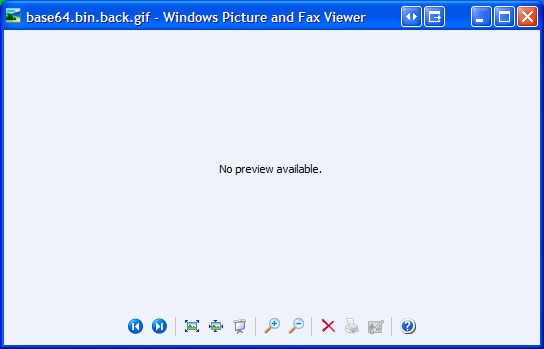
You may remember that there was a GDI+ crackdown recently (that continues today) so I wondered aloud if the file was corrupted in some way and GDI+ was being conservative. Loading the file into Windows Picture and Fax Viewer gave me this - bupkes (??????).

Badgif

I tried loading it into a number of picture viewers, most of which said nope. Surprisingly, IE didn't have a problem with it. This is odd to me because I thought the GDI+ security fixes would apply to IE, but not so.  

Goodgif

To review - I've got a weird GIF that shows up in IE, but that .NET and GDI+ refuse to recognize. I could look for other image libraries that would "clean" the GIFs but that's reaching. The mainframe/host system that generates and holds these GIF isn't likely to change, and even if it did it wouldn't be fast enough for this implementation.

We could just pass it all the way through the system unmolested as the GIF that it is. This would WORK but only until browsers like IE became more security aware and started slapping down invalid GIFs like this one.

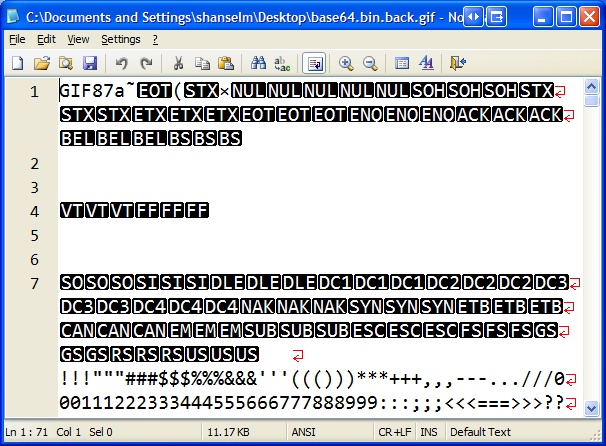
So, these GIFs are invalid. But how? As with all things for me, I begin with Notepad2. I opened a bad example check image into Notepad2:

Badgifinnotepad2

First I notice that it's a GIF87a. Noteworthy only like an old piece of gray paper from Kindergarten is noteworthy. Then we (Patrick and I - at this point I've drafted him) notice that the alphabet and numbers appears a hundred bytes in. We figured that's the color table as they are triplets and this is a grayscale gif of 128 colors. But, without getting all 0xHex-y this early on, what else can I do to determine if this is a valid GIF or not? Well, I got it to display in IE before. I'll copy it (now a bitmap) to the clipboard and save it as a GIF. It'll likely save as a GIF89 because, hey, it's like 2 better, right?

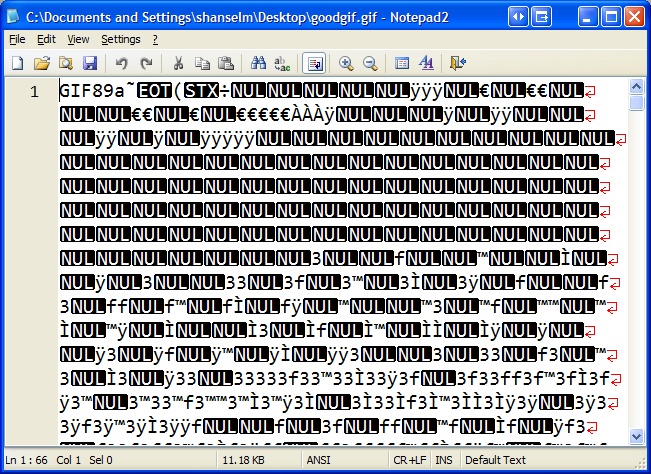
Goodgifinnotepad2

Here's the same graphic saved again. Ya, it looks totally different, so you assume my copy/paste was an invalid thing to do (in the scientific method sense). Well, hang in there, it gets worse. It's clearly a GIF89a and it clearly has a different color table. Otherwise, nothing here jumps out when comparing them with our eyes.

At this point, it's time to bite the bullet and decode the GIF header. We figure a GIF can be corrupt in two ways, either the header is bogus or the image data is. We'll do the easy one first. Time to pull out the June 15th, 1987 GIF spec from Compuserve.

Working structure by structure we produced this little nugget of uselessness:

    using (FileStream f = File.Open(@"C:\Documents and Settings\shanselm\Desktop\bad.gif",FileMode.Open))
    //using (FileStream f = File.Open(@"C:\Documents and Settings\shanselm\Desktop\good.gif",FileMode.Open))
    {
        using(BinaryReader reader = new BinaryReader(f))
        {
            string sigversion = new string(reader.ReadChars(6));
            if (sigversion.StartsWith("GIF"))
            {
                ushort width = reader.ReadUInt16();
                ushort height = reader.ReadUInt16();
 
                byte someshit = reader.ReadByte();
                int colortable = someshit & 0x7;
 
                byte bgcolor = reader.ReadByte();
                byte apsectratio = reader.ReadByte();
 
                int logicallength = (int)Math.Pow(2,colortable+1);
                int colortablelength = (int)(3 * logicallength);
 
                //Color table, yuck. RGB is a struct elsewhere in our file.
                // It's a value type, that's why we poke it back in at the bottom of the loop.
                RGB[] RGBs = new RGB[logicallength];
                for (int i = 0; i < logicallength; i++)
                {
                    RGB rgb = RGBs[i];
                    rgb.R = reader.ReadByte();
                    rgb.G = reader.ReadByte();
                    rgb.B = reader.ReadByte();
                    RGBs[i] = rgb;
                }
 
                //Image Descriptor
                byte imageseparator = reader.ReadByte();
                uint leftpos = reader.ReadUInt16();
                uint toppos = reader.ReadUInt16();
                uint widthagain = reader.ReadUInt16();
                uint heightagain = reader.ReadUInt16();
                byte localcolortableflags = reader.ReadByte();
 
                int localcolortablepresent = localcolortableflags & 0x80;
                int interlace = localcolortableflags & 0x40;
                int sortbit = localcolortableflags & 0x20;
                int localcolortable = localcolortableflags & 0x07;
 
                //We figured if the header was bad we'd mess with it in this process somewhere
                // then if we fixed it in the byte[], we'd fall through to the code below
                // that previously hadn't worked. If Image.FromStream did work, we'd have fixed the bug
                // Of course, we got all the way here and there wasn't anything wrong with the GIF header!            
            }
        }
 
        using (MemoryStream m = new MemoryStream(bytes))
        {
            using (Image image = Image.FromStream(m))
            {
                image.Save("foo.jpg",ImageFormat.Jpeg);
            }                    
        }   

Well, crap. We made it all this way and there didn't appear to be ANYTHING (per spec) wrong with the GIF header. We checked everything out in the Watch Window line by line. Nothing.

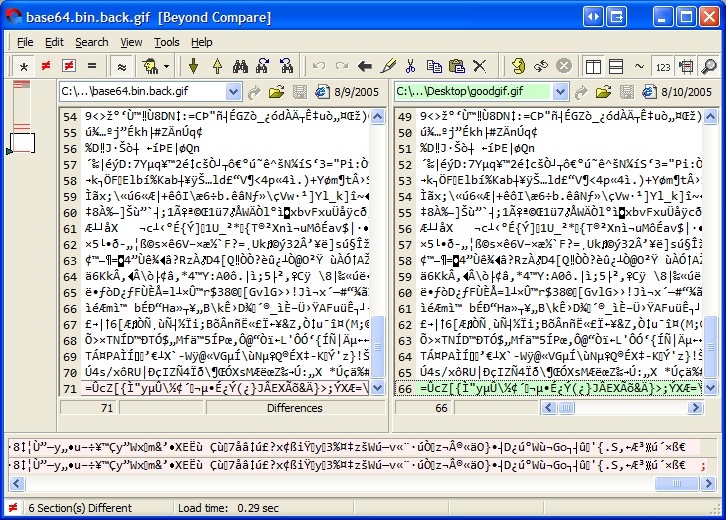
Ok, back to differences. How about checking them out in Beyond Compare?

Gifsinbc

Zoom in on that baby. Look real close. Notice in the upper left corner, there's not many differences. Remember that the old GIF87 is on the left, and the new one that I made via COPY/PASTE is on the right. The basic image data is the same, cool. So, really the only differences are the header, a byte or two in the middle, and what? What's that at the VERY BOTTOM RIGHT CORNER? A semicolon? In the valid image? WTF is that?

Hm...back to the spec. Since we've just decoded the header, perhaps there's a footer/trailer/terminator.

June 15, 1987

(c) CompuServe Incorporated, 1987

 GIF TERMINATOR

In order to provide a synchronization for the termination of a GIF

   image  file,  a  GIF  decoder  will process the end of GIF mode when the

   character 0x3B hex or ';' is found after an image  has  been  processed.

   By  convention  the decoding software will pause and wait for an action

Lovely. Do we have an off-by-one? Are we dropping the last byte as we go through the system?

We go back to the system that sites just ahead of the mainframe check imager and request an image. We look at the byte array returned, and notice that the LAST BYTE IS MISSING. The images are trasmitted on a secure internal network using HTTP. The Content/Type is image/gif and the Content-Length HTTP Header, in this case, was 20814. That was exactly how many bytes were received.

So here's the question (that hasn't been answered):

Is it more likely that the host system has or is generating bogus/bad/invalid GIFs or that the Content-Length HTTP Header being returned by their unknown kind of Web Server is off by one and System.Net.HttpWebRequest is trusting what it's being told? I vote bogus GIFs, Patrick thinks bad Content-Length. Not sure if we'll ever know.

The fix, of course, was to check if the byte array representing this kind of GIF is terminated with 0x3b or not, and if not, append it. Once 0x3b was appended, System.Drawing and GDI+ had NO problem with the bytes.

Crisis averted. Chao continues.

About Scott

Scott Hanselman is a former professor, former Chief Architect in finance, now speaker, consultant, father, diabetic, and Microsoft employee. He is a failed stand-up comic, a cornrower, and a book author.

facebook bluesky subscribe
About   Newsletter
Hosting By
Hosted on Linux using .NET in an Azure App Service

DasBlog Gold release soon...SourceForge CVS is down

August 09, 2005 Comment on this post [2] Posted in DasBlog
Sponsored By

FYI, we were going to release DasBlog 1.8 Gold today, but SourceForge CVS is down.  My bad for not checking the schedule. We'll release as soon as it opens up.

About Scott

Scott Hanselman is a former professor, former Chief Architect in finance, now speaker, consultant, father, diabetic, and Microsoft employee. He is a failed stand-up comic, a cornrower, and a book author.

facebook bluesky subscribe
About   Newsletter
Hosting By
Hosted on Linux using .NET in an Azure App Service

It's official - FeedDemon is the Bomb

August 07, 2005 Comment on this post [12] Posted in Musings
Sponsored By

Forgetting for the moment that they are the same company, I've just officially moved off Newsgator 2.5 and onto FeedDemon.

Bottom Line: I couldn't handle the Physic Weight of the bold unread [9689] messages in my Aggregrated News folder.

It was making me ill, and ever since I got deeply GTD and reached Zero Email Bounce (ZEB) nirvana in Outlook, I just couldn't have thousands of emails sitting there.

That said, FeedDemon is great - Highly Recommended. I've got it on my work laptop, my home PC and my home laptop. And finally, something that never worked even with (gasp) Newsgator 2.5, items, feeds, and read-status is sync'ed between machines. Happy Day.

I've got three folders, Friends, Tech, and News, and hundreds of feeds. However, it's easy to read them with Newspaper view. It's easy to save stuff with the News Bin. It's easy to watch for keywords with Watches.

Most wanted Feed Demon Feature: RSS Comments Support

I'm still using iTunes for my Podcasting. Haven't quite figured out why I'd use FeedStation. It's not like I'm going to care about any surprise enclosures that may show up. Audio that I want to listen to is easily added to iTunes. We shall see.

Now playing: Kaysha - La Zouk Hooray

About Scott

Scott Hanselman is a former professor, former Chief Architect in finance, now speaker, consultant, father, diabetic, and Microsoft employee. He is a failed stand-up comic, a cornrower, and a book author.

facebook bluesky subscribe
About   Newsletter
Hosting By
Hosted on Linux using .NET in an Azure App Service

Programmatically adding Mime Types to IIS

August 05, 2005 Comment on this post [3] Posted in ASP.NET
Sponsored By

Can you add Mime Types to IIS programmatically? KBs say no: http://support.microsoft.com/kb/q142558/

This VBS will though: (Update: This guy did essentially the same thing!)

Dim LocalMimeMap, MimeMap
Dim ExtensionToAdd, MimeTypeToAdd
Dim i
Const ADS_PROPERTY_UPDATE = 2
Set LocalMimeMap = GetObject("IIS://localhost/MimeMap")
MimeMap = LocalMimeMap.GetEx("MimeMap")
ExtensionToAdd = InputBox("Extension:","IIS") 'TODO Take this from the Command Line
MimeTypeToAdd = InputBox("MIME Type:","IIS") 'TODO Take this from the Command Line
i = UBound(MimeMap)+1
Redim Preserve MimeMap(i) 'Make it bigger and maintain its contents
Set MimeMap(i) = CreateObject("MimeMap") 'Add onto the end
MimeMap(i).Extension = ExtensionToAdd
MimeMap(i).MimeType = MimeTypeToAdd
LocalMimeMap.PutEx ADS_PROPERTY_UPDATE,"MimeMap",MimeMap 'Poke it back in
LocalMimeMap.SetInfo

About Scott

Scott Hanselman is a former professor, former Chief Architect in finance, now speaker, consultant, father, diabetic, and Microsoft employee. He is a failed stand-up comic, a cornrower, and a book author.

facebook bluesky subscribe
About   Newsletter
Hosting By
Hosted on Linux using .NET in an Azure App Service

XmlFragmentWriter - Omiting the Xml Declaration and the XSD and XSI namespaces

August 04, 2005 Comment on this post [12] Posted in ASP.NET | Learning .NET | XmlSerializer
Sponsored By

There' s a pretty nasty XmlFragmentWriter example up on GDN that uses reflection to mess with the internal state of an XmlTextWriter in order to omit the XML declaration. Yikes.

This is an alternate (better) XmlFragmentWriter that's breaks fewer Commandments. It takes code from Sairama, one of our platform engineers at Corillian, to omit the XmlDecl. I took Sai's stuff and added Kzu's xsi/xsd trick to create XML fragments. Here's XmlFragmentWriter.

Given a class (just an example, don't serialize passwords!):

public class AuthenticationInfo

{

    public string Username;

    public string Password;

}

Here's the code and an instance serialized using the standard XmlSerializer. Note the Xml Declaration and the XML schema and instance namespace:

<?xml version="1.0"?>
<AuthenticationInfo
      xmlns:xsd="
http://www.w3.org/2001/XMLSchema
      xmlns:xsi="
http://www.w3.org/2001/XMLSchema-instance">
  <Username>user1</Username>
  <Password>pass1</Password>
</AuthenticationInfo>

Standard XmlSerializer fare: 

AuthenticationInfo a = new AuthenticationInfo();

a.Username = "user1";

a.Password = "pass1";


XmlSerializer x = new XmlSerializer( typeof(AuthenticationInfo));

XmlTextWriter w2 = new XmlTextWriter(@"c:\bar.xml",null);

w2.Formatting = Formatting.Indented;

x.Serialize( w2, a );

w2.Close();

Here's the same object serialized using our XmlFragmentWriter: 

<AuthenticationInfo>
  <Username>user1</Username>
  <Password>pass1</Password>
</AuthenticationInfo>

And here's how it's used:

AuthenticationInfo a = new AuthenticationInfo();

a.Username = "user1";

a.Password = "pass1";


XmlSerializer f = new XmlSerializer( typeof(AuthenticationInfo));

XmlFragmentWriter w = new XmlFragmentWriter(@"c:\foo.xml",null);

w.Formatting = Formatting.Indented;

f.Serialize( w, a );

w.Close();

And here's the XmlFragmentWriter class:

class XmlFragmentWriter : XmlTextWriter

{

    public XmlFragmentWriter(TextWriter w) : base(w){}

    public XmlFragmentWriter(Stream w, Encoding encoding) : base(w, encoding) {}

    public XmlFragmentWriter(string filename, Encoding encoding) :
        base(new FileStream(filename, FileMode.Create, FileAccess.Write, FileShare.None), encoding){}


    bool _skip = false;


    public override void WriteStartAttribute( string prefix, string localName, string ns )

    {

        // STEP 1 - Omits XSD and XSI declarations.

        // From Kzu - http://weblogs.asp.net/cazzu/archive/2004/01/23/62141.aspx

        if ( prefix == "xmlns" && ( localName == "xsd" || localName == "xsi" ) )  

        {

            _skip = true;

            return;

        }

        base.WriteStartAttribute( prefix, localName, ns );

    }


    public override void WriteString( string text )

    {

        if ( _skip ) return;

        base.WriteString( text );

    }


    public override void WriteEndAttribute()

    {

        if ( _skip )

        {

            // Reset the flag, so we keep writing.

            _skip = false;

            return;

        }

        base.WriteEndAttribute();

    }


    public override void WriteStartDocument()

    {

       // STEP 2: Do nothing so we omit the xml declaration.

    }

}

Thanks Kzu and Sairama for giving me these pieces to assemble. I tell you, System.Xml is slick slick slick. Updated with a cleaner solution.

(You can also get rid of the namespaces with another trick but it smells hacky and I don't know what the side effects would be if your document had other namespaces)

Now playing: Akon - Show Out

About Scott

Scott Hanselman is a former professor, former Chief Architect in finance, now speaker, consultant, father, diabetic, and Microsoft employee. He is a failed stand-up comic, a cornrower, and a book author.

facebook bluesky subscribe
About   Newsletter
Hosting By
Hosted on Linux using .NET in an Azure App Service

Disclaimer: The opinions expressed herein are my own personal opinions and do not represent my employer's view in any way.