Ah, crap...

About Scott
Scott Hanselman is a former professor, former Chief Architect in finance, now speaker, consultant, father, diabetic, and Microsoft employee. He is a failed stand-up comic, a cornrower, and a book author.
About Newsletter

Scott Hanselman is a former professor, former Chief Architect in finance, now speaker, consultant, father, diabetic, and Microsoft employee. He is a failed stand-up comic, a cornrower, and a book author.
I was converting some C# 2.0 code for the next Coding4Fun Some Assembly Required to VB.NET. I happened to use an automated C# to VB.NET tool to get me started.
It converted this C# code:
if( (btData - '0') <= 9)
{
receivedChecksum = (byte)((btData - '0') << 4);
}
else
{
receivedChecksum = (byte)((btData - 'A' + 10) << 4);
}
Into this attempt at VB.NET code.
If btData - "0" <= 9 ThenOf course, Machine.Shift.Left (and .Right) doesn't exist. Looks like something that the convertor folks missed? Perhaps they forgot to implement?
At any rate, you can use the standard bit shifting << and >> operators in VB.NET 2.0 like this.
If btData - "0" <= 9 ThenAnd I continue forward...
UPDATED:
You might think that VB.NET would let you use ^= if you can << and >>.
Well, it will compile things like
foo ^= bar
But the ^= operator means Power Of in VB, not Xor as I thought it should. Doh! I'm out of VB.NET practice.
VB.NET folks, I'm sorry, but when it comes down to manipulating raw Bytes, the language sucks.
foo = foo Xor bar
And I continue forward...
Scott Hanselman is a former professor, former Chief Architect in finance, now speaker, consultant, father, diabetic, and Microsoft employee. He is a failed stand-up comic, a cornrower, and a book author.
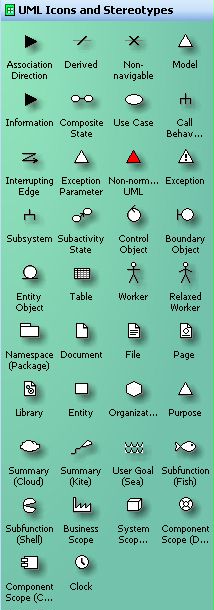
I was out looking for UML Shapes for Microsoft Visio today. I knew I had found them before, but I couldn't find them for the life of me. Chris Brooks reminded me of Pavel Hruby's most excellent Visio Stencil and Template for UML 2.0 downloads.
He's got versions going all the way back to Visio 4.1, and more importantly he's got one for Visio 2003. He offers them as a free service but appreciates donations via PayPal.
Scott Hanselman is a former professor, former Chief Architect in finance, now speaker, consultant, father, diabetic, and Microsoft employee. He is a failed stand-up comic, a cornrower, and a book author.
Not only am I digging GuildWars more than any game since HL2 and Doom3, but I'm really enjoying it with the new ErgoDex DX1 (I mentioned this device last year).
The ErgoDex is, for lack of a better word, a Macro Pad. It's an 8x10 pad that most folks mistake for a Wacom Tablet when they pass by. However, it's got 25 loose (wireless) keys that adhere to its surface. They are kind of RFID-y and have unique numbers (i.e. they are addressable). It ships with keys 1 to 25 and you can buy 26-50 as an accessory. The keys have magic stickum underneath and twist off easily. If they get dirty you can wipe them and the stickum comes back.
Additionally, their user-interface for the recording of macros (single key, multi-key with or without timing and/or key concurrency) is fantastic. I've got lots of gamepads (don't we all) with all sorts of crap interfaces for macros and key bindings. This one just works. You can drag and drop or you can just click the ErgoDex key you want to assign, then the key or keys on the main keyboard it should emulate.
The other sweet thing about it is the ad-hoc macro recorder. There's a hardware button on the pad that starts and stops recording. You can throw temporary macros onto a key, type on the main keyboard, then finish. Subsequent presses on the ErgoDex key play back what you did with timings.
Like any good pad of any kind (mouse, stylus, etc), you can pop off the clear top and put a skin underneath it. Their software includes a shiny manager program that lets you create all sorts of underlays. I haven't had this much fun since I created home-made overlays for my Vectrex.
I've also used my ErgoDex at work along with CodeRush to have one button access to refactoring, class creation, quick navigation and a number of other VS.NET HotKeys.
Why have a pad like this you ask? There's a few simple reasons:
I like the idea of a totally custom controller/keypad for absolutely any reason I like. The ErgoDex also comes with Macro support for all the Microsoft Office apps and it even detects things you've got installed. It automatically set up profiles for FarCry and Doom 3.
I also like the idea of putting the keyboard elsewhere out of site and gaming with just this specialized pad (25 keys that are set up the way I want rather than 101 keys that are set up like a typewriter) and the mouse.
I hate being I/O bound by the hardware I interface to the computer with. I'd like to use pads, mice, voice and pens all at the same time.
Recommended for the serious gamer anyone serious about interfacing with their computer effectively.
UPDATE#1: There's a bootleg RSS Feed for the GuildWars.com site as they don't have one.
Now playing: Black Eyed Peas - Hey Mama
Scott Hanselman is a former professor, former Chief Architect in finance, now speaker, consultant, father, diabetic, and Microsoft employee. He is a failed stand-up comic, a cornrower, and a book author.
I've been a little heads down lately. Sorry about that. I've been slow to blog. However, here's a short list of the things that have been on my mind lately. (Also, I WILL be updating the Ultimate Tools List, but I want to do it justice, so bear with me.)
What has been on my mind this last week, in no particular order:
I will leave you, Dear Reader (both of you) with this. I've got potentially big news coming. I shall leave you to speculate wildly. Discuss.
Scott Hanselman is a former professor, former Chief Architect in finance, now speaker, consultant, father, diabetic, and Microsoft employee. He is a failed stand-up comic, a cornrower, and a book author.
Disclaimer: The opinions expressed herein are my own personal opinions and do not represent my employer's view in any way.