I've had a Nintendo Switch since launch day and let me tell you, it's joyful. Joyous. It's a little joy device. I love 4k Xboxen and raw power as much as the next Jane or Joe Gamer, but the Switch just keeps pumping out happy games. Indie games, Metroidvania games like Axiom Verge, Legend of Zelda: Breath of the Wild (worth the cost of the system) and now, super Mario Odyssey. Even Doom and Wolfenstein 2 are coming to the Switch soon!
I've travelled already with my Switch all over. Here's what I've come up with for my travels - and my at-home Switch Experience. I owe and use these items personally - and I vouch for their awesomeness and utility.
This TaoTronics BlueTooth adapter fixes the most obvious problem with the Switch - no blueooth headset support. If there is ever a Switch 1.5 release, you can bet they'll add Bluetooth. This device is great for a few reasons. It's small, it has its own rechargeable battery, it charges with micro USB, and it supports both transmit and receive. That's an added bonus in that it lets you turn any speakers with a 1/8" headphone jack into a BT speaker. Again, tiny and fits in my Switch case. I pair my Airpods with this device by putting the Airpods into pairing mode by putting the case button, then holding down the pairing button on this adapter, which promiscuously pairs. Works great.
I have a Zelda version of this case. It's very roomy and I can fit a 3rd party stand, a dozen cartridges, BT adapter, headphones, screen wipes, and more inside. There's a number of options and styles past the link, including character cases.
These gel-covers - or ones like them - are essential. The Switch Joy-Cons are great for children's hands, but for normal/larger-sized people they are lacking something. It's not the cover, it's the extra depth these gel covers give you. I can't use the Switch without them.
This is an airplane must. I want to use my Pro Controller one a plane - or at least detached Joy-Cons - so ideally I want to have the Switch stand on its own. The Switch does have its own kickstand, but honestly, it's flimsy. Works when the world isn't moving, but the angle is wrong and it tips over easily on a plane. This playstand folds flat, fits in the case above, and is very adjustable. It also works great to hold your phone or small tablet for watching movies, so it ends up playing double duty. Plus, it's $12.
This one is optional UNLESS you have little kids and Mario Kart. When you're using Switch Joy-Cons as individual controllers, again, they are small. These turn them into tiny Xbox-style controllers. They are plastic holsters, but the kids love them.
This can replace your not-portable Switch Dock. I didn't believe it would work but it's great. I can also fit this tiny Dongle in my Switch Case, and along with an HDMI cable and existing Switch power adapter I can plug the Switch into any hotel TV with HDMI. It's an amazing thing to be able to game in a hotel on a long business trip with minimal stuff to carry.
Another docking option that requires some assembly and disassembly on your part is this Portable Dock. It's not the dock, it's just the plastic shell. You'll need to take apart your existing giant dock and discover it's all air. The internals of the official dock then fit inside this one.
What are YOUR must have Switch Accessories? And more important, WHY HAVE YOU NO BUY SWITCH?
* My blog often uses Amazon affiliate links. I use that money for tacos and switch games. Please click on them and support my blog!
Scott Hanselman is a former professor, former Chief Architect in finance, now speaker, consultant, father, diabetic, and Microsoft employee. He is a failed stand-up comic, a cornrower, and a book author.
There is a great post from Steve Laster in 2016 about optimizing ASP.NET Docker Image sizes. Since then Docker has added multi-stage build files so you can do more in one Dockerfile...which feels like one step even though it's not. Containers are about easy and reliable deployment, and they're also about density. You want to use as little memory as possible, sure, but it also is nice to make them as small as possible so you're not spending time moving them around the network. The size of the image file can also affect startup time for the container. Plus it's just tidy.
I've been building a little 6 node Raspberry Pi (ARM) Kubenetes Cluster on my desk - like you do - this week, and I noticed that my image sizes were a little larger than I'd like. This is a bigger issue because it's a relatively low-powered system, but again, why carry around x unnecessary megabytes if you don't have to?
First I make a basic ASP.NET Core app. I could do a Web API, but this time I'll do an MVC one with Razor Pages. To be clear, they are the same thing just with different starting points. I can always add pages or add JSON to either, later.
For Docker use cases it's easier to change the listening URL with an Environment Variable. Sure, it could be 80, but I like 5000. I'll set the ASPNETCORE_URLS environment variable to http://+:5000 when I make the Dockerfile.
Optimized MultiStage Dockerfile for ASP.NET
There's a number of "right" ways to do this, so you'll want to think about your scenarios. You'll see below that I'm using ARM (because Raspberry Pi) so if you see errors running your container like "qemu: Unsupported syscall: 345" then you're trying to run an ARM image on x86/x64. I'm going to be building an ARM container from Windows but I can't run it here. I have to push it to a container registry and then tell my Raspberry Pi cluster to pull it down and THEN it'll run, over there.
Here's what I have so far. NOTE there are some things commented out, so be conscious. This is/was a learning exercise for me. Don't you copy/paste unless you know what's up! And if there's a mistake, here's a GitHub Gist of my Dockerfile for you to change and improve.
It's important to understand that .NET Core has an SDK with build tools and development kits and compilers and stuff, and then it has a runtime. The runtime doesn't have the "make an app" stuff, it only has the "run an app stuff." There is not currently an SDK for ARM so that's a limitation that we are (somewhat elegantly) working around with the multistage build file. But, even if there WAS an SDK for ARM, we'd still want to use a Dockerfile like this because it's more efficient with space and makes a smaller image.
Let's break this down. There are two stages. The first FROM is the SDK image that builds the code. We're doing the build inside Docker - which is lovely, and great reliable way to do builds.
PRO TIP: Docker is smart about making intermediate images and doing the least work, but it's useful if we (the authors) do the right thing as well to help it out.
For example, see where we COPY the .csproj over and then do a "dotnet restore"? Often you'll see folks do a "COPY . ." and then do a restore. That doesn't allow Docker to detect what's changed and you'll end up paying for the restore on EVERY BUILD.
By making this two steps - copy the project, restore, copy the code, this means your "dotnet restore" intermediate step will be cached by Docker and things will be WAY faster.
After you build, you'll do a publish. If you know the destination like I do (linux-arm) you can do a RID (runtime id) publish that is self-contained with -r linux-arm (or debian, or whatever) and you'll get a complete self-contained version of your app.
Otherwise, you can just publish your app's code and use a .NET Core runtime image to run it. Since I'm using a complete self-contained build for this image, it would be overkill to ALSO include the .NET runtime. If you look at the Docker hub for Microsoft/dotnet You'll see images called "deps" for "dependencies." Those are images that sit on top of debian that include the things .NET needs to run - but not .NET itself.
The stack of images looks generally like this (for example)
FROM debian:stretch
FROM microsoft/dotnet:2.0-runtime-deps
FROM microsoft/dotnet:2.0-runtime
So you have your base image, your dependencies, and your .NET runtime. The SDK image would include even more stuff since it needs to build code. Again, that's why we use that for the "as builder" image and then copy out the results of the compile and put them in another runtime image. You get the best of all worlds.
FROM microsoft/dotnet:2.0-sdk as builder

RUN mkdir -p /root/src/app/aspnetcoreapp
WORKDIR /root/src/app/aspnetcoreapp

#copy just the project file over
# this prevents additional extraneous restores
# and allows us to re-use the intermediate layer
# This only happens again if we change the csproj.
# This means WAY faster builds!
COPY aspnetcoreapp.csproj .
#Because we have a custom nuget.config, copy it in
COPY nuget.config .
RUN dotnet restore ./aspnetcoreapp.csproj

COPY . .
RUN dotnet publish -c release -o published -r linux-arm

#Smaller - Best for apps with self-contained .NETs, as it doesn't include the runtime
#          It has the *dependencies* to run .NET Apps. The .NET runtime image sits on this
FROM microsoft/dotnet:2.0.0-runtime-deps-stretch-arm32v7

#Bigger - Best for apps .NETs that aren't self-contained.
#FROM microsoft/dotnet:2.0.0-runtime-stretch-arm32v7

# These are the non-ARM images.
#FROM microsoft/dotnet:2.0.0-runtime-deps
#FROM microsoft/dotnet:2.0.0-runtime

WORKDIR /root/
COPY --from=builder /root/src/app/aspnetcoreapp/published .
ENV ASPNETCORE_URLS=http://+:5000
EXPOSE 5000/tcp
# This runs your app with the dotnet exe included with the runtime or SDK
#CMD ["dotnet", "./aspnetcoreapp.dll"]
# This runs your self-contained .NET Core app. You built with -r to get this
CMD ["./aspnetcoreapp"]
Notice also that I have a custom nuget.config, so if you do also you'll need to make sure that's available at build time for dotnet restore to pick up all packages.
I've included by commented out a bunch of the FROMs in the second stage. I'm using just the ARM one, but I wanted you to see the others.
Once we have the code we build copied into our runtime image, we set our environment variable so our all listens on port 5000 internally (remember that from above?) Then we run our app. Notice that you can run it with "dotnet foo.dll" if you have the runtime, but if you are like me and using a self-contained build, then you'll just run "foo."
To sum up:
Build with FROM microsoft/dotnet:2.0-sdk as builder
Copy the results out to a runtime
Use the right runtime FROM for you
Right CPU architecture?
Using the .NET Runtime (typical) or using a self-contained build (less so)
Listening on the right port (if a web app)?
Running your app successfully and correctly?
Do you have a .dockerignore? Super important for .NET Builds, as you don't' want to copy over /obj, /bin, etc, but you do want /published. obj/ bin/ !published/
Optimizing a little more
There are a few pre-release "Tree Trimming" tools that can look at your app and remove code and binaries that you are not calling. I included Microsoft.Packaging.Tools.Trimming as well to try it out and get even more unused code out of my final image by just adding a package to my project.
Step 8/14 : RUN dotnet publish -c release -o published -r linux-arm /p:LinkDuringPublish=true
---> Running in 39404479945f
Microsoft (R) Build Engine version 15.4.8.50001 for .NET Core
Copyright (C) Microsoft Corporation. All rights reserved.

  Trimmed 152 out of 347 files for a savings of 20.54 MB
  Final app size is 33.56 MB
  aspnetcoreapp -> /root/src/app/aspnetcoreapp/bin/release/netcoreapp2.0/linux-arm/aspnetcoreapp.dll
  Trimmed 152 out of 347 files for a savings of 20.54 MB
  Final app size is 33.56 MB
If you run docker history on your final image you can see exactly where the size comes from. If/when Microsoft switches from a Debian base image to an Alpine one, this should get even smaller.
C:\Users\scott\Desktop\k8s for pi\aspnetcoreapp>docker history c60
IMAGE               CREATED             CREATED BY                                      SIZE                COMMENT
c6094ca46c3b        3 minutes ago       /bin/sh -c #(nop)  CMD ["dotnet" "./aspnet...   0B
b7dfcf137587        3 minutes ago       /bin/sh -c #(nop)  EXPOSE 5000/tcp              0B
a5ba51b91d9d        3 minutes ago       /bin/sh -c #(nop)  ENV ASPNETCORE_URLS=htt...   0B
8742269735bc        3 minutes ago       /bin/sh -c #(nop) COPY dir:cc64bd3b9bacaeb...   56.5MB
28c008e38973        3 minutes ago       /bin/sh -c #(nop) WORKDIR /root/                0B
4bafd6e2811a        4 hours ago         /bin/sh -c apt-get update     && apt-get i...   45.4MB
<missing>           3 weeks ago         /bin/sh -c #(nop)  CMD ["bash"]                 0B
<missing>           3 weeks ago         /bin/sh -c #(nop) ADD file:8b7cf813a113aa2...   85.7MB
Here is the evolution of my Dockerfile as I made changes and the final result got smaller and smaller. Looks like 45 megs trimmed with a little work or about 20% smaller.
C:\Users\scott\Desktop\k8s for pi\aspnetcoreapp>docker images | find /i "aspnetcoreapp"
shanselman/aspnetcoreapp 0.5  c6094ca46c3b   About a minute ago   188MB
shanselman/aspnetcoreapp 0.4  083bfbdc4e01   12 minutes ago       196MB
shanselman/aspnetcoreapp 0.3  fa053b4ee2b4   About an hour ago    199MB
shanselman/aspnetcoreapp 0.2  ba73f14e29aa   4 hours ago          207MB
shanselman/aspnetcoreapp 0.1  cac2f0e3826c   3 hours ago          233MB
Later I'll do a blog post where I put this standard ASP.NET Core web app into Kubernetes using this YAML description and scale it out on the Raspberry Pi. I'm learning a lot! Thanks to Alex Ellis and Glenn Condron and Jessie Frazelle for their time!
Scott Hanselman is a former professor, former Chief Architect in finance, now speaker, consultant, father, diabetic, and Microsoft employee. He is a failed stand-up comic, a cornrower, and a book author.
First, why would you do this? Why not. It's awesome. It's a learning experience. It's cheaper to get 6 pis than six "real computers." It's somewhat portable. While you can certainly quickly and easily build a Kubernetes Cluster in the cloud within your browser using a Cloud Shell, there's something more visceral about learning it this way, IMHO. Additionally, it's a non-trivial little bit of power you've got here. This is also a great little development cluster for experimenting. I'm very happy with the result.
By the end of this blog post you'll have not just Hello World but you'll have Cloud Native Distributed Containerized RESTful microservice based on ARMv7 w/ k8s Hello World! as a service. (original Tweet). ;)
It's almost the same physical size as a Raspberry Pi, so it fits perfect at the bottom of your stack. It puts out 2.4a per port AND (wait for it) it includes SIX 1ft Micro USB cables...perfect for running 6 Raspberry Pis with a single power adapter.
An overarching goal for this little stack is that it be easy to move around and set up but also to power. We have power to spare, so I'd like to avoid a bunch of "wall warts" or power adapters. This is an 8 port switch that can be powered over a Raspberry Pi's USB. Because I'm given up to 2.4A to each micro USB, I just plugged this hub into one of the Pis and it worked no problem. It's also...wait for it...the size of a Pi. It also include magnets for mounting.
1 - Some Small Router- This one is a little tricky and somewhat optional.
You can just put these Pis on your own Wifi and access them that way, but you need to think about how they get their IP address. Who doles out IPs via DHCP? Static Leases? Static IPs completely?
The root question is - How portable do you want this stack to be? I propose you give them their own address space and their own router that you then use to bridge to other places. Easiest way is with another router (you likely have one lying around, as I did. Could be any router...and remember hub/switch != router.
Here is a bad network diagram that makes the point, I think. The idea is that I should be able to go to a hotel or another place and just plug the little router into whatever external internet is available and the cluster will just work. Again, not needed unless portability matters to you as it does to me.
You could ALSO possibly get this to work with a Travel Router but then the external internet it consumed would be just Wifi and your other clients would get on your network subnet via Wifi as well. I wanted the relative predictability of wired.
What I WISH existed was a small router - similar to that little 8 port hub - that was powered off USB and had an internal and external Ethernet port. This ZyXEL Travel Router is very close...hm...
Optional - Pelican Case if you want portability. I'll see what airport security thinks. O_O
Optional - Tiny Keyboard and Mouse - Raspberry Pis can put out about 500mA per port for mice and keyboards. The number one problem I see with Pis is not giving them enough power and/or then having an external device take too much and then destabilize the system. This little keyboard is also a touchpad mouse and can be used to debug your Pi when you can't get remote access to it. You'll also want an HMDI cable occasionally.
You're Rich - If you have money to burn, get the 7" Touchscreen Display and a Case for it, just to show off htop in color on one of the Pis.
Dodgey Network Diagram
Disclaimer
OK, first things first, a few disclaimers.
The software in this space is moving fast. There's a non-zero chance that some of this software will have a new version out before I finish this blog post. In fact, when I was setting up Kubernetes, I created a few nodes, went to bed for 6 hours, came back and made a few more nodes and a new version had come out. Try to keep track, keep notes, and be aware of what works with what.
Next, I'm just learning this stuff. I may get some of this wrong. While I've built (very) large distributed systems before, my experience with large orchestrators (primarily in banks) was with large proprietary ones in Java, C++, COM, and later in C#, .NET 1.x,2.0, and WCF. It's been really fascinating to see how Kubernetes thinks about these things and comparing it to how we thought about these things in the 90s and very early 2000s. A lot of best practices that were HUGE challenges many years ago are now being codified and soon, I hope, will "just work" for a new generation of developer. At least another full page of my resume is being marked [Obsolete] and I'm here for it. Things change and they are getting better.
Software
Get your Raspberry PIs and SD cards together. Also bookmark and subscribe to Alex Ellis' blog as you're going to find yourself there a lot. He's the author of OpenFaas, which I'll be using today and he's done a LOT of work making this experiment possible. So thank you Alex for being awesome! He has a great post on how Multi-stage Docker files make it possible to effectively use .NET Core on a Raspberry Pi while still building on your main machine. He and I spent a few late nights going around and around to make this easy.
You'll do special stuff for the ONE master/boss node and different stuff for the some number of worker nodes.
ADVANCED TIP! If you know what you're doing Linux-wise, you should save this excellent prep.sh shell script that Alex made, then SKIP to the node-specific instructions below. If you want to learn more, do it step by step.
ALL NODES
Burn Jessie to a SD Card
You're going to want to get a copy of Raspbian Jesse Lite and burn it to your SD Cards with Etcher, which is the only SD Card Burner you need. It's WAY better than the competition and it's open source.
You can also try out Hypriot and their "optimized docker image for Raspberry Pi" but I personally tried to get it working reliably for a two days and went back to Jesse. No disrespect.
Creating an empty file called "ssh" before you put the card in the Raspberry Pi
After ssh'ing into my main node, I used /ifconfig eth0 to figure out what the IP adresss was. Ideally you want this to be static (not changing) or at least a static lease. I logged into my router and set it as a static lease, so my main node ended up being 192.168.170.2, and .1 is the router itself.
Kubernetes uses this admin.conf for a ton of stuff, so you're going to want a copy in your $HOME folder so you can call "kubectl" easily later, copy it and take ownership.
While ssh'ed into the main node - or from any networked machine that has the admin.conf on it - try a few commands.
Here I'm trying "kubectl get nodes" and "kubectl get pods."
Note that I already have some stuff installed, so you'll want try "kubectl get pods --namespace kube-system" to see stuff running. If everything is "Running" then you can finish setting up networking. Kubernetes has fifty-eleven choices for networking and I'm not qualified to pick one. I tried Flannel and gave up and then tried Weave and it just worked. YMMV. Again, double check Alex's Gist if this changes.
kubectl apply -f https://git.io/weave-kube-1.6
At this point you should be ready to run some code!
Hello World...with Markdown
Back to Alex's gist, I'll try this "markdownrender" app. It will take some Markdown and return HTML.
This part can be tricky - it was for me. You need to understand what you're doing here. How do we know the ports? A few ways. First, it's listed as nodePort in the function.yml that represents the desired state of the application.
We can also run "kubectl get svc" and see the ports for various services.
See those ports that are outside:insider? You can get to markdownrender directly from 31118 on an internal IP like localhost, or the main/master IP. Those 10.x.x.x are all software networking, you can not worry about them. See?
pi@hanselboss1:~ $ curl -4 http://10.104.121.82:31118 -d "# test" curl: (7) Failed to connect to 10.104.121.82 port 31118: Network is unreachable
Can we access this cluster from another machine? My Windows laptop, perhaps?
Access your Raspberry Pi Kubernetes Cluster from your Windows Machine (or elsewhere)
I put KubeCtl on my local Windows machine put it in the PATH.
I copied the admin.conf over from my Raspberry Pi. You will likely use scp or WinSCP.
I made a little local batch file like this. I may end up with multiple clusters and I want it easy to switch between them.
SET KUBECONFIG="C:\users\scott\desktop\k8s for pi\admin.conf
Once you have Kubectl on another machine that isn't your Pi, try running "kubectl proxy" and see if you can hit your cluster like this. Remember you'll get weird "Connection refused" if kubectl thinks you're talking to a local cluster.
Here you can get to localhost:8001/api and move around, then you've successfully punched a hole over to your cluster (proxied) and you can treat localhost:8001 as your cluster. So "kubectl proxy" made that possible.
If you have WSL (Windows Subsystem for Linux) - and you should - then you could also do this and TUNNEL to the API. But I'm going to get cert errors and generally get frustrated. However, tunneling like this to other apps from Windows or elsewhere IS super useful. What about the Kubernetes Dashboard?
Pay close attention to that URL! There are several sites out there that may point to older URLs, non ARM dashboard, or use shortened URLs. Make sure you're applying the ARM dashboard. I looked here https://github.com/kubernetes/dashboard/tree/master/src/deploy.
I can access the Kubernetes Dashboard now from my Windows machine at http://localhost:8080 and hit Skip to login.
Do note the Namespace dropdown and think about what you're viewing. There's the kube-system stuff that manages the cluster
Adding OpenFaas and calling a serverless function
Let's go to the next level. We'll install OpenFaas - think Azure Functions or Amazon Lambda, except for your own Docker and Kubernetes cluster. To be clear, OpenFaas is an Application that we will run on Kubernetes, and it will make it easier to run other apps. Then we'll run other stuff on it...just some simple apps like Hello World in Python and .NET Core. OpenFaas is one of several open source "Serverless" solutions.
Do you need to use OpenFaas? No. But if your goal is to write a DoIt() function and put it on your little cluster easily and scale it out, it's pretty fabulous.
Once OpenFaas is installed on your cluster, here's Alex's great instructions on how to setup your first OpenFaas Python function, so give that a try first and test it. Once we've installed that Python function, we can also hit http://192.168.170.2:31112/ui/ (where that's your main Boss/Master's IP) and see it the OpenFaas UI.
OpenFaas and the "faas-netes" we setup above automates the build and deployment of our apps as Docker Images to Kuberetes. It makes the "Developer's Inner Loop" simpler. I'm going to make my .NET app, build, deploy, then change, build, deploy and I want it to "just work" on my cluster. And later, and I want it to scale.
I'm doing .NET Core, and since there is a runtime for .NET Core for Raspberry Pi (and ARM system) but no SDK, I need to do the build on my Windows machine and deploy from there.
Quick Aside: There are docker images for ARM/Raspberry PI for running .NET Core. However, you can't build .NET Core apps (yet?) directly ON the ARM machine. You have to build them on an x86/x64 machine and then get them over to the ARM machine. That can be SCP/FTPing them, or it can be making a docker container and then pushing that new docker image up to a container registry, then telling Kubernetes about that image. K8s (cool abbv) will then bring that ARM image down and run it. The technical trick that Alex and I noticed was of course that since you're building the Docker image on your x86/x64 machine, you can't RUN any stuff on it. You can build the image but you can't run stuff within it. It's an unfortunate limitation for now until there's a .NET Core SDK on ARM.
What's required on my development machine (not my Raspberry Pis?
I'll use the faas-cli to make a new function with charp. I'm calling mine dotnet-ping.
faas-cli new --lang csharp dotnet-ping
I'll edit the FunctionHandler.cs to add a little more. I'd like to know the machine name so I can see the scaling happen when it does.
using System;
using System.Text;

namespace Function
{
    public class FunctionHandler
    {
        public void Handle(string input) {
            Console.WriteLine("Hi your input was: "+ input + " on " + System.Environment.MachineName);
        }
    }
}
Check out the .yml file for your new OpenFaas function. Note the gateway IP should be your main Pi, and the port is 31112 which is OpenFaas.
I also changed the image to include "shanselman/" which is my Docker Hub. You could also use a local Container Registry if you like.
Head over to the ./template/csharp/Dockerfile and we're going to change it. Ordinarily it's fine if you are publishing from x64 to x64 but since we are doing a little dance, we are going to build and publish the .NET apps as linux-arm from our x64 machine, THEN push it, we'll use a multi stage docker file. Change the default Docker file to this:
FROM microsoft/dotnet:2.0-sdk as builder
ENV DOTNET_CLI_TELEMETRY_OPTOUT 1
# Optimize for Docker builder caching by adding projects first.
RUN mkdir -p /root/src/function WORKDIR /root/src/function COPY ./function/Function.csproj .
WORKDIR /root/src/ COPY ./root.csproj . RUN dotnet restore ./root.csproj
COPY . .
RUN dotnet publish -c release -o published -r linux-arm
ADD https://github.com/openfaas/faas/releases/download/0.6.1/fwatchdog-armhf /usr/bin/fwatchdog RUN chmod +x /usr/bin/fwatchdog
FROM microsoft/dotnet:2.0.0-runtime-stretch-arm32v7
Notice a few things. All the RUN commands are above the second FROM where we take the results of the first container and use its output to build the second ARM-based one. We can't RUN stuff because we aren't on ARM, right?
We use the Faas-Cli to build the app, build the docker container, AND publish the result to Kubernetes.
Super cool. I'm going to keep using this little Raspberry Pi Kubernetes Cluster to learn as I get ready to do real K8s in Azure! Thanks to Alex Ellis for his kindness and patience and to Jessie Frazelle for making me love both Windows AND Linux!
* If you like this blog, please do use my Amazon links as they help pay for projects like this! They don't make me rich, but a few dollars here and there can pay for Raspberry Pis!
Sponsor: Check out JetBrains Rider: a new cross-platform .NET IDE. Edit, refactor, test and debug ASP.NET, .NET Framework, .NET Core, Xamarin or Unity applications. Learn more and download a 30-day trial!
About Scott
Scott Hanselman is a former professor, former Chief Architect in finance, now speaker, consultant, father, diabetic, and Microsoft employee. He is a failed stand-up comic, a cornrower, and a book author.
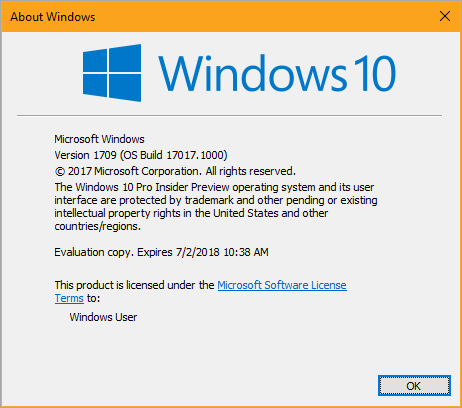
NOTE: I'm not involved with the Windows Team or the Windows Insider Program. This blog is my own and written as a user of Windows. I have no inside information. I will happily correct this blog post if it's incorrect. Remember, don't just do stuff to your computer because you read it on a random blog. Think first, backup always, then do stuff.
Beta testing is always risky. The Windows Insiders Program lets you run regular early builds of Windows 10. There's multiple "rings" like Slow and Fast - depending on your risk tolerance, and bandwidth. I run Fast and maybe twice a year there's something bad-ish that happens like a bad video driver or a app that doesn't work, but it's usually fixed within a week. It's the price I pay for happily testing new stuff. There's the Slow ring which is more stable and updates like once a month vs once a week. That ring is more "baked."
This last week, as I understand it, a nasty bug made it out to Fast for some number of people (not everyone but enough that it sucked) myself included.
I don't reboot my Surface Book much, maybe twice a month, but I did yesterday while preparing for the DevIntersection conference and suddenly my main machine was stuck in a "Repairing Windows" reboot loop. It wouldn't start, wouldn't repair. I was FREAKING out. Other people I've seen report a Green Screen of Death (GSOD/BSOD) loop with an error in volsnap.sys.
TO FIX IT
The goal is to get rid of the bad volsnap from Windows 10 Insiders build version 17017 and replace that one file with a non-broken version from a previous build. That's your goal. There's a few ways to do this, so you need to put some thought into how you want to do it.
NOTE: At the time of this writing, Fast Build 17025 is rolling out and fixes this, so if you can take that build you're cool, and no worries. Do it.
1. Can you boot Windows 10 off something else? USB/DVD?
Can you boot off something else like another version Windows 10 USB key or a DVD? Boot off your recovery media as if you're re-installing Windows 10 BUT DO NOT CLICK INSTALL.
You may need to do special keystrokes to boot off your USB key. On Lenovo it's F2, or F10. On Surfaces it's Power+Volume Down. Go search for "boot off usb MANUFACTURER NAME" for your computer!
When you've run Windows 10 Setup, instead click Repair, then Troubleshoot, then Command Prompt. It's especially important to get to the Command Prompt this way rather than pressing Shift-10 as you enter setup, because this path will allow you to unlock your possibly BitLockered C: drive.
NOTE: If your boot drive is bitlockered you'll need to go to https://onedrive.live.com/RecoveryKey on another machine or your phone and find your computer's Recovery Key. You'll enter this as you press Troubleshoot and it will allow you to access your now-unencrypted drive from the command prompt.
At this point all your drive letters may be weird. Take a moment and look around. Your USB key may be X: or Z:. Your C: drive may be D: or E:.
2. Do you have an earlier version of volsnap.sys? Find it.
If you've been taking Windows Insiders Builds/Flights, you may have a C:\Windows.old folder. Remembering to be conscious of your drive letters, you want to rename the bad volsnap and copy in the old one from elsewhere. In this example, I get it from C:\Windows.old.
Unfortunately, *I* didn't have a C:\windows.old folder as I used Disk Cleanup to get more space. I found a good volsnap.sys from another machine in my house and copied it to the root of the USB key I booted off up. In that case my copy command was different as I copied from my USB key to c:\windows\system32\drivers, but the GOAL was the same - get a good volsnap.sys.
Once I resolved my boot issue, I went to Windows Update and am now updating to 17025.
Here's the rule of three. It's a long time computer-person rule of thumb that you can apply to your life now. It's also called the Backup 3-2-1 rule.
3 copies of anything you care about - Two isn't enough if it's important.
2 different formats - Example: Dropbox+DVDs or Hard Drive+Memory Stick or CD+Crash Plan, or more
1 off-site backup - If the house burns down, how will you get your memories back?
Beta testing will cost you some time, and system crashes happen. But are they a nightmare data loss scenario or are they an irritant. For me this was a scary "can't boot" scenario, but I had another machine and my stuff was backed up.
Don't take beta builds of anything on your primary machine that you care about and that makes you money.
DISCLAIMER: I love you but this blog post has NO warranty. I have no idea what I'm doing and if this makes your non-bootable beta software machine even worse, that's on you, Dear Reader.
Sponsor: Check out JetBrains Rider: a new cross-platform .NET IDE. Edit, refactor, test and debug ASP.NET, .NET Framework, .NET Core, Xamarin or Unity applications. Learn more and download a 30-day trial!
About Scott
Scott Hanselman is a former professor, former Chief Architect in finance, now speaker, consultant, father, diabetic, and Microsoft employee. He is a failed stand-up comic, a cornrower, and a book author.
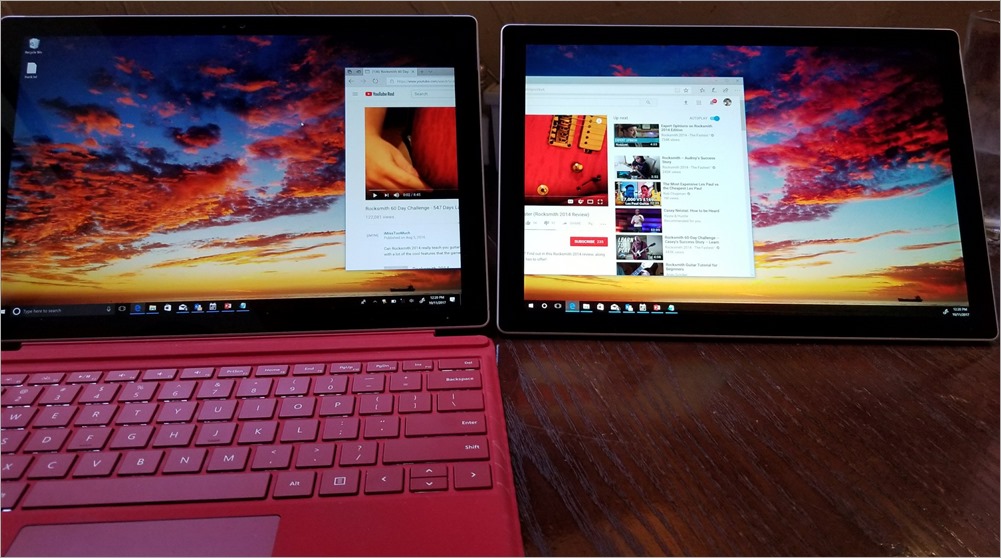
James Clarke from the Windows team rolled into a meeting today with two Surfaces...but one had no keyboard. Then, without any ceremony, he proceeded to do this:
Now, I consider myself a bit of a Windows Productivity Tips Gourmand, and while I was aware of Miracast and the general idea of a Wireless Display, I didn't realize that it worked this well and that it was built into Windows 10.
In fact, I'm literally sitting here in a hotel with a separate USB3 LCD display panel to use as a second monitor. I've also used Duet Display and used my iPad Pro as a second monitor.
I usually travel with a main laptop and a backup laptop anyway. Why do I lug this extra LCD around? Madness. I had this functionality all the time, built in.
Use your second laptop as a second monitor
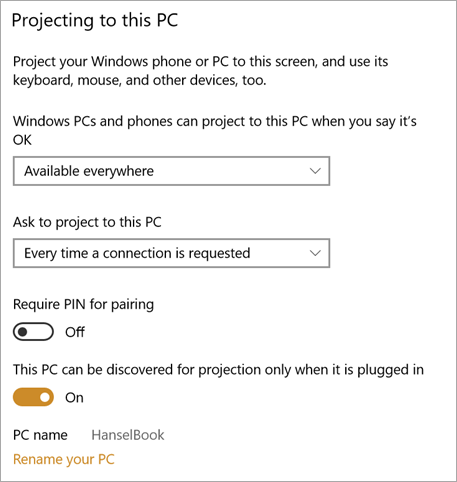
On the machine you want to use as a second monitor, head over to Settings | System | Projecting to this PC and set it up as you like, considering convenience vs. security.
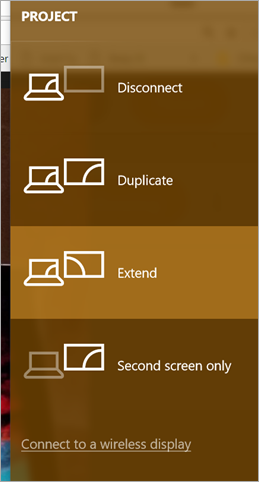
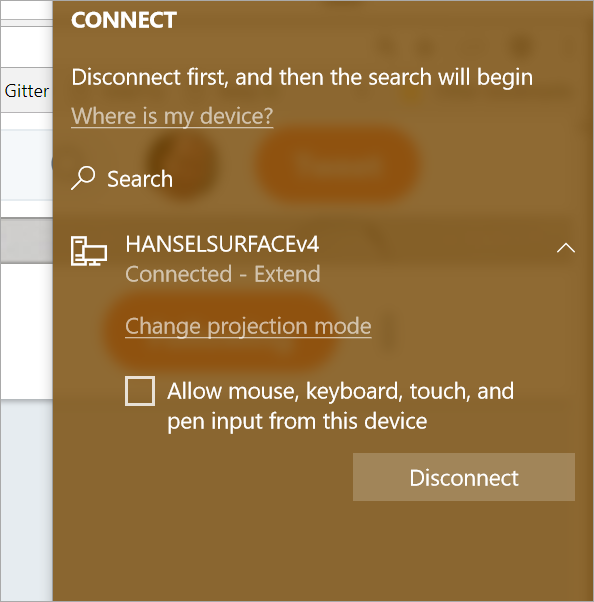
Then, from your main machine - the one you are projecting from - just hit Windows Key+P, like you were projecting to a projector or second display. At the bottom, hit Connect to a Wireless Display.
Then wait a bit as it scans around for your PC. You can extend or duplicate...just like another monitor...
...because Windows thinks it IS another monitor.
You can also do this with Miracast TVs like my LG, or your Roku or sometimes Amazon Fires, or you can get a Microsoft Wireless Display Adapter and HDMI to any monitor - even ones at hotels!
NOTE: It's not super fast. It's sometimes pixelly and sometimes slow, depending on what's going on around you. But I just moved Chrome over onto my other machine and watched a YouTube video, just fine. I wouldn't play a game on it, but browsing, dev, typing, coding, works just fine!
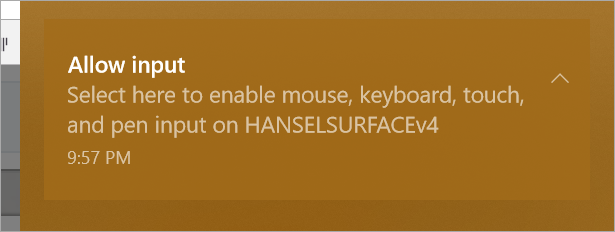
Get ready for this. You can ALSO use the second machine as a second collaboration point! That means that someone else could PAIR with you and also type and move their mouse. THIS makes pair programming VERY interesting.
Give it a try and let me know how it goes. I used two Surfaces, but I also have extended my display to a 3 year old Lenovo without issues.
Sponsor:GdPicture.NET is an all-in-one SDK for WinForms, WPF, and Web development. It supports 100+ formats, including PDF and Office Open XML. Create powerful document imaging, image processing, and document management apps!
About Scott
Scott Hanselman is a former professor, former Chief Architect in finance, now speaker, consultant, father, diabetic, and Microsoft employee. He is a failed stand-up comic, a cornrower, and a book author.



 There is a great post from