Scott Hanselman

Displaying your realtime Blood Glucose from NightScout on an AdaFruit PyPortal

March 28, 2019 Comment on this post [4] Posted in Hardware | Open Source
Sponsored By

file-2AdaFruit makes an adorable tiny little Circuit Python IoT device called the PyPortal that's just about perfect for the kids - and me. It a little dakBoard, if you will - a tiny totally programmable display with Wi-Fi and  lots of possibilities and sensors. Even better, you can just plug it in over USB and edit the code.py file directly on the drive that will appear. When you save code.py the device soft reboots and runs your code.

I've been using Visual Studio Code to program Circuit Python and it's become my most favorite IoT experience so far because it's just so easy. The "Developer's Inner Loop" of code, deploy, debug is so fast.

As you may know, I use a Dexcom CGM (Continuous Glucose Meter) to manage my Type 1 Diabetes. I feed the data every 5 minutes into an instance of the Nightscout Open Source software hosted in Azure. That gives me a REST API to my own body.

I use that REST API to make "glanceable displays" where I - or my family - can see my blood sugar quickly and easily.

I put my blood sugar in places like:

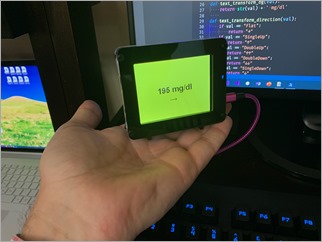
And today, on a tiny PyPortal device. The code is simple, noting that I don't speak Python, so Pull Requests are always appreciated.

import time
import board
from adafruit_pyportal import PyPortal

# Set up where we'll be fetching data from
DATA_SOURCE = "https://NIGHTSCOUTWEBSITE/api/v1/entries.json?count=1"
BG_VALUE = [0, 'sgv']
BG_DIRECTION = [0, 'direction']

RED = 0xFF0000;
ORANGE = 0xFFA500;
YELLOW = 0xFFFF00;
GREEN = 0x00FF00;

def get_bg_color(val):
if val > 200:
return RED
elif val > 150:
return YELLOW
elif val < 60:
return RED
elif val < 80:
return ORANGE
return GREEN

def text_transform_bg(val):
return str(val) + ' mg/dl'

def text_transform_direction(val):
if val == "Flat":
return "→"
if val == "SingleUp":
return "↑"
if val == "DoubleUp":
return "↑↑"
if val == "DoubleDown":
return "↓↓"
if val == "SingleDown":
return "↓"
if val == "FortyFiveDown":
return "→↓"
if val == "FortyFiveUp":
return "→↑"
return val

# the current working directory (where this file is)
cwd = ("/"+__file__).rsplit('/', 1)[0]
pyportal = PyPortal(url=DATA_SOURCE,
json_path=(BG_VALUE, BG_DIRECTION),
status_neopixel=board.NEOPIXEL,
default_bg=0xFFFFFF,
text_font=cwd+"/fonts/Arial-Bold-24-Complete.bdf",
text_position=((90, 120), # VALUE location
(140, 160)), # DIRECTION location
text_color=(0x000000, # sugar text color
0x000000), # direction text color
text_wrap=(35, # characters to wrap for sugar
0), # no wrap for direction
text_maxlen=(180, 30), # max text size for sugar & direction
text_transform=(text_transform_bg,text_transform_direction),
)

# speed up projects with lots of text by preloading the font!
pyportal.preload_font(b'mg/dl012345789');
pyportal.preload_font((0x2191, 0x2192, 0x2193))
#pyportal.preload_font()

while True:
try:
value = pyportal.fetch()
pyportal.set_background(get_bg_color(value[0]))
print("Response is", value)
except RuntimeError as e:
print("Some error occured, retrying! -", e)
time.sleep(180)

I've put the code up at https://github.com/shanselman/NightscoutPyPortal. I want to get (make a custom?) a larger BDF (Bitmap Font) that is about twice the size AND includes 45 degree arrows ↗ and ↘ as the font I have is just 24 point and only includes arrows at 90 degrees. Still, great fun and took just an hour!

NOTE: I used the Chortkeh BDF Font viewer to look at the Bitmap Fonts on Windows. I still need to find a larger 48+ PT Arial.

What information would YOU display on a PyPortal?


Sponsor: Manage GitHub Pull Requests right from the IDE with the latest JetBrains Rider. An integrated performance profiler on Windows comes to the rescue as well.

About Scott

Scott Hanselman is a former professor, former Chief Architect in finance, now speaker, consultant, father, diabetic, and Microsoft employee. He is a failed stand-up comic, a cornrower, and a book author.

facebook bluesky subscribe
About   Newsletter
Hosting By
Hosted on Linux using .NET in an Azure App Service

F7 is the greatest PowerShell hotkey that no one uses any more. We must fix this.

March 26, 2019 Comment on this post [14] Posted in Musings | PowerShell
Sponsored By

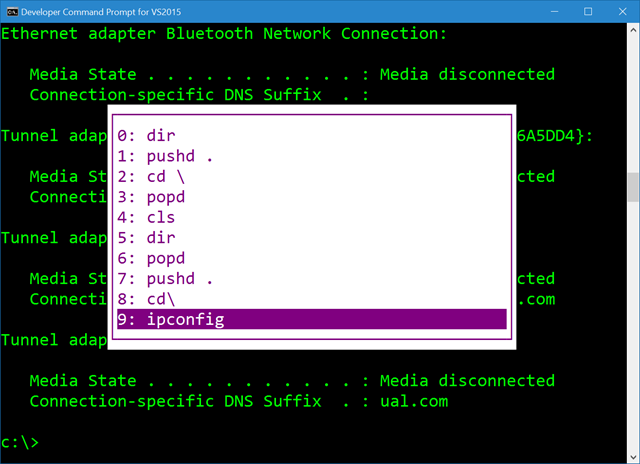
Thousands of years ago your ancestors, and myself, were using DOS (or CMD) pressing F7 to get this amazing little ASCII box to pop up to pick commands they'd typed before.

Holy crap it's a little ASCII box

When I find myself in cmd.exe I use F7 a lot. Yes, I also speak *nix and Yes, Ctrl-R is amazing and lovely and you're awesome for knowing it and Yes, it works in PowerShell.

Ctrl-R for history works in PowerShell

Here's the tragedy. Ctrl-R for a reverse command search works in PowerShell because of a module called PSReadLine. PSReadLine is basically a part of PowerShell now and does dozens of countless little command line editing improvements. It also - not sure why and I'm still learning - unknowingly blocks the glorious F7 hotkey.

If you remove PSReadLine (you can do this safely, it'll just apply to the current session)

Remove-Module -Name PSReadLine

Why, then you get F7 history with a magical ASCII box back in PowerShell. And as we all know, 4k 3D VR be damned, impress me with ASCII if you want a developer's heart.

There is a StackOverflow Answer with a little PowerShell snippet that will popup - wait for it - a graphical list with your command history by calling

Set-PSReadlineKeyHandler -Key F7

And basically rebinding the PSReadlineKeyHandler for F7. PSReadline is brilliant, but I what I really want to do is to tell it to "chill" on F7. I don't want to bind or unbind F7 (it's not bound by default) I just want it passed through.

Until that day, I, and you, can just press Ctrl-R for our reverse history search, or get this sad shadow of an ASCII box by pressing "h." Yes, h is already aliased on your machine to Get-History.

PS C:\Users\scott> h

  Id CommandLine
   -- -----------
    1 dir
    2 Remove-Module -Name PSReadLine

Then you can even type "r 1" to "invoke-history" on item 1.

But I will still mourn my lovely ASCII (High ASCII? ANSI? VT100?) history box.


Sponsor: Manage GitHub Pull Requests right from the IDE with the latest JetBrains Rider. An integrated performance profiler on Windows comes to the rescue as well.

About Scott

Scott Hanselman is a former professor, former Chief Architect in finance, now speaker, consultant, father, diabetic, and Microsoft employee. He is a failed stand-up comic, a cornrower, and a book author.

facebook bluesky subscribe
About   Newsletter
Hosting By
Hosted on Linux using .NET in an Azure App Service

Getting Started with .NET Core and Docker and the Microsoft Container Registry

March 21, 2019 Comment on this post [7] Posted in Docker | DotNetCore
Sponsored By

It's super easy to get started with .NET Core and/or ASP.NET Core with Docker. If you have Docker installed you don't need to install anything to try out .NET Core, of course.

To run a little .NET Core console app:

docker run --rm mcr.microsoft.com/dotnet/core/samples:dotnetapp

And the result:

latest: Pulling from dotnet/core/samples
Hello from .NET Core!
...SNIP...

**Environment**
Platform: .NET Core
OS: Linux 4.9.125-linuxkit #1 SMP Fri Sep 7 08:20:28 UTC 2018

To run a quick little ASP.NET Core website just:

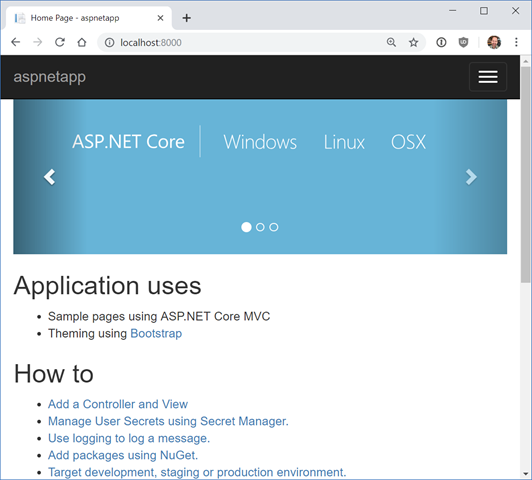
docker run -it --rm -p 8000:80 --name aspnetcore_sample mcr.microsoft.com/dotnet/core/samples:aspnetapp

And here it is running on localhost:8000

Simple ASP.NET Core app under Docker

You can also host ASP.NET Core Images with Docker over HTTPS to with this image, or run ASP.NET Core apps in Windows Containers.

Note that Microsoft teams are now publishing container images to the MCR (Microsoft Container Registry) so they can use the Azure CDN and pull faster when they are closer to you globally. The images start at MCR and then can be syndicated to other container registries.

The new repos follow:

When you "docker pull" you can use tag strings for .NET Core and it works across any supported .NET Core version

  • SDK: docker pull mcr.microsoft.com/dotnet/core/sdk:2.1
  • ASP.NET Core Runtime: docker pull mcr.microsoft.com/dotnet/core/aspnet:2.1
  • .NET Core Runtime: docker pull mcr.microsoft.com/dotnet/core/runtime:2.1
  • .NET Core Runtime Dependencies: docker pull mcr.microsoft.com/dotnet/core/runtime-deps:2.1

For example, I can run the .NET Core 3.0 SDK and mess around with it like this:

docker run -it mcr.microsoft.com/dotnet/core/sdk:3.0 

I've been using Docker to run my unit tests on my podcast site within a container locally. Then I volume mount and dump the test results out in a local folder and inspect them with Visual Studio

docker build --pull --target testrunner -t podcast:test .
docker run --rm -v c:\github\hanselminutes-core\TestResults:/app/hanselminutes.core.tests/TestResults podcast:test

I can then either host the Docker container in Azure App Service for Containers, or as little one-off per-second billed instances with Azure Container Instances (ACI).

Have you been using .NET Core in Docker? How has it been going for you?


Sponsor: Manage GitHub Pull Requests right from the IDE with the latest JetBrains Rider. An integrated performance profiler on Windows comes to the rescue as well.

About Scott

Scott Hanselman is a former professor, former Chief Architect in finance, now speaker, consultant, father, diabetic, and Microsoft employee. He is a failed stand-up comic, a cornrower, and a book author.

facebook bluesky subscribe
About   Newsletter
Hosting By
Hosted on Linux using .NET in an Azure App Service

What is Blazor and what is Razor Components?

March 19, 2019 Comment on this post [28] Posted in ASP.NET | Javascript | Open Source
Sponsored By

I've blogged a little about Blazor, showing examples like Compiling C# to WASM with Mono and Blazor then Debugging .NET Source with Remote Debugging in Chrome DevTools as well as very early on asking questions like .NET and WebAssembly - Is this the future of the front-end?

Let's back up and level-set.

NOTE: This is a great site for learning Blazor! Check out Blazor University!

What is Blazor?

Blazor is a single-page app framework for building interactive client-side Web apps with .NET. Blazor uses open web standards without plugins or code transpilation. Blazor works in all modern web browsers, including mobile browsers.

You write C# in case of JavaScript, and you can use most of the .NET ecosystem of open source libraries. For the most part, if it's .NET Standard, it'll run in the browser. (Of course if you called a Windows API or a Linux specific API and it didn't exist in the client-side browser S world, it's not gonna work, but you get the idea).

The .NET code runs inside the context of WebAssembly. You're running "a .NET" inside your browser on the client-side with no plugins, no Silverlight, Java, Flash, just open web standards.

WebAssembly is a compact bytecode format optimized for fast download and maximum execution speed.

Here's a great diagram from the Blazor docs.

Blazor runs inside your browser, no plugins needed

Here's where it could get a little confusing. Blazor is the client-side hosting model for Razor Components. I can write Razor Components. I can host them on the server or host them on the client with Blazor.

You may have written Razor in the past in .cshtml files, or more recently in .razor files. You can create and share components using Razor - which is a mix of standard C# and standard HTML, and you can host these Razor Components on either the client or the server.

In this diagram from the docs you can see that the Razor Components are running on the Server and SignalR (over Web Sockets, etc) is remoting them and updating the DOM on the client. This doesn't require Web Assembly on the client, the .NET code runs in the .NET Core CLR (Common Language Runtime) and has full compatibility - you can do anything you'd like as you are not longer limited by the browser's sandbox.

Here's Razor Components running on the server

Per the docs:

Razor Components decouples component rendering logic from how UI updates are applied. ASP.NET Core Razor Components in .NET Core 3.0 adds support for hosting Razor Components on the server in an ASP.NET Core app. UI updates are handled over a SignalR connection.

Here's the canonical "click a button update some HTML" example.

@page "/counter"

<h1>Counter</h1>

<p>Current count: @currentCount</p>

<button class="btn btn-primary" onclick="@IncrementCount">Click me</button>

@functions {
int currentCount = 0;

void IncrementCount()
{
currentCount++;
}
}

You can see this running entirely in the browser, with the C# .NET code running on the client side. .NET DLLs (assemblies) are downloaded and executed by the CLR that's been compiled into WASM and running entirely in the context of the browser.

Note also that I'm stopped at a BREAKPOINT in C# code, except the code is running in the browser and mapped back into JS/WASM world.

Debugging Razor Components on the Client Side

But if I host my app on the server as hosted Razor Components, the C# code runs entirely on the Server-side and the client-side DOM is updated over a SignalR link. Here I've clicked the button on the client side and hit the breakpoint on the server-side in Visual Studio. No there's no POST and no POST-back. This isn't WebForms - It's Razor Components. It's a SPA app written in C#, not JavaScript, and I can change the locations of the running logic, while the UI remains always standard HTML and CSS.

Debugging Razor Components on the Server Side

It's a pretty exciting time on the open web. There's a lot of great work happening in this space and I'm very interesting to see how frameworks like Razor Components/Blazor and Phoenix LiveView change (or don't) how we write apps for the web.


Sponsor: Manage GitHub Pull Requests right from the IDE with the latest JetBrains Rider. An integrated performance profiler on Windows comes to the rescue as well.

About Scott

Scott Hanselman is a former professor, former Chief Architect in finance, now speaker, consultant, father, diabetic, and Microsoft employee. He is a failed stand-up comic, a cornrower, and a book author.

facebook bluesky subscribe
About   Newsletter
Hosting By
Hosted on Linux using .NET in an Azure App Service

Xbox Avatar accessories for People with Diabetes! Sponsored by Nightscout and Konsole Kingz

March 14, 2019 Comment on this post [2] Posted in Diabetes | Gaming
Sponsored By

My Xbox user name is Glucose for a reason.

This is a passion project of mine. You've likely seen me blog about diabetes for many many years. You may have enjoyed my diabetes hacks like lighting up my keyboard keys to show me my blood sugar, or some of the early work Ben West and I did to bridge Dexcom's cloud with the NightScout open source diabetes management system.

Recently Xbox announced new avatars! They look amazing and the launch was great. They now have avatars in wheelchairs, ones with artificial limbs, and a wide variety of hair and skin tones. This is fantastic as it allows kids (and adults!) to be seen and be represented in their medium of choice, video games.

I was stoked and immediately searched the store for "diabetes." No results. No pumps, sensors, emotes, needles, nothing. So I decided to fix it.

NOW AVAILABLE: Go and buy the Nightscout Diabetes CGM avatar on the Xbox Store now!

I called two friends - my friends at the Nightscout Foundation, dedicated to open source and open data for people with diabetes, as well as my friends at Konsole Kingz, digital avatar creators extraordinaire with over 200 items in the Xbox store from kicks to jerseys and tattoos.

And we did it! We've added our first diabetes avatar top with some clever coding from Konsole Kingz, it is categorized as a top but gives your avatar not only a Nightscout T-Shirt with your choice of colors, but also a CGM (Continuous Glucose Meter) on your arm!

Miss USA has a CGMFor most diabetics, CGMs are the hardware implants we put in weekly to tell us our blood sugar with minimal finger sticks. They are the most outwardly obvious physical manifestation of our diabetes and we're constantly asked about them. In 2017, Miss USA contestant Krista Ferguson made news by showing her CGM rather than hiding it. This kind of visible representation matters to kids with diabetes - it tells them (and us) that we're OK.

You can find the Nightscout CGM accessory in a nuimber of ways. You can get it online at the Xbox Avatar shop, and when you've bought it, it'll be in the Purchased Tab of the Xbox Avatar Editor, under Closet | Tops.

You can even edit your Xbox Avatar on Windows 10 without an Xbox! Go pick up the Xbox Avatar Editor and install it (on both your PC and Xbox if you like) and you can experiment with shirt and logo color as well.

Consider this a beta release. We are working on improving resolution and quality, but what we really what to know is this - Do you want more Diabetes Xbox Avatar accessories? Insulin pumps on your belt? An emote to check your blood sugar with a finger stick?

Diabetes CGM on an Xbox avatar

If this idea is a good one and is as special to you and your family (and the gamers in your life with diabetes) please SHARE it. Share it on social media, tell your friends at the news. Profits from this avatar item will go to the Nightscout Foundation!


Sponsor: Manage GitHub Pull Requests right from the IDE with the latest JetBrains Rider. An integrated performance profiler on Windows comes to the rescue as well.

About Scott

Scott Hanselman is a former professor, former Chief Architect in finance, now speaker, consultant, father, diabetic, and Microsoft employee. He is a failed stand-up comic, a cornrower, and a book author.

facebook bluesky subscribe
About   Newsletter
Hosting By
Hosted on Linux using .NET in an Azure App Service

Disclaimer: The opinions expressed herein are my own personal opinions and do not represent my employer's view in any way.