Scott Hanselman

Take advantage of the extra resolution

July 01, 2005 Comment on this post [6] Posted in Programming
Sponsored By

A fellow mentioned to me today that the 1900x1280 resolution of his new laptop was getting to him and he was thinking of trading it back in for a laptop with a lower resolution.

When I hear folks say things like this, and lots do, I imagine them in front of the default Windows desktop with the unchanged tiny icons and tiny fonts. I'm surprised that in this time of XGA+ super-wide 16x9 laptops that Dell hasn't thought to click "Use Large Fonts" and make a few other small changes.

Here's a partial screen shot of my 1280x1024 desktop with standard fonts, icons and spacing. There's a lot of pixels there that are NOT working for me.

Before:

Smalliconssmallfonts

Now, here's the same area with Desktop|Properties|Effects|Use Large Icons checked and the default Icon font pumped up a bit. Also I turned on ClearType (and you should to, here, online [IE Only]) which still isn't turned on by default on most laptops.

After:

Largeiconslargefonts

Amazingly, I've even seen folks running their IBM Thinkpad T42s at 1024x768 (on a LCD that supports 1400x1280) because the default settings suck.

I love using Ctrl-MouseWheelScroll and applications that support them. Try it sometime. Try it in Excel or Word or IE or FireFox or Notepad2. Get the VSZoom addin for Visual Studio to zoom in and out on text. Or, just switch to 14 point (instead of 8pt) everywhere and enjoy.

Now, if you are a small font person who loves the extra detail, more power to you. But if you want the kind of space that 1024x768 provides with MAXIMUM clarity, then run your LCD at its native resolution and adjust your fonts by 30% to 40% larger.

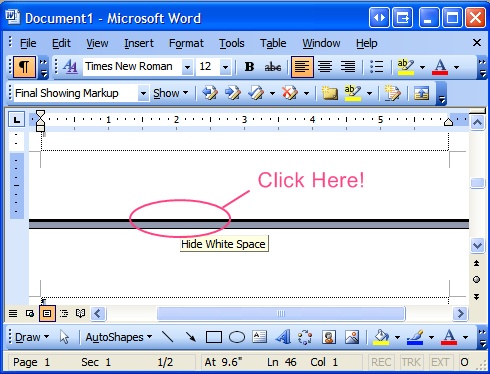
Scott's Final "Presenting with Word" Tip (If you remember one, remember this): If you are presenting a Word Document on a projector - and we all have at one point or the other - even in a small group, do this: Alt-V, then Z, T, Enter. For extra points, do Alt-V, then U for Full Screen. Then click in the gray space between pages to spare us all the bottom and top margins. Do it all in one smooth motion to impress.  

Hidewhitespace

Make the pixels work for you!

Now playing: Counting Crows - American Girls

About Scott

Scott Hanselman is a former professor, former Chief Architect in finance, now speaker, consultant, father, diabetic, and Microsoft employee. He is a failed stand-up comic, a cornrower, and a book author.

facebook bluesky subscribe
About   Newsletter
Hosting By
Hosted on Linux using .NET in an Azure App Service

Podcasting with iTunes 4.9

June 30, 2005 Comment on this post [5] Posted in NDoc
Sponsored By

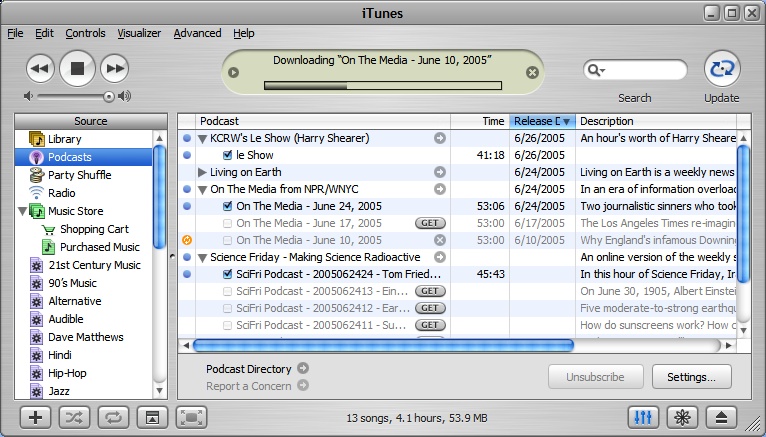
Itunespodcasting1I just updated to iTunes 4.9. I was holding off, since I make backups of with jHymn and it's unclear how that will work in the future. But the podcasting support was too attractive to ignore.

(Yes, I know I said something about Podcastarrhea before, and I stand by that. But RSS Enclosures are a good way to get the content I do want brought to me and sync'ed transparently. And I don't have to wait until 2008 for it.)

I have started riding my (new) bike to work, 5 miles each way (don't laugh, it's hard and somehow uphill both ways!) and while I'm a massive fan of Audible.com and it's brilliant iTunes integration (I'm a "Light Listener" which means $12.95 a month for two books) I'd really like to listen to a few public radio stations on my time.

There's a great list of non-commericial and public radio Podcasts at 43 Folders, and it looks like we can expect big things from NPR very soon around podcasting.

I'd love to subscribe to the many .NET Rocks Podcasts, but iTunes doesn't support BitTorrent and I'm not really interested in being a Torrent repeater. Seems my bandwidth always gets sucked up and I'm always pushing more than I'm pulling. NOTE TO SELF: I'll need to use my Sveasoft QoS support to lower the priority of BitTorrent. I hope .NET Rocks offers a conventional method soon.

About Scott

Scott Hanselman is a former professor, former Chief Architect in finance, now speaker, consultant, father, diabetic, and Microsoft employee. He is a failed stand-up comic, a cornrower, and a book author.

facebook bluesky subscribe
About   Newsletter
Hosting By
Hosted on Linux using .NET in an Azure App Service

Enabling the Security Tab on Windows XP File Properties

June 30, 2005 Comment on this post [2] Posted in ASP.NET | DasBlog
Sponsored By

Sometimes when folks are developing on Windows XP with ASP.NET they think they can't change the security settings (ACLs) for files. This comes up when developing with dasBlog when you have you change file permissions, but also when trying to do anything tricky, like moving your ASP.NET bin folder.

Stephen Venter has a nice write-up on Enabling Windows XP File Permissions explaining the checkboxes and dancing that you have to do to enable the Security Tab in a File's Property Dialog on Windows XP Pro or Home. All this, of course, assumes you're running NTFS as your file system.

About Scott

Scott Hanselman is a former professor, former Chief Architect in finance, now speaker, consultant, father, diabetic, and Microsoft employee. He is a failed stand-up comic, a cornrower, and a book author.

facebook bluesky subscribe
About   Newsletter
Hosting By
Hosted on Linux using .NET in an Azure App Service

25 Rules of Management

June 30, 2005 Comment on this post [4] Posted in Musings
Sponsored By

I've been reading as much as I can on how to be an effective manager lately. For a number of reasons, mostly internal, but also because in a recent lunch Chris Sells said (something like):

"If you're not getting slapped by your boss at least twice a year, you're not pushing the envelope enough."

It was just the little nugget of quasi-wisdom I needed to get thinking about my style. My boss, Chris Brooks, also pointed me to Swanson's Rules. Number 3 looked familiar.

Bill Swanson's '25 Unwritten Rules of Management'
1. Learn to say, "I don't know." If used when appropriate, it will be often.
2. It is easier to get into something than it is to get out of it.
3. If you are not criticized, you may not be doing much.
4. Look for what is missing. Many know how to improve what's there, but few can see what isn't there.
5. Viewgraph rule: When something appears on a viewgraph (an overhead transparency[, or powerpoint]), assume the world knows about it, and deal with it accordingly.
6. Work for a boss with whom you are comfortable telling it like it is. Remember that you can't pick your relatives, but you can pick your boss.
7. Constantly review developments to make sure that the actual benefits are what they are supposed to be. Avoid Newton's Law.
8. However menial and trivial your early assignments may appear, give them your best efforts.
9. Persistence or tenacity is the disposition to persevere in spite of difficulties, discouragement, or indifference. Don't be known as a good starter but a poor finisher.
10. In completing a project, don't wait for others; go after them, and make sure it gets done.
11. Confirm your instructions and the commitments of others in writing. Don't assume it will get done!
12. Don't be timid; speak up. Express yourself, and promote your ideas.
13. Practice shows that those who speak the most knowingly and confidently often end up with the assignment to get it done.
14. Strive for brevity and clarity in oral and written reports.
15. Be extremely careful of the accuracy of your statements.
16. Don't overlook the fact that you are working for a boss.
* Keep him or her informed. Avoid surprises!
* Whatever the boss wants takes top priority.
17. Promises, schedules, and estimates are important instruments in a well-ordered business.
* You must make promises. Don't lean on the often-used phrase, "I can't estimate it because it depends upon many uncertain factors."
18. Never direct a complaint to the top. A serious offense is to "cc" a person's boss.
19. When dealing with outsiders, remember that you represent the company. Be careful of your commitments.
20. Cultivate the habit of "boiling matters down" to the simplest terms. An elevator speech is the best way.
21. Don't get excited in engineering emergencies. Keep your feet on the ground.
22. Cultivate the habit of making quick, clean-cut decisions.
23. When making decisions, the pros are much easier to deal with than the cons. Your boss wants to see the cons also.
24. Don't ever lose your sense of humor.
25. Have fun at what you do. It will reflect in your work. No one likes a grump except another grump. 
 
[from Swanson's Rules]

About Scott

Scott Hanselman is a former professor, former Chief Architect in finance, now speaker, consultant, father, diabetic, and Microsoft employee. He is a failed stand-up comic, a cornrower, and a book author.

facebook bluesky subscribe
About   Newsletter
Hosting By
Hosted on Linux using .NET in an Azure App Service

Integrating Ruby and Watir with NUnit

June 29, 2005 Comment on this post [15] Posted in ASP.NET | Ruby | Watir | Javascript | NUnit | Bugs | Tools
Sponsored By

OK, I'm hooked. Ruby is the bomb and I'm loving it. We shall see what the future brings, the debugger is iffy, I need to recompile Notepad2 like Wes did with Ruby syntax support, but otherwise I'm digging it.

The back story is this. I've been trying to find the Holy Grail, or even the 40% Grail of Automated Web UI Testing for at least the last 5 years. We use NUnit for everything, so it'd be cool if whatever we chose could fail NUnit tests.

Lately folks have been trying again all over the next and lots of good stuff has been happening in this space.

  • NUnitASP - http://nunitasp.sourceforge.net/
    • Pros: C# class library for downloading and parsing web pages. Very CSharpy.
    • Cons: Nothing has happened with this since November 2004. Have to extend it constantly for more complex controls. Thinks about things in a Control way.
  • SAMIE - http://samie.sourceforge.net/
    • Pros: Uses Perl to drive IE around using it's OLE automation interface. Keeps logs, can fill with data from databases, and there's a cheesy but functional WinForms app to help write the scripting language. 
    • Cons: Uses Perl. LOL.
  • HttpUnit - http://httpunit.sourceforge.net/
    • Pros: Feels good to the Java folks, integrates with JUnit, lower level focused.
    • Cons: May not be actively developed, no activity since October 2004.
  • IEUnit - http://ieunit.sourceforge.net/
    • Pros: Almost zero installation footprint. Javascript based engine uses the language we were all born knowing. Rich debugging because you can use the Windows Script Debugger. Fairly simple in design. Actively developed. Nice WinForms script helper. Good if you already dig the DOM.
    • Cons: Slightly cheesy handling of model dialogs. Steals focus while running tests.
  • Selenium - http://selenium.thoughtworks.com/
    • Pros: Good for testing cross browser compatibility. Actively worked on. Selenium tests can be expanded to use other languages.
    • Cons: Uses a Fit-like HTML as it's source code. This takes a mind shift and freaks out some folks. Server-side component required.

And the one I'm currently enamored with is Watir. There's a great comparison of Watir and Selenium by a contributor to both here.:

  • Watir (Pronounced "Water") Web Application Testing in Ruby - http://wtr.rubyforge.org/
    • Pros: Actively being worked on. Uses Ruby, the language du jour. Can run tests asychronously. Simple, elegant, fast. Ruby's interactive shell makes it easy to develop tests (more on this later in this post). Great support for client side things like script events, and even mouse rollovers.
    • Cons: Haven't found any yet, but I'm sure they are out there. Very focused on the DOM.

Ok, just to level set if you made it this far: Watir is an open source functional testing library for automated tests to be developed and run against a web browser. Cool?

Here's an example that visits Google, searches for "Programming Ruby" and confirms that it found what it was looking for. The stuff after the # are comments.

require 'watir' # the watir controller
include Watir
test_site =
'http://www.google.com'
ie = IE
.new
ie.goto(test_site)
ie.text_field(:name, "q").set("pickaxe")
# q is the name of the search field
ie.button(:name, "btnG").click # "btnG" is the name of the Search button
if ie.contains_text("Programming Ruby")
  puts "Test Passed. Found the test string: 'Programming Ruby'. Actual Results match Expected Results."
else
  puts "Test Failed! Could not find: 'Programming Ruby'"
end

Very simple. So, Patrick and I wanted to integrate this into our NUnit tests, some of which already use Cassini for self-contained tests, and others are more complex but ultimately result in a web site. We wanted to do something like this from our existing infrastructure:

[TestFixture]
    public class WatirTest 
    {
        public WatirTest(){}
 
        [Test]
        public void FirstTest()
        {
            WatirAssert.TestPassed("ibcexample.rb");
        }
    }

This was the Goal. We talked about adding [WatirTest] attributes or extending a new WatirTestCase and even a whole new series of Assertions, but we didn't see any reason to be tricky, other than to be tricky. We opted for simple simple simple.

public class WatirAssert 
{
    public static void TestPassed(string rubyFileName)
    {
        string output = String.Empty;
        using(Process p = new Process())
        {
            p.StartInfo.UseShellExecute = false;
            p.StartInfo.RedirectStandardOutput = true;
            p.StartInfo.FileName = "ruby.exe";
            p.StartInfo.Arguments = rubyFileName;
            p.StartInfo.WorkingDirectory = AppDomain.CurrentDomain.BaseDirectory;
            p.Start();
            output = p.StandardOutput.ReadToEnd();
            p.WaitForExit();
        }
        Console.Write(output);
        Trace.Write(output);
        Regex reg = new Regex(@"(?<tests>\d+) tests, (?<assertions>\d+) assertions, 
(?<failures>\d+) failures, (?<errors>\d+) errors",
            RegexOptions.Compiled);
        Match m = reg.Match(output);
        try
        {
            int tests = int.Parse(m.Groups["tests"].Value);
            int assertions = int.Parse(m.Groups["assertions"].Value);
            int failures = int.Parse(m.Groups["failures"].Value);
            int errors = int.Parse(m.Groups["errors"].Value);
 
            if (tests > 0 && failures > 0) 
            {
                Assert.Fail(String.Format("WatirAssert: Failures {0}", failures));
            }
            else if (errors > 0) 
            {
                Assert.Fail(String.Format("WatirAssert: Errors {0}", errors));
            }
        }
        catch(Exception e)
        {
            Assert.Fail("WatirAssert EXCEPTION: " + e.ToString());
        }
    }
}

Using this, and armed with increasing knowledge of Ruby we started writing test cases (one per use case) for a large bank as a good test of this concept. These tests would run at the very end of the build process. After the build, test, docs, etc, we'd run the smoke (or integration) tests using Watir.

UPDATE: Your Ruby classes have to derive from the Ruby Unit Testing framework for this to work automatically. So your "template" would be (Note: the class name has an initial capital letter):

require 'watir'
include Watir
require 'test/unit'

class TestExampleTemplate < Test::Unit::TestCase 
  def test_search
    ie = IE.new
    ie.goto("
http://www.google.com")
    ie.text_field(:name, "q").set("pickaxe")
    ie.button(:value, "Google Search").click
    assert(ie.contains_text("Programming Ruby, 2nd Ed."))
  end
end

Now, referring back to the syntax:

ie.text_field(:name, "q").set("pickaxe") # q is the name of the search field
ie.button(:name, "btnG").click # "btnG" is the name of the Search button

You may think it'll be a hassle to do a lot of View|Source work and figure out the names and IDs of these textboxes and buttons. However, even though Watir only runs IE (remember it wraps IE's COM stuff) FireFox presented a great way to avoid all that poking through HTML source. Yes, it's the greatest thing FireFox brought to the Web Developer (besides Venkman), it's the Web Developer Extension.

Bring up your site in FireFox and from the Web Developer toolbar, click Forms|Display Form Details. Notice as in the screen shot below you'll get the IDs and Names of all your form elements. Then code your Watir script to them. Shiny.

Webdeveloperformsdisplay

If you want get Ruby and Watir and start playing:

  • Download Ruby for Windows
  • Download Watir and run install.rb
  • Go into C:\watir_bonus\examples and run googleSuite_test.rb
  • Then, look at articleExample.rb and make some changes to test your own site.
  • Enjoy. Feel free to integrate into your NUnit tests if you like using our code above. If you expand it, let us know.

About Scott

Scott Hanselman is a former professor, former Chief Architect in finance, now speaker, consultant, father, diabetic, and Microsoft employee. He is a failed stand-up comic, a cornrower, and a book author.

facebook bluesky subscribe
About   Newsletter
Hosting By
Hosted on Linux using .NET in an Azure App Service

Disclaimer: The opinions expressed herein are my own personal opinions and do not represent my employer's view in any way.